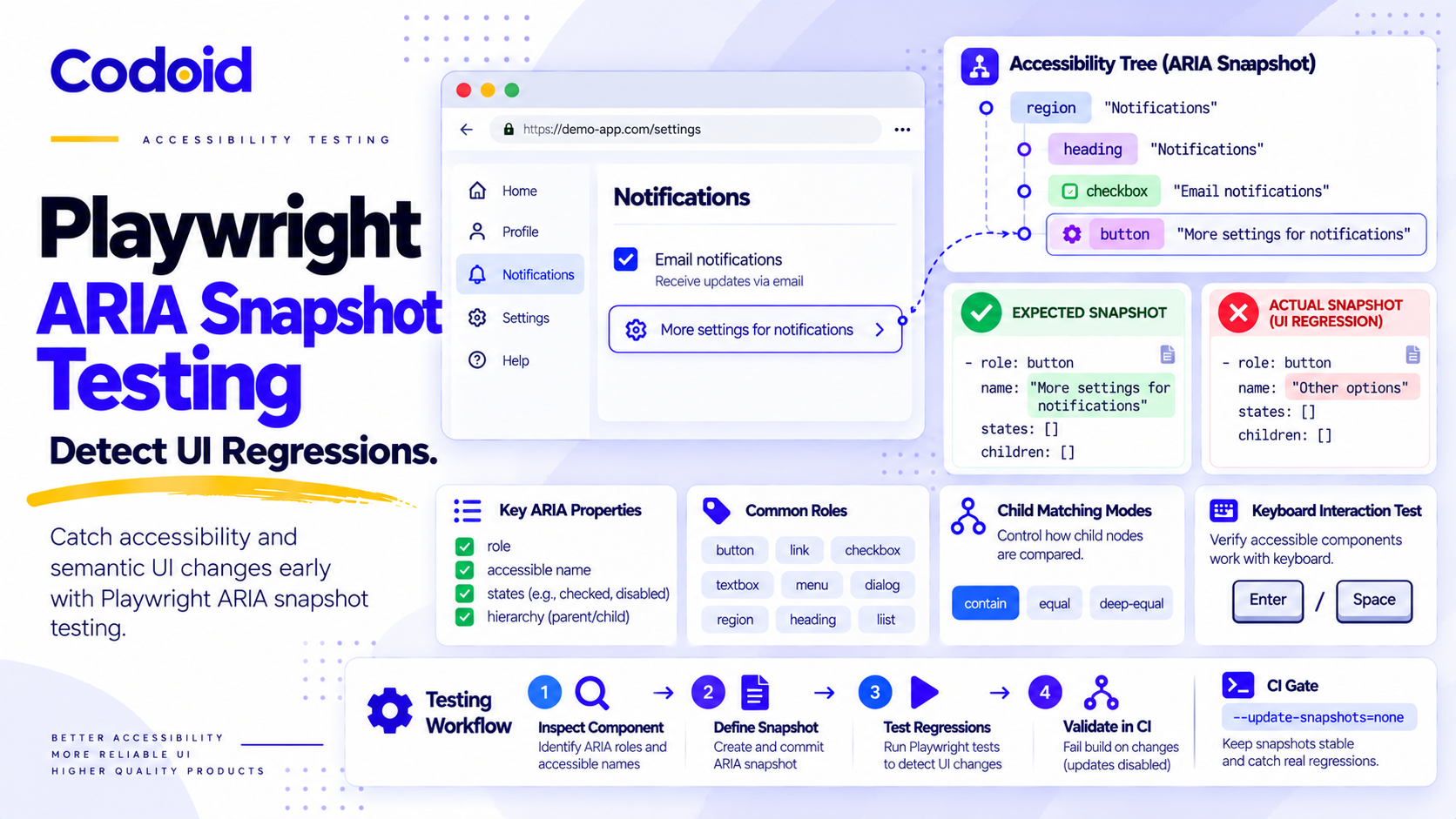
As web applications evolve, preserving accessibility semantics across releases becomes increasingly difficult. Playwright ARIA snapshot testing solves this by verifying whether a page or component still exposes the roles, accessible names, states, and structural relationships defined in a YAML template. To reliably detect regressions in CI, teams must inspect a scoped component, write or generate a carefully reviewed expectation, and execute it with snapshot updates disabled. The critical design choice is deciding which semantics must match exactly and which unrelated children may vary.
An ARIA snapshot is not automatically an exact accessibility-tree comparison. Playwright’s default matching accepts additional children; names and states that you omit are not asserted. A passing test establishes only the constraints written into its template. This guide turns that selective matching into repeatable regression checks instead of a baseline-approval exercise. See the official ARIA snapshot documentation.
Table of Content
- 1. What Playwright ARIA snapshots actually verify
- 2. Write your first scoped ARIA snapshot test
- 3. Detect accessible-name, role, and state regressions
- 4. Choose the right matching strictness for UI-structure regressions
- 5. Make snapshots repeatable across states and environments
- 6. Run ARIA snapshot tests in CI without hiding regressions
- 7. Diagnose failures and prove the tests detect the intended regressions
- 8. A practical rollout checklist for ARIA snapshot testing
1. What Playwright ARIA snapshots actually verify
Roles, accessible names, states, and hierarchy
Playwright serializes exposed accessibility semantics as YAML-like nodes. For example, - heading "Notification preferences" [level=2] describes a heading role, its computed accessible name, and its level. Indentation defines expected nesting; ordered entries define expected sequence. Snapshots may expose states such as checked, expanded, selected, and disabled, when relevant.
One rule prevents many false assumptions: an omitted name or state is unconstrained, and an unqualified single-node template can match at any depth within the selected scope. Thus - button checks for a button role somewhere in that scope, not a particular button or its keyboard behavior. Matching is case-sensitive and order-sensitive, with whitespace normalization inside names and text. An explicit /children mode controls how child nodes are compared. Playwright’s matching reference documents these distinctions.
Select the narrowest scope that expresses the requirement:
- Page: Stable page-wide landmarks and hierarchy (Main risk: Unrelated changes create noise)
- Named region or dialog: A feature or component with an accessibility contract (Main risk: A poorly chosen container can miss content outside it)
- Named control: Targeted role, name, and state checks (Main risk: Cannot protect broader relationships alone)
Where snapshots fit alongside functional, visual, and accessibility tests:
- ARIA snapshot: Changed role, name, state, or expected accessible structure (What it does not establish alone: Keyboard operability or WCAG conformance)
- Focused Playwright assertion: Specific accessible name, attribute, state, or interaction (What it does not establish alone: Structure outside that assertion)
- Screenshot comparison: Pixel-level visual change (What it does not establish alone: Correct computed roles and names)
- Automated accessibility scan: Violations detectable by configured rules (What it does not establish alone: Every issue or real assistive-technology experience)
- Keyboard and assistive-technology assessment: Focus, activation, navigation, and user-observed behavior (What it does not establish alone: Repeatable coverage of all release states without additional automation)
Use these methods together. Playwright’s accessibility testing guide explicitly cautions that automated detection cannot replace manual assessment. Codoid’s SPA accessibility guide covers keyboard focus and dynamic-state testing in greater depth.
2. Write your first scoped ARIA snapshot test
Set up a small TypeScript fixture with explicit version assumptions
In a new Node.js project, install the version used for the examples and the Chromium browser. Your team should also use a Node.js release supported by its Playwright and CI runner configuration.
npm init -y
npm install --save-dev @playwright/[email protected]
npx playwright install chromium
Create tests/notification-prefs.spec.ts with the following fixture. The checkbox has a native label; the disclosure button has visible text “More settings” and the computed accessible name “More settings for notifications”. This intentionally keeps the visible label inside the accessible name. It supports WCAG 2.5.3, Label in Name, which helps speech-input users activate controls using the words they see. The fixture is a synthetic lesson, not production widget guidance.
import { test, expect } from '@playwright/test';

const markup = `
<section aria-labelledby="prefs-heading">
  <h2 id="prefs-heading">Notification preferences</h2>
  <label><input type="checkbox" checked>Product updates</label>
  <button type="button"
    aria-label="More settings for notifications"
    aria-controls="more-options"
    aria-expanded="false">
    More settings
  </button>
  <div id="more-options" hidden>
    <label><input type="checkbox">Weekly digest</label>
  </div>
</section>
<script>
  const button = document.querySelector('button[aria-controls]');
  button.addEventListener('click', () => {
    const wasOpen = button.getAttribute('aria-expanded') === 'true';
    button.setAttribute('aria-expanded', String(!wasOpen));
    document.getElementById('more-options').hidden = wasOpen;
  });
</script>
`;

test.beforeEach(async ({ page }) => {
  await page.setContent(markup);
});
page.setContent() avoids network data or login dependencies. In a real suite, navigate to the actual feature and establish equivalent permissions, test data, and initial state. Prefer native controls and established accessible labeling techniques in production.
Start by inspecting what the locator exposes rather than guessing YAML. Add this test below the fixture:
test('inspects the notification region', async ({ page }) => {
  const panel = page.getByRole('region', {
    name: 'Notification preferences',
  });
  console.log(await panel.ariaSnapshot());
});
A representative captured shape, labeled illustrative output, is:
- region "Notification preferences":
  - heading "Notification preferences" [level=2]
  - checkbox "Product updates" [checked]
  - text: Product updates
  - button "More settings for notifications": More settings
locator.ariaSnapshot() inspects the current structure; it does not wait for a semantic contract to become true. expect(locator).toMatchAriaSnapshot() is an auto-retrying assertion against your intentionally chosen constraints. Playwright documents both APIs in its snapshot guide and locator assertion reference.
Add the actual collapsed-state contract as a separate test. Notice that it intentionally omits the standalone text node but includes both the button’s computed name and visible text:
test('preserves collapsed panel semantics', async ({ page }) => {
  const panel = page.getByRole('region', {
    name: 'Notification preferences',
  });
  await expect(panel).toMatchAriaSnapshot(`
    - region "Notification preferences":
      - heading "Notification preferences" [level=2]
      - checkbox "Product updates" [checked]
      - button "More settings for notifications": More settings
  `);
  const button = page.getByRole('button', {
    name: 'More settings for notifications',
  });
  await expect(button).toHaveAttribute('aria-expanded', 'false');
  await expect(page.locator('#more-options')).toHaveCount(1);
  await expect(page.locator('#more-options')).toBeHidden();
});
Run npx playwright test tests/notification-prefs.spec.ts. The expected outcome is a passing snapshot and a hidden, still-mounted disclosure panel. The captured output above is a discovery aid; the smaller template is the reviewed semantic requirement, not a verbatim dump of everything Playwright serialized.
3. Detect accessible-name, role, and state regressions
Test the computed accessible name, not just the visible label
Native labels, element text, aria-labelledby, and aria-label can contribute to an accessible name according to the naming algorithm. Here aria-label overrides the button’s text, so its computed name is “More settings for notifications”, while the visible text remains “More settings”. Because the computed name contains the complete visible label at its start, the example avoids the label-in-name defect that a name such as “Advanced options” would introduce. W3C’s Label in Name explanation distinguishes an accessible name from visible copy.
To check test sensitivity, temporarily change only aria-label="More settings for notifications" to aria-label="Other options". Keep the region locator stable, rerun the collapsed test, and verify that the expected button name fails. This deliberately broken version would also violate the label-in-name relationship; restore the correct label after the experiment.
For critical names, use a focused assertion in addition to the region snapshot:
await expect(page.locator('button[aria-controls]'))
  .toHaveAccessibleName('More settings for notifications');
An attribute-based locator is appropriate for this diagnostic because it can still find the same button after a naming regression. In application code, use the most stable, meaningful selector available.
Check native roles, heading levels, and interactive states
Checking <h2> to <h3> should violate the expected [level=2] constraint. Replacing a native <button> with an unadorned <div> removes the button role. But a <div role="button"> can preserve an ARIA role without acquiring native keyboard behavior, so a semantic snapshot is not a substitute for functional tests.
Cover the expanded state independently:
test('exposes expanded settings', async ({ page }) => {
  const button = page.getByRole('button', {
    name: 'More settings for notifications',
  });
  await button.click();
  await expect(page.getByRole('region', {
    name: 'Notification preferences',
  })).toMatchAriaSnapshot(`
    - region "Notification preferences":
      - button "More settings for notifications" [expanded]: More settings
      - checkbox "Weekly digest"
  `);
  await expect(button).toHaveAttribute('aria-expanded', 'true');
  await expect(page.locator('#more-options')).toBeVisible();
});
The W3C disclosure pattern also requires keyboard activation with Enter and Space. This additional test verifies behavior a static ARIA snapshot can miss:
test('opens with Enter and closes with Space', async ({ page }) => {
  const button = page.getByRole('button', {
    name: 'More settings for notifications',
  });
  const details = page.locator('#more-options');

  await expect(details).toBeHidden();
  await button.focus();
  await page.keyboard.press('Enter');
  await expect(button).toHaveAttribute('aria-expanded', 'true');
  await expect(details).toBeVisible();

  await page.keyboard.press('Space');
  await expect(button).toHaveAttribute('aria-expanded', 'false');
  await expect(details).toBeHidden();
});
If the click handler were mistakenly attached only to pointer events, the ARIA snapshot of the initial collapsed state might still pass, while this Enter/Space test fails. Preserve both test layers.
4. Choose the right matching strictness for UI-structure regressions
Compare contain, equal, and deep-equal
Suppose a notification-channel navigation contains a named list. Naming both the navigation and list removes ambiguity when additional lists appear in the navigation:
<nav aria-label="Notification channels">
  <ul aria-label="Available channels">
    <li><a href="#email">Email</a></li>
    <li><a href="#sms">SMS</a></li>
  </ul>
</nav>
- Mode at the list node: contain (default) | Extra third list item: May pass | Extra button nested in first item: May pass
- Mode at the list node: equal | Extra third list item: Fails | Extra button nested in first item: May pass: nested children remain partially matched
- Mode at the list node: deep-equal | Extra third list item: Fails | Extra button nested in first item: Fails: nested child structure is constrained
Use a named list locator and put /children under that list node; do not assert a lone - list against an entire navigation and assume it proves the list’s location. This example targets the list intentionally:
const nav = page.getByRole('navigation', { name: 'Notification channels' });
const channels = nav.getByRole('list', { name: 'Available channels' });
await expect(channels).toMatchAriaSnapshot(`
  - list "Available channels":
    - /children: deep-equal
    - listItem:
      - link "Email":
        - /url: "#email"
    - listItem:
      - link "SMS":
        - /url: "#sms"
`);
For this fixture, the deep-equal constraint fails when a third list item is appended or a new button is nested inside either item. equal fails for an extra direct list item, but may allow the nested button. The rule applies where /children is placed; it does not prove that the list is a direct child of navigation. If that parent-child relationship is also contractual, capture an anchored navigation template with the appropriate child constraint. These semantics follow Playwright’s strict-matching documentation.
Specify names, states, order, and dynamic text deliberately
Child strictness and property matching solve different problems. Even deep-equal cannot verify an accessible name you chose to omit. Likewise, - checkbox does not constrain checked state, and - button does not identify a particular control. Keep exact names for stable labels and explicit states for meaningful state transitions; normalize only data that genuinely changes.
For instance, - heading /Issues [0-9]+$/ [level=2] can constrain an intentionally variable counter. Avoid an indiscriminate /.*/, which can accept a broken name. Prefer stable fixture values for critical labels and separate localized baselines where wording legitimately differs. Playwright’s matcher also preserves the required order of specified child nodes.
5. Make snapshots repeatable across states and environments
Control data and wait for the intended UI state
A retrying assertion does not know whether a loading screen or the final feature is the intended contract. Use a repeatable sequence: prepare data, navigate or render, wait for a meaningful ready condition, assert the intended state, record evidence. Avoid fixed sleeps as the primary readiness strategy. For application tests, reset persistent preferences and isolate accounts or fixtures to prevent parallel runs from changing one another’s expectations.
Choose state coverage based on user impact rather than snapshotting every transient frame:
- Collapsed: Expected heading, name, selected controls (Complementary check: Details are hidden and panel state is false)
- Expanded: Expanded button and revealed checkbox (Complementary check: Enter/Space and focus behavior)
- Error or permission denial: Exposed error role or meaningful message (Complementary check: Recovery interaction and error handling)
- Intentional localized copy: Correct localized name and structure (Complementary check: Locale-aware keyboard and functional checks)
An application with asynchronous data may need loading and empty-state tests too. Record preconditions and the expected result for each state rather than reusing a stale snapshot accidentally.
Define browser, locale, and baseline-sharing policies
Playwright can set locale, timezoneId, and viewport explicitly. A shared semantic baseline across Chromium, Firefox, and WebKit is useful when the product promises the same structure; intentional browser- or locale-specific product differences require separately reviewed expectations. Check the Playwright configuration options before declaring a baseline portable.
For external files, name variants deliberately, for example notification-prefs-en-US.aria.yml and notification-prefs-fr-FR.aria.yml. An optional config path template for teams with many fixtures is:
expect: {
  toMatchAriaSnapshot: {
    pathTemplate: '{testDir}/_aria_/{testFilePath}/{arg}{ext}',
  },
}
Place this expect block inside defineConfig(...) if you adopt it. The default file placement is already workable; configure paths only when repository organization or intentional variants justify it. The TestConfig path-template reference defines the supported tokens.
6. Run ARIA snapshot tests in CI without hiding regressions
Commit baselines and configure a validation-only CI job
Inline snapshot templates live in TypeScript source. For a separately reviewed .aria.yml file, the equivalent assertion can be placed in a test that uses the shared beforeEach fixture:
test('matches the external notification baseline', async ({ page }) => {
  const panel = page.getByRole('region', {
    name: 'Notification preferences',
  });
  await expect(panel).toMatchAriaSnapshot({
    name: 'notification-prefs.aria.yml',
  });
});
Use one baseline style for each expectation. The external test is an alternative to maintaining the same contract inline; it is not a second source of truth. Playwright normally places named files in a *.spec.ts-snapshots directory beside the test and can share one snapshot across browser projects. Playwright’s snapshot storage guide explains path customization.
A first-run sequence for an external file is:
# Generate missing baselines locally; review them before approval.
npx playwright test tests/notification-prefs.spec.ts --update-snapshots=missing

git status --short
# Stage the created file to make its contents reviewable in a diff.
git add tests/notification-prefs.spec.ts-snapshots/notification-prefs.aria.yml
git diff --cached -- tests/notification-prefs.spec.ts-snapshots/

# After the baseline is accepted, verify without any updates.
npx playwright test tests/notification-prefs.spec.ts --update-snapshots=none
The staged path is illustrative of the default test-file naming convention; adjust it to the file Playwright actually generated. Check its role, name, state, and nesting changes before approving the staged content. Generation and staging are not approval or publication.
Use the following playwright.config.ts as a proposed validation configuration. It rejects unreviewed baselines and fails the job on unresolved flakiness:
import { defineConfig } from '@playwright/test';

export default defineConfig({
  testDir: './tests',
  globalTimeout: 20 * 60 * 1000,
  retries: process.env.CI ? 1 : 0,
  failOnFlakyTests: !!process.env.CI,
  forbidOnly: !!process.env.CI,
  updateSnapshots: 'none',
  reporter: [['list'], ['html', { open: 'never' }]],
  use: {
    browserName: 'chromium',
    locale: 'en-US',
    timeZoneId: 'UTC',
    viewport: { width: 1280, height: 720 },
    trace: 'retain-on-failure',
  },
});
Here is a GitHub Actions example for a reviewed, sanitized test environment, saved as .github/workflows/aria-snapshots.yml:
name: ARIA snapshot regression checks
on:
  pull_request:
  push:
    branches: [main]

permissions:
  contents: read

jobs:
  semantics:
    runs-on: ubuntu-latest
    timeout-minutes: 20
    steps:
      - uses: actions/checkout@v6
      - uses: actions/setup-node@v6
        with:
          node-version: '22'
          cache: 'npm'
      - run: npm ci
      - run: npx playwright install --with-deps chromium
      - run: npx playwright test --update-snapshots=none
      - name: Upload restricted failure evidence
        if: ${{ failure() }}
        uses: actions/upload-artifact@v5
        with:
          name: playwright-failure-evidence
          path: |
            playwright-report/
            test-results/
          if-no-files-found: ignore
          retention-days: 7
This job requires a committed npm lockfile and compatible runner. permissions: contents: read limits the default token permissions. For dependency integrity, adopt your organization’s GitHub Actions workflow dependency lockfile or replace major-version action references with verified full commit SHAs; major tags are convenient but mutable. Apply repository rules so PRs cannot silently bypass the required job. GitHub’s secure-use guidance explains these controls.
Protect failure artifacts. Even a staging trace or HTML report may contain URLs, cookies, tokens, entered text, and application data. Use synthetic accounts and redacted fixtures; limit repository and artifact access; retain evidence briefly; and inspect or sanitize exports before sharing them outside the authorized team. Avoid uploading unreviewed production data. See Playwright’s CI guidance.
Review baseline changes separately from test validation
Treat baseline changes as deliberate code changes: make the UI change, generate the local update, inspect the semantic diff, secure reviewer approval, commit, verify again with none. Reviewers should check roles, names, states, nesting, and accessibility consequences, not merely accept generated YAML.
- missing: Creates absent baselines; tests that only create them pass (Appropriate use: First local creation, then review)
- changed: Updates changed and missing baselines (Appropriate use: Explicitly approved local updates)
- none: Never updates baselines (Appropriate use: Pull-request and release validation)
- default: Creates missing baselines but marks creating tests failed (Appropriate use: Useful safeguard; not the same as none)
The current Playwright snapshot-update documentation also describes a all. Inline updates normally produce reviewable patch files using the default patch source-update method; named .aria.yml files are written directly. Keep the none override explicit in CI even when local update workflows exist. One passing retry after a failure remains a signal to investigate, not proof of a stable release gate.
7. Diagnose failures and prove the tests detect the intended regressions
Separate locator failures, state problems, semantic changes, and tooling changes
Classify the failure before updating any baseline. A missing named locator and a mismatch inside an existing region have different likely causes and evidence requirements.
- Named region not found: Loading, landmark semantics, naming, permissions (Evidence to preserve: Locator error, ready-state trace)
- Expected accessible name changed: aria-label, visible copy, native labeling (Evidence to preserve: Expected/actual YAML and relevant DOM)
- Expanded or checked state differs: User action, attribute update, async state (Evidence to preserve: Action trace and state assertions)
- Added control did not fail: Scope, omitted children, contain mode (Evidence to preserve: Current YAML and intended strictness)
- Browser or locale mismatch: Project configuration and expected variants (Evidence to preserve: Browser/version, locale, diff)
- Baseline missing or rejected: File path, committed file, update policy (Evidence to preserve: Repository status and CI command)
- Intermittent pass/fail: Readiness, shared state, retries (Evidence to preserve: Per-attempt trace and test logs)
The following illustrative comparison, not an actual 1.64.1 runner error message, shows the accessible-name mutation in Section 3:
EXPECTED: - button "More settings for notifications": More settings
ACTUAL: - button "Other options": More settings
        ^ accessible name changed; visible text did not
DECISION: Investigate and restore the label; do not update the baseline.
The distinction matters: an indiscriminate snapshot update would make the regression look intentional. Playwright’s Trace Viewer supports investigation of actions and page state; Codoid’s flaky-test debugging guide covers related evidence workflows.
Deliberately break the fixture, inspect the evidence, and restore it
Before promoting a green test to a CI gate, change one variable at a time, predict its result, run it, record the assertion and trace, and restore the clean fixture. These are planned mutation experiments, not measured outcomes from a client project.
- Change the button name to “Other options”: Named-region snapshot fails (Important qualification: Keep region locator stable; restore the accessible label)
- Change <h2> to <h3>: [level=2] expectation fails (Important qualification: Visual similarity proves nothing about hierarchy)
- Replace native button with unadorned <div>: Expected button role absent (Important qualification: An ARIA role on a <div> can hide a keyboard regression)
- Uncheck Product updates: [checked] fails (Important qualification: Omitted state means no check)
- Add third list item: equal and deep-equal fail (Important qualification: Default contain may still pass)
- Insert nested button within a list item: deep-equal fails; equal may pass (Important qualification: Location of /children is decisive)
- Disable keyboard activation while preserving roles: Snapshot may pass; Enter/Space test should fail (Important qualification: Keep functional and semantic checks together)
- Change visual-only styling: Snapshot may pass (Important qualification: Use visual tests for styling expectations)
For each mutation, record the precondition, action, expected failure, observed failure or unexpected pass, and restoration result. A green run is meaningful only when you have shown that important regressions would turn it red.
8. A practical rollout checklist for ARIA snapshot testing
Choose one stable, high-value component with meaningful names, roles, and states. Prepare deterministic data and state, and assert readiness rather than sleeping for a fixed duration. Inspect its current ariaSnapshot(), then author a smaller intentional template. Set child strictness explicitly where added or nested controls would be risky. Add focused name, visibility, and keyboard assertions for behaviors snapshots cannot establish. Prove the protection with one accessible-name mutation and one extra-child mutation. Commit reviewed baselines and require --update-snapshots=none in CI.
Conclusion
Start with one named component, one deliberately broken name, and one read-only CI check. That limited rollout validates the method before wider adoption. Use snapshot contracts alongside axe-based checks and appropriate manual evaluation. For teams building a broader accessibility validation program, Codoid offers web accessibility testing services; baseline acceptance and release decisions should remain grounded in the application’s requirements.

Ready to Automate Accessibility Regressions?
Talk to an ExpertFrequently Asked Questions
-
How do I generate an ARIA snapshot in Playwright?
You can inspect the current accessibility tree by running await locator.ariaSnapshot() or by using the Playwright code generator. For external .aria.yml expectations, run a new test locally with the --update-snapshots=missing flag, inspect the generated file, and commit it only after reviewing the semantic changes.
-
What is the difference between ariaSnapshot() and toMatchAriaSnapshot()?
ariaSnapshot() returns a current representation of the accessibility tree for inspection and debugging. toMatchAriaSnapshot() is an auto-retrying assertion that compares the current UI against your intentionally chosen YAML template. A captured tree is not automatically the correct acceptance contract; you must define the expected constraints.
-
Why can an extra child still pass an ARIA snapshot test?
By default, Playwright uses the /children: contain mode, which requires the specified child nodes to be present in the correct order but permits additional, unspecified children. To strictly enforce the exact number of children, you must apply the equal mode for direct children or deep-equal for nested strictness at the relevant node.
-
Can Playwright ARIA snapshots replace axe or keyboard testing?
No. ARIA snapshots only verify the specific semantic constraints (roles, names, states) written into the template. They do not establish keyboard operability, WCAG conformance, or visual correctness. Automated accessibility scans (like axe) and manual keyboard/assistive-technology assessments are still required to detect different classes of issues.
-
What are the matching strictness modes for Playwright ARIA snapshots?
Playwright provides three modes for comparing child nodes: contain (the default, which allows extra children), equal (which fails if extra direct children are added), and deep-equal (which strictly enforces the structure of both direct and nested children). Choosing the right strictness is a critical design choice for catching UI structure regressions.
-
How do you handle dynamic text or variable data in ARIA snapshots?
For intentionally variable text, such as a dynamic counter, you should use precise regular expressions rather than indiscriminate wildcards. For example, - heading /Issues [0-9]+$/ [level=2] safely constrains the variable number. Avoid using - heading /.*/, as this is too broad and can accept completely broken or missing names.
-
How do I prevent unreviewed baseline updates in my CI/CD pipeline?
To enforce a strict validation gate, you must explicitly set --update-snapshots=none in your CI test command. This guarantees that the pipeline will never silently overwrite or create new .aria.yml baselines, ensuring that any unexpected semantic changes fail the build and require developer review.























Comments(0)