
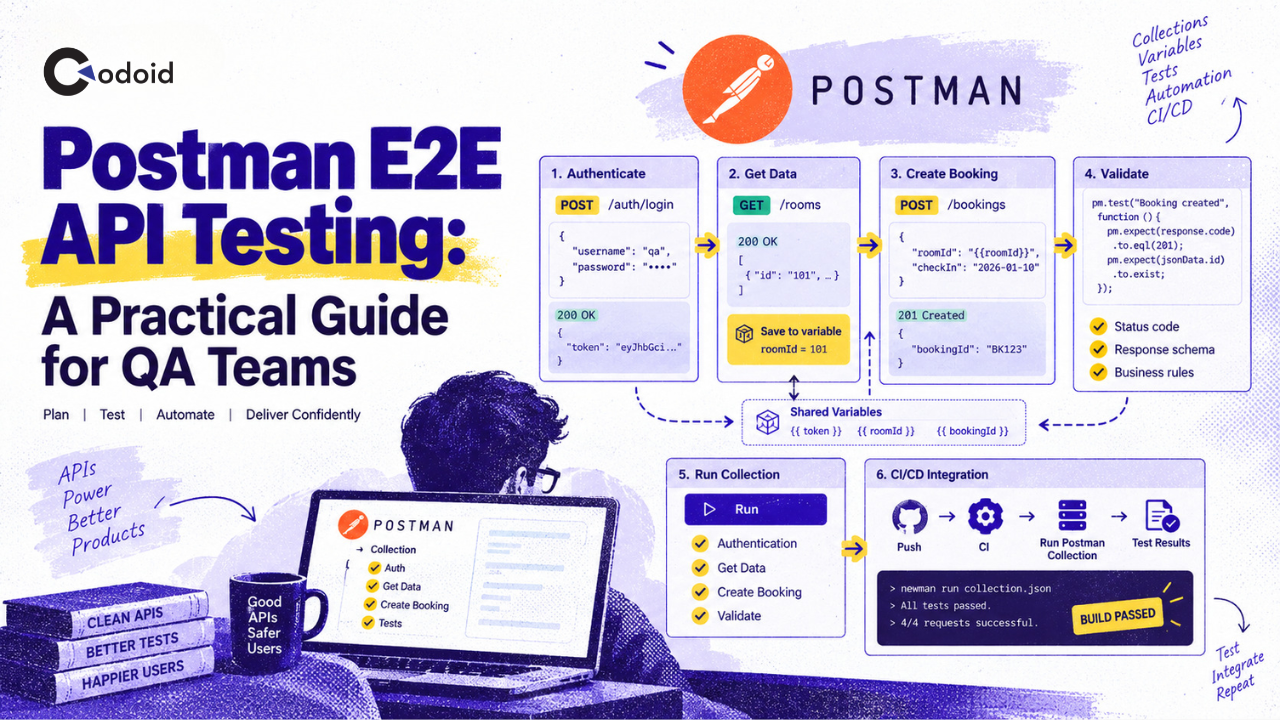
End-to-end API testing verifies more than whether individual endpoints return the expected status code. It validates whether a complete business workflow works when multiple API operations, services, authentication mechanisms, and data dependencies interact. Postman is well suited to this type of testing because a Postman Collection can represent an entire workflow: authenticate a user, create data, retrieve it, update it, verify the result, and clean up the generated records. Post-response scripts can validate each step and pass values such as IDs and tokens to later requests.
How do you write E2E API tests in Postman?
To write an end-to-end API test in Postman, organize the API requests for a complete user journey into a collection, execute them in the required sequence, capture values from one response as variables, use those variables in later requests, and add JavaScript assertions with pm.test() and pm.expect() at each stage.
Run the complete collection with the Collection Runner during development and with the Postman CLI in CI/CD to verify that the workflow continues to work after application changes.
Key takeaways
- Model an E2E test around a business workflow, not isolated API endpoints.
- Store related requests in a Postman Collection and run them in a predictable sequence.
- Capture IDs, tokens, and other generated values from responses and reuse them in later requests.
- Add assertions for HTTP status, response data, business rules, and, where useful, response schema.
- Keep environment-specific configuration such as the base URL outside individual requests.
- Create and clean up test data so repeated runs remain independent.
- Run collections locally first, then automate them with the Postman CLI in CI/CD.
- For new Postman v12 workflows using Collection v3, prefer Postman CLI over Newman because Newman doesn’t support Collection v3.
What is end-to-end API testing in Postman?
End-to-end API testing is the process of validating a complete application workflow by sending a sequence of related API requests and verifying that data and behavior remain correct from the beginning of the workflow to the end.
A single API test might confirm that:
GET /orders/123
returns HTTP 200.
An E2E test goes further. It might validate this workflow:
Authenticate user
    ↓
Create customer
    ↓
Create order
    ↓
Retrieve order
    ↓
Verify order/customer relationship
    ↓
Cancel order
    ↓
Delete test data
Each operation depends on information created by an earlier operation.
Postman describes E2E testing as testing complete application flows that can involve multiple endpoints and APIs. Collections, scripts, variables, and configurable request order make it possible to represent those workflows as automated tests.
E2E testing vs. testing a single API endpoint
Testing an individual endpoint answers a question such as:
Does POST /orders create an order correctly?
End-to-end testing answers a broader question:
Can an authenticated customer complete the entire order workflow successfully, and is the resulting data consistent across the APIs involved?
An effective test strategy normally uses both approaches. Endpoint-level tests provide fast, targeted feedback, while E2E tests verify that components continue to work together.
Why do E2E API tests matter?
Modern applications commonly distribute a single business operation across multiple APIs or services.
An online purchase, for example, can involve:
Authentication
    ↓
Customer service
    ↓
Catalog service
    ↓
Order service
    ↓
Payment service
    ↓
Inventory service
Testing each endpoint independently does not prove that the complete workflow succeeds.
An E2E test can detect problems such as:
- an authentication token that one downstream API rejects;
- an ID returned by one service that another service cannot process;
- incorrect mappings between customer and order records;
- a successful API response that leaves the system in the wrong business state;
- incompatible changes between services;
- invalid data propagation across several requests;
- failures that occur only when operations run in their real sequence.
Postman’s documentation specifically positions E2E testing as a way to simulate real-world workflows and identify integration and workflow problems across multiple application components.
How do E2E API tests work in Postman?
A typical Postman E2E workflow has five building blocks.
1. Requests represent actions
Each API request represents one operation in the user journey.
For example:
POST   /auth/login
POST   /customers
POST   /orders
GET    /orders/{orderId}
DELETE /orders/{orderId}
DELETE /customers/{customerId}
2. Postman Collections represent test suites
The requests are saved inside a Postman Collection in the order required by the workflow.
The Collection Runner can execute some or all requests in a collection and record their test results. Scripts can also pass data between those requests.
3. Variables pass data between requests
Suppose POST /customers returns:
{
  "id": "cust_1845",
  "name": "API Test User"
}
The post-response script can capture the ID:
const response = pm.response.json();
pm.collectionVariables.set("customerId", response.id);
A later request can then reference it:
GET {{baseUrl}}/customers/{{customerId}}
Postman supports multiple variable scopes, including global, collection, environment, iteration data, and local variables.
4. Assertions validate each stage
Postman executes JavaScript in post-response scripts. Assertions are commonly created with pm.test() and pm.expect() using Chai-style syntax.
For example:
pm.test("Customer creation succeeds", function () {
    pm.response.to.have.status(201);
});
pm.test("Response contains a customer ID", function () {
    const body = pm.response.json();
    pm.expect(body.id).to.be.a("string");
    pm.expect(body.id).to.not.be.empty;
});
5. The collection is executed as one workflow
During development, use the Collection Runner.
For automated builds and deployments, the same tests can be executed using:
postman collection run <collection>
The Postman CLI can execute collections locally or inside CI/CD pipelines.
How to write E2E API tests in Postman step by step
Consider an e-commerce application with this workflow:
- Authenticate.
- Create a customer.
- Create an order for that customer.
- Retrieve the order.
- Verify its business state.
- Delete the generated test data.
The following implementation uses generic endpoints so the pattern can be adapted to most REST APIs. See our guide to testing payment APIs if your checkout workflow specifically involves payment processing.
1. Create a dedicated E2E Postman Collection
Create a collection named:
Orders API - E2E Tests
Then create a folder such as:
Checkout Happy Path
Add the requests in business-flow order:
01 - Login
02 - Create Customer
03 - Create Order
04 - Get Order
05 - Delete Order
06 - Delete Customer
Descriptive names make failures easier to understand in Collection Runner and CI reports.
Avoid collections containing requests named only:
Request 1
Request 2
Test
GET API
A test report should immediately tell the engineer which business operation failed.
2. Create environment variables
Create a test environment and define configuration such as:
baseUrl
For example:
baseUrl = https://api.test.example.com
Your requests can then use:
{{baseUrl}}/orders
instead of hard-coding the hostname.
This enables the same collection to run against environments such as:
Development
QA
Staging
without rewriting every request. Postman environments are designed to group variables whose values differ between execution contexts.
Keep workflow-generated values such as these separate:
accessToken
customerId
orderId
testEmail
These values will be generated during the test.
3. Generate unique test data
Repeated E2E tests should avoid collisions with data created by previous runs.
Postman provides dynamic variables for generating test values, including random UUIDs.
In the Pre-request script for Create Customer:
const runId = pm.variables.replaceIn("{{$randomUUID}}");
pm.collectionVariables.set(
    "testEmail",
    `postman-e2e-${runId}@example.test`
);
The request body can reference it:
{
  "name": "Postman E2E User",
  "email": "{{testEmail}}"
}
This makes each run less likely to conflict with data from another execution.
4. Authenticate the workflow
Request:
POST {{baseUrl}}/auth/login
Example request body:
{
  "username": "{{username}}",
  "password": "{{password}}"
}
The API might return:
{
  "access_token": "eyJ..."
}
Add this post-response script:
pm.test("Authentication succeeds", function () {
    pm.response.to.have.status(200);
});
const response = pm.response.json();
pm.test("Access token is returned", function () {
    pm.expect(response.access_token).to.be.a("string");
    pm.expect(response.access_token).to.not.be.empty;
});
if (response.access_token) {
    pm.collectionVariables.set(
        "accessToken",
        response.access_token
    );
}
Later requests can use:
Authorization: Bearer {{accessToken}}
For production test suites, avoid storing long-lived credentials directly in the collection. CI systems should supply secrets securely at runtime.
5. Create the customer and capture its ID
Request:
POST {{baseUrl}}/customers
Authorization: Bearer {{accessToken}}
Content-Type: application/json
Body:
{
  "name": "Postman E2E User",
  "email": "{{testEmail}}"
}
Post-response tests:
pm.test("Customer is created", function () {
    pm.response.to.have.status(201);
});
const customer = pm.response.json();
pm.test("Customer response contains required data", function () {
    pm.expect(customer.id).to.be.a("string");
    pm.expect(customer.email).to.eql(
        pm.collectionVariables.get("testEmail")
    );
});
if (customer.id) {
    pm.collectionVariables.set(
        "customerId",
        customer.id
    );
}
This request performs two jobs:
- verifies that customer creation works;
- supplies customerId to the rest of the workflow.
That data dependency is one of the defining characteristics of E2E API testing.
6. Create an order using the customer ID
Request:
POST {{baseUrl}}/orders
Authorization: Bearer {{accessToken}}
Body:
{
  "customerId": "{{customerId}}",
  "items": [
    {
      "sku": "TEST-SKU-001",
      "quantity": 1
    }
  ]
}
Post-response script:
pm.test("Order is created", function () {
    pm.response.to.have.status(201);
});
const order = pm.response.json();
pm.test("Order belongs to the test customer", function () {
    pm.expect(order.customerId).to.eql(
        pm.collectionVariables.get("customerId")
    );
});
pm.test("New order has expected status", function () {
    pm.expect(order.status).to.eql("CREATED");
});
if (order.id) {
    pm.collectionVariables.set(
        "orderId",
        order.id
    );
}
Notice that these assertions validate business behavior, not merely HTTP behavior.
A 201 response alone does not prove that the order was associated with the correct customer.
7. Retrieve the order and verify persisted state
Next, send:
GET {{baseUrl}}/orders/{{orderId}}
Authorization: Bearer {{accessToken}}
Post-response script:
pm.test("Order can be retrieved", function () {
    pm.response.to.have.status(200);
});
const order = pm.response.json();
pm.test("Returned order has correct ID", function () {
    pm.expect(order.id).to.eql(
        pm.collectionVariables.get("orderId")
    );
});
pm.test("Customer relationship is persisted", function () {
    pm.expect(order.customerId).to.eql(
        pm.collectionVariables.get("customerId")
    );
});
pm.test("Order contains at least one item", function () {
    pm.expect(order.items)
        .to.be.an("array")
        .that.is.not.empty;
});
This is stronger than asserting only the Create Order response.
The follow-up GET verifies that the new state can be retrieved from the system after creation.
8. Validate the response schema where appropriate
Postman can also validate JSON responses against a JSON Schema.
For example:
const schema = {
    type: "object",
    required: [
        "id",
        "customerId",
        "status",
        "items"
    ],
    properties: {
        id: {
            type: "string"
        },
        customerId: {
            type: "string"
        },
        status: {
            type: "string"
        },
        items: {
            type: "array"
        }
    }
};
pm.test("Order response matches schema", function () {
    pm.response.to.have.jsonSchema(schema);
});
Schema validation and business assertions solve different problems.
The schema confirms that the response has the expected structure. Assertions such as:
pm.expect(order.customerId).to.eql(expectedCustomerId);
verify that the returned values are correct for the workflow.
Use both when both contract shape and business state matter.
9. Clean up the generated order
Send:
DELETE {{baseUrl}}/orders/{{orderId}}
Then verify:
pm.test("Order cleanup succeeds", function () {
    pm.expect(pm.response.code).to.be.oneOf([
        200,
        204
    ]);
});
Use the response code required by your API contract rather than blindly accepting both values in a real test suite.
10. Clean up the generated customer
Send:
DELETE {{baseUrl}}/customers/{{customerId}}
Then remove transient variables if they are no longer required:
pm.collectionVariables.unset("customerId");
pm.collectionVariables.unset("orderId");
pm.collectionVariables.unset("testEmail");
pm.collectionVariables.unset("accessToken");
Cleanup matters because abandoned test records can create:
- duplicate-data failures;
- polluted test databases;
- misleading reports;
- storage growth;
- dependencies between otherwise unrelated test runs.
Related Blogs
How to Test Payment APIs: A Practical Guide for QA and Backend Teams
REST API Testing Checklist: What QA Engineers and Developers Need to Test
Practical E2E example: customer checkout workflow
The complete scenario now looks like this.
Business scenario
Verify that an authenticated user can create a customer and place an order, and that the resulting order is retrievable with the correct customer relationship.
Preconditions
The test environment must provide:
baseUrl
valid test credentials
TEST-SKU-001 or another known test product
Input
A unique email address is generated for each collection run.
Workflow
Login
    ↓
Capture accessToken
    ↓
Create customer
    ↓
Capture customerId
    ↓
Create order
    ↓
Capture orderId
    ↓
GET order
    ↓
Verify business state
    ↓
Delete order
    ↓
Delete customer
Expected result
The collection succeeds only if:
- authentication succeeds;
- a new customer can be created;
- the API returns a valid customer ID;
- an order can be created using that customer;
- the persisted order references the same customer;
- the expected items and order state are returned;
- generated test records can be removed.
Example failure condition
Suppose Create Order returns:
{
  "id": "ord_8921",
  "customerId": "cust_9999",
  "status": "CREATED"
}
while the test created:
customerId = cust_1845
The HTTP request technically succeeded, but the E2E test should fail because:
pm.expect(order.customerId).to.eql(
    pm.collectionVariables.get("customerId")
);
detects the incorrect relationship.
This illustrates why effective API E2E tests validate business continuity between requests, not just response status codes.
E2E testing vs. unit, integration, and contract API testing
| S. No | Testing type | Primary purpose | Typical scope | Example |
|---|---|---|---|---|
| 1 | Unit/API endpoint test | Verify a small unit of API behavior | One function or endpoint behavior | Check that POST /orders rejects missing data |
| 2 | Contract test | Verify request/response structure | API interface | Confirm GET /orders/{id} conforms to its documented schema |
| 3 | Integration test | Verify components exchange data correctly | Two or more interacting components | Confirm Order Service successfully calls Inventory Service |
| 4 | End-to-end test | Verify a complete business journey | Multiple endpoints, services, and state transitions | Authenticate, create customer, create order, retrieve order, clean up |
Postman supports multiple API testing styles, including integration, E2E, regression, and performance testing.
The difference is primarily scope and intent.
Do not replace all lower-level tests with E2E tests. E2E suites typically exercise more components and therefore tend to be harder to diagnose when something fails. See our REST API Testing Checklist for the endpoint-level checks that should sit underneath your E2E suite, and our gRPC API Testing guide if any of your services communicate over gRPC instead of REST.
Best practices for writing maintainable Postman E2E tests
Test business journeys, not arbitrary endpoint sequences
Start with a real user or system workflow.
Good:
Register -> Login -> Create Project -> Retrieve Project -> Delete Project
Less useful:
GET endpoint A -> POST endpoint B -> GET endpoint C
unless those requests represent an actual business process.
Keep environment-specific values out of requests
Use:
{{baseUrl}}
instead of:
https://qa-server-17.example.com/api
Environment variables make the same collection reusable across deployment environments.
Capture values instead of hard-coding IDs
Avoid:
/orders/12345
when request 12345 was created manually weeks ago.
Prefer:
pm.collectionVariables.set(
    "orderId",
    pm.response.json().id
);
followed by:
/orders/{{orderId}}
This makes the flow self-contained.
Make test data unique
Generate unique usernames, emails, reference numbers, or UUIDs when the application requires uniqueness.
For example:
const id = pm.variables.replaceIn("{{$randomUUID}}");
Postman’s dynamic variables are specifically designed for runtime-generated values.
Assert business outcomes
Status-code assertions are necessary but insufficient.
Instead of only:
pm.response.to.have.status(200);
also validate:
pm.expect(order.customerId)
  .to.eql(expectedCustomerId);
pm.expect(order.status)
  .to.eql("CREATED");
Put reusable assertions at the right level
Postman allows post-response scripts at the collection, folder, and request levels. Collection-level scripts run for requests in the collection, while folder scripts can apply shared logic to requests within that folder.
Use this capability for genuinely shared behavior such as:
pm.test("Response is not a server error", function () {
    pm.expect(pm.response.code).to.be.below(500);
});
Avoid copying the same code into dozens of requests.
Keep each test independent
An E2E test should preferably create the records it needs.
Avoid making Test B depend on data that Test A happened to leave behind.
Independent tests are easier to:
- rerun;
- parallelize;
- debug;
- execute in CI;
- move between environments.
Clean up test data
Treat cleanup as part of the workflow.
A test that repeatedly creates users, orders, projects, or subscriptions without removing them can eventually become unreliable.
Use descriptive assertion names
Prefer:
pm.test(
    "Created order belongs to current customer",
    function () {
        // assertion
    }
);
over:
pm.test("Test 4", function () {
    // assertion
});
Postman displays test names in its results, so clear names reduce triage time.
Use conditional workflow logic carefully
Postman supports changing collection execution order with:
pm.execution.setNextRequest()
This can implement branches and loops during collection runs.
However, use branching only when the business flow genuinely requires it.
A heavily interconnected collection can become difficult to understand and debug.
Common mistakes when writing E2E tests in Postman
| S. No | Mistake | Why it happens | Impact | Recommended fix |
|---|---|---|---|---|
| 1 | Checking only HTTP status codes | Tests start as simple endpoint checks | Business failures remain undetected | Assert response values and persisted state |
| 2 | Hard-coding IDs | Test was built manually first | Tests break when data changes | Capture IDs dynamically |
| 3 | Sharing one test account across concurrent runs | Setup appears easier | Parallel tests interfere with each other | Create isolated or uniquely identified data |
| 4 | Hard-coding URLs | Collection starts in one environment | Difficult to run elsewhere | Use {{baseUrl}} and environments |
| 5 | Leaving test records behind | Cleanup is treated as optional | Test environment becomes polluted | Add cleanup requests |
| 6 | Storing secrets in collection JSON | Convenience during development | Credentials can be exposed | Inject credentials securely |
| 7 | Adding arbitrary waits | Testing asynchronous workflows | Slow and flaky tests | Poll for a defined state with a timeout |
| 8 | Making tests depend on execution history | Existing records seem convenient | Fresh environments fail | Build prerequisites during each workflow |
| 9 | Creating too many branches | Collection becomes a mini-program | Debugging becomes difficult | Keep primary workflows explicit |
| 10 | Running only from the Postman UI | Automation is postponed | Regressions reach later pipeline stages | Add CLI execution to CI |
Troubleshooting Postman E2E tests
Why does the first request pass but later requests fail?
The most common cause is that a value required by later requests was never saved correctly.
Check whether the previous script contains something like:
const data = pm.response.json();
pm.collectionVariables.set(
    "orderId",
    data.id
);
Then inspect the resolved variable before the failing request.
Also confirm that the JSON property is actually called:
id
rather than:
orderId_id
order_id
Why is {{orderId}} unresolved?
The variable may:
- never have been created;
- be stored in the wrong scope;
- have a different spelling;
- have been unset too early;
- be overridden by another variable with the same name.
Postman uses variable scope precedence when several variables share a name, so avoid unnecessarily reusing the same key at different scopes.
Why does the workflow work with Send but not when I run the collection?
Individual Send operations do not reproduce every collection-run behavior.
For example, pm.execution.setNextRequest() affects collection execution but has no effect when a request is executed individually using Send.
Test workflow behavior with the Collection Runner before debugging request-order logic.
Why does the test pass individually but fail in the complete suite?
Possible causes include:
- shared variables being overwritten;
- another request deleting required data;
- authentication state changing;
- request-order dependencies;
- duplicated test data;
- a previous request failing silently;
- eventual consistency between services.
Start with the first request whose business assertion fails rather than only examining the final failed request.
How do I test an asynchronous API workflow?
Suppose an API returns:
{
  "jobId": "job-123",
  "status": "PROCESSING"
}
Do not add an arbitrary fixed sleep and assume processing will finish.
Instead, design a polling request:
GET /jobs/{{jobId}}
and continue until:
status = COMPLETED
or a defined retry/timeout limit is reached.
Postman’s workflow controls can be used to direct which request runs next during a collection execution.
Always include a maximum attempt count to prevent an infinite loop.
How to run E2E tests with the Postman Collection Runner
Once individual requests work:
- Open the collection.
- Select Run.
- Choose a functional local run.
- Select the required environment.
- Verify the request sequence.
- Start the collection run.
- Review failed requests and assertions.
The Collection Runner executes the requests and records test results for the run. Scripts can also transfer data between requests and modify workflow execution.
A successful run should resemble:
01 - Login             PASS
02 - Create Customer   PASS
03 - Create Order      PASS
04 - Get Order         PASS
05 - Delete Order      PASS
06 - Delete Customer   PASS
Run the collection multiple times before adding it to CI.
One successful execution does not prove that the suite has isolated test data or reliable cleanup.
How to run Postman E2E API tests in CI/CD
Postman’s current command-line tool for running collections is the Postman CLI.
Install it with npm when Node.js and npm are available:
npm install -g postman-cli
Postman documents postman collection run for executing collections locally and from CI/CD.
A local collection file can be run with:
postman collection run ./tests/orders-e2e.json
An environment file can be supplied with:
postman collection run \
  ./tests/orders-e2e.json \
  --environment ./tests/qa.environment.json
The CLI also supports injecting environment variables at runtime with options such as --env-var.
For example:
postman collection run \
  ./tests/orders-e2e.json \
  --environment ./tests/qa.environment.json \
  --env-var "username=$E2E_USERNAME" \
  --env-var "password=$E2E_PASSWORD"
The exact syntax for referencing CI secrets varies by CI provider.
For Postman cloud-backed operations, CI can authenticate using:
postman login --with-api-key "$POSTMAN_API_KEY"
Postman recommends API-key authentication for CI/CD use cases requiring CLI authentication.
A useful pipeline structure is:
Build application
    ↓
Run unit tests
    ↓
Deploy test environment
    ↓
Run Postman API E2E collection
    ↓
   Pass?
  /      \
Yes       No
 ↓         ↓
Continue  Stop pipeline
The Postman CLI returns a non-zero exit code when a failure is detected, which allows CI systems to fail the corresponding step.
Postman tools and implementation options for E2E testing
| S. No | Option | Best use | Key consideration |
|---|---|---|---|
| 1 | Individual request + Post-response tests | Developing and debugging one step | Does not validate the entire workflow |
| 2 | Collection Runner | Local E2E development and manual regression runs | Requires an interactive/local execution |
| 3 | Scheduled collection runs | Recurring automated API checks | Execution model differs from local workflows |
| 4 | Postman CLI | CI/CD and command-line automation | Recommended approach for modern Postman collections |
| 5 | Newman | Existing command-line collection automation | Does not support Postman v12 Collection v3 |
| 6 | Mock servers | Replacing unavailable external dependencies | A mocked dependency does not prove the real integration works |
Postman continues to document Newman as a command-line collection runner, but its current documentation states that Newman isn’t compatible with the Collection v3 format used by Postman v12 and later for Native Git workflows. New projects using that format should use Postman CLI.
If you’re weighing Postman against a lighter-weight alternative for this kind of workflow, see our Postman vs Bruno comparison and our Bruno Tutorial for API Testing. And if you want Postman’s AI assistant to help scaffold these tests, our Postbot AI Tutorial covers that workflow.

Need Help Building Reliable API Test Suites?
Talk to Our API Testing ExpertsLimitations and risks of Postman E2E testing
E2E failures can be difficult to diagnose
A workflow may involve:
API gateway
authentication
database
message queue
third-party API
multiple microservices
A failed final assertion does not automatically identify which component introduced the problem.
Keep assertions at important intermediate boundaries so the first incorrect state is easier to locate.
Tests can become flaky when they depend on shared systems
Instability can come from:
- shared test data;
- asynchronous processing;
- rate limits;
- downstream services;
- changing environments;
- network conditions.
Design the workflow to minimize uncontrolled dependencies.
E2E suites should not replace lower-level testing
Running an entire business workflow to verify every small validation rule is inefficient.
Keep narrow behavior in unit, contract, or endpoint-level tests and reserve E2E tests for critical cross-component journeys.
Secrets require special handling
Postman’s Vault can securely provide sensitive data for supported interactive workflows, but pm.vault methods aren’t supported by scheduled collection runs, monitors, the Postman CLI, or Newman.
For CI/CD, inject required secrets through the CI platform or another approved secrets-management mechanism rather than designing the suite around local Vault access.
Postman CLI has an OAuth 2.0 limitation
Postman’s current documentation states that the Postman CLI doesn’t support performing OAuth 2.0 authentication itself.
If your E2E workflow requires OAuth 2.0, design automation so the required token can be obtained or supplied through an appropriate non-interactive mechanism supported by your identity system.
Do not hard-code long-lived access tokens into the collection.
E2E suites become expensive when they grow without prioritization
A collection with every possible business permutation may eventually become:
- slow;
- difficult to maintain;
- expensive to troubleshoot;
- unreliable in shared environments.
Prioritize journeys such as:
authentication
account creation
checkout/payment
critical CRUD workflow
authorization boundaries
high-risk integrations
Then cover detailed validation behavior with narrower test layers.
Conclusion
This guide on Postman E2E API testing started with a business workflow rather than a list of independent endpoints.
Build the workflow as a collection, create its prerequisites during the run, capture generated values such as IDs, pass those values into subsequent requests, and assert the business state at each important boundary. Finish by removing generated data so the test remains repeatable.
A practical progression is:
Build one critical workflow
    ↓
Make test data independent
    ↓
Add meaningful assertions
    ↓
Verify cleanup
    ↓
Run repeatedly in Collection Runner
    ↓
Execute with Postman CLI
    ↓
Add to CI/CD
The result is more than a collection of API checks. It becomes an executable representation of how an important application workflow is expected to behave from start to finish.
Frequently Asked Questions
-
Can Postman be used for end-to-end API testing?
Yes. Postman supports E2E API workflows by organizing related API requests into collections, executing them in sequence, passing data between requests using variables, and validating responses through JavaScript test scripts. Collections can be executed manually through Collection Runner or automated using Postman CLI.
-
How do I pass data from one Postman request to another?
Parse the response in a post-response script and store the required value in a suitable variable, then reference it later with a variable placeholder. Postman's scripting API supports collection, environment, global, local, and iteration-data variable scopes.
-
Should I use environment variables or collection variables?
Use environment variables for values that vary between environments, such as baseUrl. Collection variables are useful for values that belong to the test workflow itself, such as customerId or orderId. Choose the narrowest practical scope.
-
What should an E2E API test validate?
A strong E2E API test validates HTTP result, response structure, required fields, business values, relationships between resources, persisted state, downstream outcome, and cleanup, not just a 200 OK status.
-
How many E2E API tests should a project have?
There is no universal target. Cover the workflows whose failure would create the most significant user or business impact, such as authentication, account provisioning, core transactions, payments, and permissions.
-
Can Postman E2E tests run automatically?
Yes. Postman collections can be run manually, scheduled through supported Postman features, or executed from CI/CD pipelines with Postman CLI.
-
Is Newman still useful for Postman automation?
Newman remains available and can run compatible Postman Collections from the command line, but it does not support Collection v3 used with Postman v12 Native Git workflows. For new Collection v3 automation, use Postman CLI.
-
Should E2E API tests use fixed or dynamic test data?
Prefer dynamically created or isolated data when the workflow changes application state. Fixed reference data can still be appropriate when intentionally stable. Dynamic IDs reduce collisions between repeated or concurrent test runs.
-
Should cleanup run when an earlier test fails?
Ideally, yes. Without resilient cleanup, a failure mid-workflow can leave partially created data behind. Design cleanup so it can tolerate missing resources and still remove anything successfully created.




























Comments(0)