
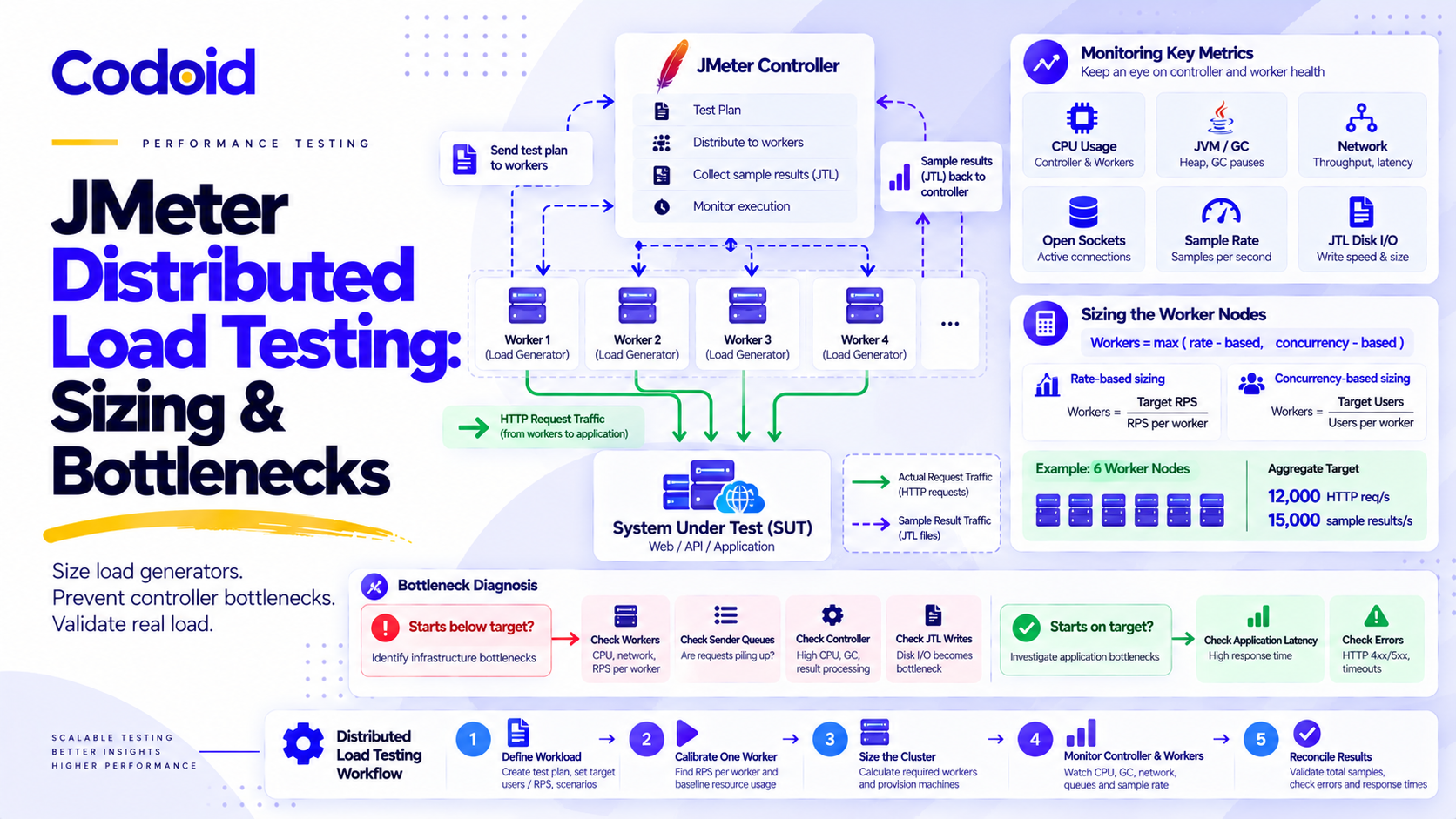
JMeter distributed load testing uses multiple load-generating machines to simulate application traffic that may exceed the practical capacity of a single JMeter instance. One controller coordinates the remote workers, while the workers send requests directly to the application and return sample results for analysis. Distributed execution is useful for large API workloads, high-concurrency scenarios, and tests that require multiple traffic-generating machines. But adding workers does not guarantee higher throughput or more accurate measurements. The controller, worker JVMs, network connections, and result-collection pipeline can introduce bottlenecks of their own.
Consider a hypothetical test targeting 12,000 HTTP requests per second. Throughput plateaus even after additional workers are started, while application CPU utilization remains low. Is the application saturated, or is the test infrastructure failing to generate the intended load? Answering that question requires a defensible sizing method, correct remote configuration, and evidence that the workload actually reached the system under test.
Key Takeaways
- JMeter remote workers each execute the complete test plan. Threads and arrival rates are not automatically divided across machines.
- Size load generators using both measured request-rate capacity and concurrent virtual-user capacity.
- Monitor controller result processing separately from the workers’ application traffic.
- Configure the sample-sender mode on the controller and batch thresholds on the workers when using client-configured remote senders.
- Validate scheduled versus actual request starts, sample accounting, application-side traffic, and statistical aggregation before making capacity claims.
Table of Content
- 1. How Does JMeter Distributed Load Testing Work?
- 2. Define the Workload Before Sizing Load Generators
- 3. How Many JMeter Load Generators Do You Need?
- 4. Prevent JMeter Controller Bottlenecks
- 5. Configure JMeter Remote Testing Correctly
- 6. Validate JMeter Results Before Claiming Capacity
- 7. Troubleshoot Distributed JMeter Throughput Plateaus
- 8. Choose Between RMI Distributed Mode and Autonomous Workers
- 9. Best Practices for Reliable Distributed JMeter Testing
- 10. Common Distributed Testing Mistakes
- 11. Limitations and Operational Risks
- Conclusion
1. How Does JMeter Distributed Load Testing Work?
JMeter distributed testing is an execution architecture in which a controller starts and coordinates remote JMeter engines. Each engine runs the assigned test plan and communicates directly with the system under test (SUT).
The controller manages remote execution and collects results. It does not normally proxy application HTTP requests.
(Diagram description: A central JMeter Controller sends control/start signals to Worker 01, Worker 02, and Worker 03. The workers execute the full test plan and send HTTP(S) traffic directly to the System Under Test. Dashed lines indicate RMI sample return traffic from the workers back to the controller.)
Example RMI: registry 1099, worker engine 4000, controller callbacks 50000-50002.
Three details are essential.
First, every worker receives and executes the test plan. A Thread Group configured with 1,000 users on each of six workers represents 6,000 configured users, not 1,000 shared users.
Second, application traffic and result-return traffic follow separate paths. Workers can be capable of generating traffic while the controller struggles to process incoming samples.
Third, test-plan transfer does not automatically distribute supporting CSV data files, scripts, or external resources. Those dependencies must be provisioned appropriately on each worker.
See the Apache JMeter Remote Testing documentation for the official architecture and setup requirements.
2. Define the Workload Before Sizing Load Generators
A requirement such as “simulate 10,000 users” is insufficient for determining generator capacity.
A useful workload specification describes the business journey, arrival pattern, think time, HTTP request mix, response sizes, connection reuse, and required measurement window.
Distinguish virtual users, HTTP requests, and samples
These measurements are related but not interchangeable.
- Virtual users: Active JMeter user workflows, including time spent waiting (Example: 9,000 active users)
- Business iterations/s: Completed or started business workflows per second, depending on the metric definition (Example: 3,000 iterations/s)
- HTTP requests/s: Application HTTP requests generated per second (Example: 12,000 requests/s)
- Sample results/s: Individual records produced by the configured JMeter samplers and controllers (Example: 15,000 results/s)
For this example, one business iteration consists of four HTTP requests and one Transaction Controller.
Transaction Controller setting: Generate Parent Sample is unchecked. JMeter therefore generates an independent transaction result in addition to the four HTTP sample results.
At 3,000 completed iterations per second, assuming no additional recorded samples:
- HTTP request rate = 3,000 x 4 = 12,000 HTTP requests/s
- Business transaction rate = 3,000 transactions/s
- Total result rate = 3,000 x 5 = 15,000 sample results/s
The extra transaction result does not represent an additional HTTP request.
If Generate Parent Sample is checked instead, the Transaction Controller produces a parent result containing child samples. Flat CSV result accounting changes, so the same five-row calculation must not be reused without checking the saved output.
Calculate concurrency using cycle time
For a steady-state user workflow:
Required users = iteration arrival rate x average cycle time
Or:
U = λ_iteration x T_cycle
Where:
- U: Average active virtual users, including think time and timers
- λ_iteration: Iterations started per second
- T_cycle: Average complete workflow duration in seconds
- λ_HTTP: HTTP requests per second
- λ_samples: Recorded sample results per second
- q_safe: Validated safe HTTP request rate per worker
- b_wire: Average result-transport bytes per sample
- b_CSV: Average bytes per saved CSV result row
Virtual-user concurrency is not the same as the number of HTTP requests simultaneously in flight.
Suppose the application must sustain 3,000 iterations per second and each iteration takes:
- 0.5 seconds of workflow execution
- 1.5 seconds of think time and pacing
The average cycle time is 2 seconds.
U = 3,000 x 2 = 6,000
Now suppose workflow execution becomes slower and takes 1.5 seconds while think time remains 1.5 seconds. The average cycle time increases to 3 seconds.
U = 3,000 x 3 = 9,000
Maintaining the same arrival rate now requires approximately 9,000 active virtual-user workflows.
These are mean-value estimates, not guarantees that enough execution capacity exists for bursts or long-tail response times.
Closed workloads versus open workloads
A closed workload holds a configured user population. When responses slow, users complete fewer iterations, and throughput generally falls.
An open workload schedules arrivals independently of previous completions. When response times increase, more concurrent work may accumulate.
This distinction matters because a test with 6,000 fixed users is not equivalent to a test sustaining 3,000 new business iterations per second.
Do remote workers automatically divide the arrival rate?
No. Remote engines execute the same configured arrival schedule unless the plan explicitly parameterizes or partitions it. For a cluster target of 3,000 iterations per second across six equivalent workers:
Per-worker arrival rate = 3,000 / 6 = 500 iterations/s
If the test plan schedules 3,000 arrivals per second on every worker, the aggregate configured target becomes 18,000 arrivals per second.
Apache documents property-driven schedules for the Open Model Thread Group. This component is marked experimental, so its behavior should be verified in the pinned JMeter release.
3. How Many JMeter Load Generators Do You Need?
The required number of JMeter workers depends on both the request-generation rate and the active-user population that each machine can sustain.
Three-step sizing method
Step 1: Calibrate one representative worker. Measure the sustained HTTP request rate and active-user count achievable by one worker without generator saturation, excessive garbage collection, connection exhaustion, or result-sender backpressure.
Step 2: Calculate the rate-based and concurrency-based worker counts.
N = max(ceil(A_HTTP/q_safe), ceil(U_required/U_safe))
Where U_safe is the measured safe active-user envelope of one worker.
Step 3: Validate the entire cluster. Run the full worker count and verify that shared networks, controller resources, test-data distribution, and the SUT do not introduce new limiting factors.
Worked six-worker sizing example
Assume a representative worker has been calibrated with these illustrative, not benchmarked, safe operating limits:
- Aggregate HTTP target: 12,000 requests/s
- Aggregate modeled active users: 9,000
- Safe request rate per worker: 2,000 requests/s
- Safe active users per worker: 1,800
- Rate-based worker count: 6
- Concurrency-based worker count: 5
- Initial worker recommendation: 6 workers
Calculation:
N = max (ceil(12,000 / 2,000), ceil(9,000 / 1,800))
N = max (6, 5) = 6
Six workers form the initial capacity estimate.
For a closed Thread Group modeling 9,000 users, that means configuring 1,500 threads per worker.
For the open-model workload, each worker instead receives a target of 500 iteration arrivals per second. At a three-second mean cycle time, that implies approximately 1,500 active users per worker on average, but actual concurrency remains dynamic.
These are alternative workload configurations, not settings that should automatically be combined in the same test.
Measure resource capacity rather than using universal thread limits
A statement such as “one JMeter machine supports 2,000 users” omits critical information.
Worker capacity changes with the script, Java runtime, request processing, TLS behavior, network route, response sizes, assertions, and result settings.
Use progressive single-worker tests and observe the following resources:
- CPU: Per-core utilization, JVM CPU, scheduling pressure, group throttling (Saturation evidence: Starts fall behind while execution capacity is exhausted)
- Memory: Java heap, native memory, GC pause duration, thread stacks (Saturation evidence: Sustained memory growth or long GC pauses)
- Network: Bytes/s, packets/s, retransmissions, connection rate (Saturation evidence: Throughput flattens near network or connection limits)
- Sockets: Open file descriptors, ephemeral ports, TCP TIME_WAIT, connection reuse (Saturation evidence: Connection failures despite available CPU)
- Intermediaries: NAT/SNAT port availability, contract utilization, proxies (Saturation evidence: Failures or plateaus shared across workers)
- Result transport: Sender queue waits, batch transmission time (Saturation evidence: Sample reporting delays subsequent work)
Inspect container limits when workers run under Kubernetes or other group-controlled environments.
Also validate HTTP keep-alive and TLS session reuse. Creating a new TCP/TLS connection for every request can produce a completely different generator capacity from reusing connections.
Avoid blanket kernel tuning. Identify the limiting resource before changing operating-system settings.
Cross-check CPU capacity
A useful approximate CPU-bound throughput calculation is:
q_CPU = (available CPU cores x utilization budget) / CPU seconds per request
Suppose a worker has eight CPU cores, a 70% CPU utilization budget, and a measured cost of 0.0028 CPU-seconds per HTTP request.
q_CPU = (8 x 0.70) / 0.0028 = 2,000 requests / s
CPU-seconds per request describe consumed processing time, not wall-clock response time.
This calculation is a planning cross-check. Actual throughput may be constrained sooner by contention, garbage collection, sockets, or network resources.
Cross-check network capacity
At 2,000 requests per second, with an average received response size of 50,000 bytes:
Receive bandwidth = 2,000 x 50,000 = 100MB/s = 800Mbit/s
This is application response traffic before additional protocol overhead and result-reporting traffic.
A worker with insufficient network headroom can under-deliver requests even when CPU metrics appear healthy.
For additional workload and percentile terminology, see Codoid’s API Performance Testing guide.
4. Prevent JMeter Controller Bottlenecks
The JMeter controller must handle remote execution communication and the results returned by its workers.
Its capacity should therefore be planned using sample volume, serialization overhead, network transport, JVM processing, and result-file I/O.
Estimate controller traffic and JTL storage
A practical starting estimate is:
Controller inbound bandwidth = λ_samples x b_wire
JTL write bandwidth = λ_samples x b_CSV
For the illustrative 15,000-sample-per-second workload, suppose each sample averages:
- 1,500 bytes of measured result-transport traffic
- 300 bytes in its CSV result record
Controller inbound traffic is approximately:
15,000 x 1,500 = 22.5 MB / s
JTL output is approximately:
15,000 x 300 = 4.5 MB / s
At that sustained rate, CSV output grows by approximately 16.2 GB per hour using decimal units.
These estimates establish bandwidth and storage budgets. They do not prove that the controller has adequate CPU, garbage-collection, or serialization capacity.
Controller saturation calibration checklist
Increase cluster load in controlled steps and capture these measurements at every level:
- Incoming sample rate: Samples/s received by controller (Warning sign: Falls behind worker completion rate)
- RMI receive traffic: Bytes/s, retransmissions, connection health (Warning sign: Sustained transport pressure)
- Controller JVM: CPU utilization, heap, GC pauses (Warning sign: Processing or collection delays increase)
- JTL output: Rows/s, write latency, disk utilization (Warning sign: Result writes cannot keep pace)
- Worker sender health: Queue waiting, blocking, batch flush times (Warning sign: Increasing sample-return delay)
- Result reconciliation: Worker results versus combined JTL (Warning sign: Missing or delayed observations)
Calibration should identify the point where result collection starts affecting request generation.
Choose the correct sample-sender mode
JMeter supports several remote result-sender strategies.
- Standard: Sends individual results synchronously (Operational consideration: Higher result-return overhead)
- StrippedBatch: Removes response bodies and synchronously sends batches (Operational consideration: Lower transport volume, but a flush still blocks)
- StrippedAsynch: Uses response stripping and asynchronous sending through a bounded queue (Operational consideration: Smooth bursts, but producers block when the queue fills)
- StatisticalAgg: Aggregates samples before transmission (Operational consideration: Reduces detail needed for raw percentile reconstruction)
The official JMeter Properties Reference documents StrippedBatch as the default sender mode.
Batching is not statistical aggregation. Batched results may preserve individual samples; statistical aggregation can discard individual measurements.
Understand sender backpressure
Asynchronous sending can temporarily decouple sampling from result transmission. However, if samples enter the queue faster than they are removed, the queue eventually fills.
For a queue with remaining capacity Q, incoming rate λ and drain rate μ:
t_fill = Q / (λ – μ) when λ > μ
Increasing the queue capacity delays blocking. It does not increase sustained transmission throughput.
When result-return processing blocks a worker, subsequent request starts can slow down even if the preceding HTTP samples show acceptable response times.
This creates a dangerous condition: the application appears healthy because the test infrastructure is no longer generating the intended workload.
Do not confuse response stripping with CSV output
Remote result stripping and JTL field selection are separate configurations.
StrippedBatch removes response bodies from the returned sample results. CSV save-service properties determine which supported fields are written to the CSV output.
Importantly, jmeter.save.saveservice.response_data is not supported for CSV output. Setting it to false is not a meaningful method of optimizing CSV result-body storage or RMI result traffic.
For stripping modes, sample_sender_strip_also_on_error=true also strips response data from failed samples. Plan separate diagnostic capture if failure response bodies are needed.
5. Configure JMeter Remote Testing Correctly
A reproducible distributed setup requires consistent Java and JMeter versions, appropriate network access, matching dependencies, and correctly scoped properties.
Controller versus worker property map
- Configure on controller: sample_sender_client_configured=true, mode=StrippedBatch, client.rmi.localport, CSV save-service field settings, Remote hosts and result output
- Configure on each worker: server.rmi.localport, num_sample_threshold, time_threshold, sample_sender_strip_also_on_error, Sample timestamp behavior where required
Important: With client-configured sample sending, the sender mode is selected from the controller. Batch thresholds and related stripping controls are resolved on the worker.
Putting time_threshold=1000 only in controller.properties does not reliably configure that value on every remote engine. Apache explicitly documents this division between client-resolved mode and server-resolved batching settings.
Configure each worker
Create a worker.properties file containing:
# Worker-side remote engine configuration
server.rmi.localport=4000

# Worker-resolved batching configuration
num_sample_threshold=100
time_threshold=1000

# Result-body stripping
sample_sender_strip_also_on_error=true

# Record sample start timestamps
sampleresult.timestamp.start=true
Use the same intended sender configuration on every worker and inspect startup configuration or diagnostic logs to confirm that the intended values are effective.
Configure the controller
Create a separate controller.properties file:
# Controller-selected sender mode
sample_sender_client_configured=true
mode=StrippedBatch

# Reverse RMI callback port range
client.rmi.localport=50000

# CSV result format
jmeter.save.saveservice.output_format=csv
jmeter.save.saveservice.print_field_names=true
jmeter.save.saveservice.hostname=true
jmeter.save.saveservice.connect_time=true
The example retains hostname and connect-time information for investigation. Additional result fields may be necessary depending on dashboard generation, reporting requirements, and the test plan. Verify the effective CSV schema before production-scale execution.
Configure RMI connectivity and SSL
The example network configuration uses:
- RMI registry: Controller to Worker, Port 1099
- Remote engine: Controller to Worker, Port 4000
- Result callbacks: Worker to Controller, Ports 50000 to 50002
JMeter may use up to three controller-side callback ports beginning at the configured client.rmi.localport.
To create a JMeter RMI keystore in a Unix-like environment:
cd /path/to/apache-jmeter/bin
./create-rmi-keystore.sh
Copy the generated rmi_keystore.jks to the corresponding JMeter configuration location on the controller and every worker, or configure its path explicitly.
Apache documents a default seven-day validity period for keystores generated by this script. Check expiration before execution and use an appropriately managed credential lifecycle for recurring test environments.
Validate both forward and reverse RMI reachability. A worker that accepts the controller connection may still fail to return samples if callback ports or advertised hostnames are inaccessible.
Restrict RMI access to authorized test infrastructure.
Prepare the test environment
Before execution, confirm that:
- Every node has the intended pinned JMeter and Java builds, plugins, and dependencies.
- Test-plan CSV files, scripts, and other resources are available on each worker.
- Test accounts are synthetic or appropriately sanitized and safely partitioned.
- Worker, controller, and application clocks are synchronized.
- RMI SSL material, hostnames, ports, and firewalls have been verified.
- Resource telemetry, application metrics, and a stop or rollback procedure are available.
Avoid putting production secrets directly into test plans or JTL files.
Launch a six-worker closed workload
For a standard closed Thread Group, configure these fields in the plan:
- Number of Threads: ${__P(users,100)}
- Ramp-up Period: ${__P(ramp,60)}
- Duration: ${__P(duration,600)}
Configure the Thread Group for duration-based execution with appropriate looping.
Start each remote engine, using its own hostname:
jmeter-server -q worker.properties -Djava.rmi.server.hostname=lg01.internal
Then execute the controller command:
jmeter -n -t workload-closed.jmx -q controller.properties \
  -R lg01.internal,lg02.internal,lg03.internal,lg04.internal,lg05.internal,lg06.internal \
  -Djava.rmi.server.hostname=controller.internal \
  -Gusers=1500 -Gramp=120 -Gduration=1800 \
  -L results/closed-run-001.jtl -J results/closed-controller-001.log
This configures 1,500 users on each of six workers, matching the earlier 9,000-user closed-workload example.
It does not guarantee 12,000 HTTP requests per second. The achieved rate depends on cycle time and actual application behavior.
Configure the alternative open-arrival workload
For the Open Model Thread Group, a parameterized illustrative schedule is:
rate(${__P(arrivalPerWorker,500)}/sec)
random_arrivals(${__P(testMinutes,30)} min)
pause(5 min)
Enter the schedule as a valid Open Model Thread Group schedule expression and confirm its interpretation in the pinned version.
For six workers: 500 arrivals/s/worker x 6 = 3,000 arrivals/s aggregate.
Pass the worker-level rate using:
- -JarrivalPerWorker=500
- -JtestMinutes=30
The pause allows a post-arrival drain period; confirm the actual completion behavior of the workflow.
Because Open Model Thread Group arrival scheduling is independent of a fixed user count, this example should not be conflated with the 1,500-thread closed workload.
Version note: These examples were reviewed against publicly documented Apache JMeter behavior on October 8, 2026. They have not been executed and benchmarked against a recorded JMeter/Java environment. Pin and verify the intended versions before publication or operational use.
6. Validate JMeter Results Before Claiming Application Capacity
A distributed JMeter test is accurate only when it delivers the intended workload and records sufficient evidence to support the conclusion.
Verify scheduled arrivals versus actual starts
For an arrival-driven workload, compare scheduled iteration starts with actual starts during the same measurement interval.
A useful delivery ratio is:
Delivery ratio = actual starts / scheduled starts
Where a scheduler supports stochastic arrivals, apply appropriate statistical tolerance over an adequate measurement window.
A JTL file records executed samples; it does not automatically identify every arrival that was scheduled but never started. Collect scheduler-side delay or missed-arrival evidence where supported.
Separate request, transaction, and result-row accounting
For the illustrative four-request business journey:
- HTTP requests: 12,000/s (Four actual HTTP requests per iteration)
- Business transactions: 3,000/s (One completed transaction result per iteration)
- Combined JTL rows: 15,000/s (Four HTTP records and one independent transaction record)
These values assume every iteration finishes as defined and no extra samples are recorded.
The JMeter HTML dashboard does not treat every result type identically:
- Hits per second excludes Transaction Controller samples.
- Transactions per second includes Transaction Controller samples.
Consequently, a transaction-inclusive graph should not be compared directly against raw HTTP requests per second or all JTL rows without filtering and interpreting the underlying labels.
See Apache JMeter’s Dashboard documentation for graph-specific counting behavior.
Reconcile client-side and application-side traffic
Use a run identifier to correlate JMeter traffic with server-side metrics.
Compare:
- Actual request or iteration starts from load generators
- HTTP requests observed at the application edge
- Completed business operations
- Successful and failed responses
- Combined results received and saved
Account for retries, redirects, requests that failed before reaching the application, and differences in measurement windows. A mismatch does not automatically prove lost results, but every material discrepancy should have an explanation.
Preserve raw observations for percentile analysis
Do not average p99 values from separate workers.
Global p99 ≠ arithmetic average of worker p99 values
Percentiles must be calculated from pooled raw observations or correctly mergeable distribution data.
If autonomous workers produce separate JTL files, merge them carefully:
- Confirm that every CSV has the same schema, timestamp semantics, and field order.
- Preserve worker identity and retain only one CSV header.
- Use consistent time-window selection and account for in-flight completions.
- Calculate aggregate rates and percentiles from the combined observations.
For further background, see Prometheus’s guidance on histograms and summaries.
Use an acceptance matrix
Before running the test, define what evidence constitutes an acceptable execution.
The following thresholds are illustrative engineering criteria, not Apache defaults or universally required limits.
- Arrival delivery: At least 98% of planned starts within the defined steady-state window (Evidence: Scheduler and start records)
- Worker participation: All six intended workers active (Evidence: Per-worker lifecycle and metrics)
- Traffic reconciliation: Client/SUT discrepancy within a justified 1% tolerance after adjustments (Evidence: JTL and SUT ingress records)
- Sender backpressure: No sustained queue growth or material sender-induced delay (Evidence: Worker and controller telemetry)
- Measurement window: Warm-up excluded; in-flight completions handled consistently (Evidence: Run timestamps and analysis manifest)
- Business correctness: Meets the specified business-success requirement (Evidence: Assertions and application-side outcomes)
- Latency aggregation: Percentiles calculated from properly combined observations (Evidence: Raw-result or histogram analysis)
Record actual findings against these conditions.
If a criterion fails, the run can still be diagnostically useful, but it should not automatically be accepted as a clean application capacity measurement.
7. Troubleshoot Distributed JMeter Throughput Plateaus
The most useful troubleshooting sequence starts by determining whether the test generated the intended workload.
Why are actual starts below the target?
First inspect worker-level metrics.
If worker CPU, garbage collection, memory, socket availability, or network resources are exhausted, the worker may not be able to produce additional starts.
If the workers have headroom, inspect result-return processing. Controller saturation, slow JTL writes, RMI congestion, or sender backpressure may delay subsequent work.
If both paths appear healthy, verify that the configured arrival schedule and workload logic match the target.
Why do throughput and response times behave differently?
If starts are on target but business operations slow down or fail, investigate application saturation using application-side telemetry.
If starts fall below target while the application appears healthy, investigate load-generator and result-collection capacity before declaring an application limit.
Diagnostic decision tree
(Diagram description: Are actual request or iteration starts on target? If NO, check load-generator resources (CPU, garbage collection, sockets, network). Is a worker resource exhausted? If YES, fix generator. If NO, inspect sender / controller / schedule (RMI wait, JVM, JTL I/O and arrival instrumentation). If YES (starts on target), Are SUT latency or error rates increasing? If YES, investigate SUT / dependencies. If NO, verify Mix and success.)
Run controlled experiments rather than changing several settings simultaneously.
For example, compare central RMI sample collection with autonomous workers writing local results while preserving the same workload and environment.
RMI startup and result-collection problems
- Worker cannot be contacted: Registry port, DNS, firewall (Recommended check: Verify advertised hostname and TCP 1099 reachability)
- Remote engines start but results fail: Reverse callbacks (Recommended check: Verify controller address and ports 50000-50002)
- SSL handshake or certificate error: Keystore and certificate validity (Recommended check: Check keystore distribution, alias, credentials, and expiration)
Do not disable authentication or encryption merely to make an unreachable test setup run.
Related Blogs
Top Performance Testing Tools: Essential Features & Benefits.
Artillery Load Testing: Complete Guide to Performance Testing with Playwright
8. Choose Between RMI Distributed Mode and Autonomous Workers
RMI remote execution is not the only way to scale JMeter.
Multiple autonomous CLI processes can run separately and produce local result files for subsequent collection and analysis.
- Execution control: JMeter RMI distributed mode uses a Central controller | Autonomous CLI workers use External orchestration
- Result collection: JMeter RMI distributed mode returns results to controller | Autonomous CLI workers write locally and collect separately
- Main operational dependency: JMeter RMI distributed mode relies on RMI connectivity and controller processing | Autonomous CLI workers rely on scheduling, artifact collection, and merging
- Common failure concern: JMeter RMI distributed mode has callback, sender, or controller bottleneck risks | Autonomous CLI workers have worker coordination, incomplete files, misaligned windows risks
- Suitable use: JMeter RMI distributed mode for centrally coordinated remote execution | Autonomous CLI workers for independently orchestrated test infrastructure
Autonomous execution can remove centralized per-sample result return from the critical execution path. It also increases responsibility for synchronization, run metadata, and result merging.
Neither architecture guarantees higher performance. Compare them using representative, repeatable workloads.
For broader cloud deployment patterns, see Cloud Performance Testing with Apache JMeter.
9. Best Practices for Reliable Distributed JMeter Testing
Calibrate workers with the real workload. A test script containing authentication, extraction, assertions, and realistic response sizes consumes resources differently from a trivial HTTP request.
Run production-scale tests in command-line mode. Disable expensive debugging listeners and avoid unnecessarily retaining response bodies. Apache recommends minimizing resource-intensive listener activity for load testing.
Use measured headroom. Select an operating point below demonstrated saturation rather than sizing exactly to a short-lived peak.
Preserve realistic connection behavior. Align keep-alive, TLS reuse, request bodies, cookies, and authentication with the intended production workload.
Separate warm-up from measurement. Define start and end conditions before execution, then analyze identical windows across workers and application telemetry.
Partition test data deliberately. Avoid unintended contention caused by multiple workers reusing the same accounts, identifiers, or mutable objects.
Protect the target environment. Use authorized test windows, synthetic data, operational safeguards, and agreed stop conditions.
Maintain a run manifest. Record JMeter and Java versions, test-plan revision, number of workers, per-worker settings, sender mode, sample schema, monitoring sources, and acceptance criteria.
10. Common Distributed Testing Mistakes
- Setting 1,000 threads and assuming they divide across six workers: Unexpectedly configures 6,000 threads (Recommended correction: Calculate per-worker counts explicitly)
- Applying the aggregate arrival schedule to every worker: Multiplies offered arrival rate (Recommended correction: Parameterize and divide aggregate arrivals deliberately)
- Setting batch thresholds only on the controller: Worker-resolved settings may remain unchanged (Recommended correction: Configure thresholds on each worker and verify)
- Treating all JTL rows as HTTP requests: Double-counts independent transaction samples (Recommended correction: Separate HTTP, business, and result-row metrics)
- Assuming CSV response_data=false tunes transport size: Misunderstandings unsupported CSV field behavior (Recommended correction: Configure remote stripping and CSV fields separately)
11. Limitations and Operational Risks
Distributed JMeter execution does not automatically reproduce full browser rendering, frontend JavaScript execution, or real-user device behavior. HTTP-level results should not be represented as browser user-experience timings.
Geographic distribution must also be modeled deliberately. Workers in one region do not automatically represent users across multiple regions with their respective latency and network characteristics.
The accuracy of a distributed run is also limited by its instrumentation. Sampling, aggregation, timestamp choices, retries, and dropped or late-completing work can all influence conclusions.
For high-impact environments, review safety requirements before running stress or overload workloads. The application, its dependencies, and external integrations may experience real operational effects.
Conclusion
Reliable JMeter distributed load testing requires more than adding worker machines. Start with a defined workload, measure each generator’s sustainable capacity, allocate users or arrivals explicitly, and size controller result processing independently. Then validate the execution using observed starts, application-side evidence, correct transaction accounting, and consistent statistical aggregation. A defensible capacity conclusion is not merely that JMeter displayed 12,000 requests per second. It is that the generators delivered the intended workload, the measurement infrastructure remained healthy, and independently reconciled evidence established how the application performed.
Use the acceptance matrix above as a repeatable pre-publication and test-report checklist. For teams establishing a wider performance validation process, Codoid’s JMeter tutorial provides foundational context, while its Performance Testing Services page offers a route to discuss more complex test programs.

Struggling with Load Test Bottlenecks?
Talk to a Performance ExpertFrequently Asked Questions
-
How many JMeter load generators are needed for 10,000 users?
There is no fixed number. Measure the safe active-user limit and sustained request-rate capacity of one representative worker. If one worker reliably supports 1,800 active users, concurrency alone suggests at least six workers for 10,000 users. However, calculate the rate-based requirement separately and use whichever count is larger. Validate the resulting cluster before declaring it sufficient.
-
Does JMeter automatically split threads or arrival rates between workers?
No. Every remote JMeter worker executes the full test plan. Six workers running a plan configured for 1,000 threads each represent 6,000 configured threads. The same principle applies to open-model arrival schedules: a 500-arrival-per-second schedule on each of six workers represents 3,000 aggregate scheduled arrivals per second.
-
Why does JMeter throughput stop scaling when the application CPU is low?
A throughput plateau may originate in the load generators, result sender, controller, network, or connection infrastructure rather than the application. First verify whether actual request starts match the target. Then inspect worker CPU, JVM behavior, sockets, and network resources, followed by controller RMI processing and result-write performance. Only attribute the limit to the application after verifying the harness is healthy.
-
Which ports must be open for distributed JMeter testing?
The required ports depend on configuration. A common setup uses TCP 1099 for the RMI registry, a configured worker engine port such as 4000, and controller callback ports such as 50000-50002. The controller must reach the workers, and the workers must be able to establish the reverse callback connections. Confirm advertised hostnames, RMI SSL configuration, and firewall rules.
-
How should distributed JTL results and p99 latency be combined?
Standard RMI execution can produce centrally collected results. Autonomous workers require deliberate CSV collection and merging. Confirm identical schemas, timestamp behavior, worker identity, and measurement windows. Recalculate global percentiles using pooled individual samples or suitable mergeable distributions. Do not take the arithmetic average of each worker's p99 and call it the cluster p99.
































Comments(0)