by admin | Mar 1, 2021 | Mobile App Testing, Blog |
Creating a mobile application is more than just having a wireframe design and making it into a reality. There is a lot to consider when dealing with code and programming because it requires the language to make sense to make things work. Having the design in mind is integral in the app’s overall usability because any software that doesn’t look nice won’t sell. This area is where mobile app testing services come in to ensure that it not only looks beautiful but works like a dream as well.
Software testing companies are a dime a dozen nowadays, but these companies exist for a good reason. Each available mobile testing service provider can offer something new and unique insights into your app’s functionality. These services are run through strenuous A/B testing to ensure each feature you implement works and operates smoothly. Here’s why you need to invest time and resources into tirelessly A/B testing your mobile app:
What A/B Testing Can Do for Your App
Mobile testing services are often needed more than other kinds, as so many people are heavily invested in their smartphones over their personal computers. Almost all software companies try to target the millennials, as they are the prime users of smartphones and their respective applications. Younger individuals are always buying into apps, and they often know straight away when to stop using one because it’s not responsive. This generation of people is often more impatient with technology, so they immediately replace slow and outdated hardware and software.
A/B testing pits two versions of any mobile app side-by-side in front of users to gauge what works and what doesn’t. This method provides valuable feedback that can improve the way these applications run and drive conversions. Overall, testing new features and improvements ensures that people enjoy the functionality, which will let you know what is positively met or rejected by the users.
Apps are Typically Used Once and Never Again
There is only one chance to make a good impression in the vast ocean of mobile apps before someone uninstalls it and looks elsewhere. Newer software development companies have to watch out for apps that aren’t sharpened by release, as these can damage all investments poured into projects. Mobile testing service providers are great companies to invest resources in, as they often have a healthy set of developers who can offer invaluable feedback.
If you’re trying to get people to stay on your app for the long run, you’ll need to do extensive testing to create an app with good usability and functionality. In a market with tons of competition, having a software piece that doesn’t work as intended will damage your company’s reputation. Users pay attention to developers that don’t perform well or don’t bring much to the table, meaning that you’ll want to get it right the first time and continue innovating.
Whether you’re creating social networking apps, mobile games, or other kinds of productivity software, mobile app testing services can be invaluable to your company’s growth. Feedback is the key to improving what you have set out, and if anything doesn’t work in beta testing, you’ll need to iron these out before the public gets to use them.
Conclusion
Testing mobile apps is an essential service to invest in, as creating software is a delicate field that requires accurate coding and programming to get things to work effectively. Even the best companies fall short on the language side of things, which is why mobile testing services can give them the feedback they’ll need to improve their programs.
Codoid is one of the leading software testing companies that can work with various developers to achieve quality assurance in whatever they create. Our engineers can assist startups and other software developers test apps of multiple platforms and provide essential feedback to improve user experience. Contact us to learn more about how we can help you with better mobile app development.
by admin | Feb 22, 2021 | Mobile App Testing, Blog |
Since the introduction of mobile applications globally, users have grown to up to three billion over the years. The number doesn’t seem to be dwindling anytime soon, especially with more companies looking to create their own mobile applications to provide convenience to their clients.
For businesses that want to guarantee their mobile apps work flawlessly, they will need to test them out on both Android and iOS systems to uphold overall user satisfaction. Unfortunately, mobile testing has its obstacles because what may work for one platform may not work for the other!
It will help to hire mobile testing services to guarantee your app is ready for public use. Before you showcase your brand’s new features, keep reading below to find out what exactly a mobile app entails to assure users of its success.
Choosing the Kind of Device to Utilize
The device consumers use to run your mobile app is a crucial part of the process because most users today expect an application to work for almost all platforms and electronic gadgets. If your target audience is a combination of iPhone and Android users, you have to ensure that your app works on the operating systems of both kinds of devices.
However, if you choose to focus on a native application, your duty as a tester involves clarifying to your market your device’s range and the chosen platforms your mobile app can work on. That way, they won’t expect anything more than what you’re already delivering!
Selecting the Operating System Version
Another fundamental part of mobile app testing is selecting the appropriate operating system version it can work on flawlessly. At the same time, your app must be flexible enough to cater to older and newer OS versions because not all your customers will have the same version.
When it comes to relying on mobile app testing companies to try out your application, you could ask them for suggestions regarding the OS versions that can work to support your app. It will help to include older versions to cater to the needs of users with outdated OS versions as well.
Establishing the Proper Screen Size
The screen mode you plan to have for your mobile application is integral! You can choose between landscape or portrait mode, to begin with. While seemingly similar, the two settings offer different results—so getting a mobile testing service provider to figure out the best screen size and orientation is significantly helpful.
Keep in mind that if your mobile app looks seamless on landscape mode, you can’t always expect it to offer the same results when you decide to use portrait mode—and vice versa. In addition, part of improving your user experience is by testing your app on both screen modes and focusing on buttons, scroll bars, and other elements.
Providing Excellent User Experience
Brands launching mobile applications shouldn’t focus on promotion alone. They must also learn to provide a unique user experience that offers a clean and straightforward design. Most of the time, people will appreciate it if they can understand what’s happening in front of them!
Besides focusing on a user-friendly experience, your mobile app should also have a great interface that lets individuals navigate the application without difficulty. An application that puts people in a calm state without struggling is a good sign!
Conclusion
When you’re conceptualizing a mobile application for your company, you must ensure to remember the factors listed above to avoid encountering issues in the future. Besides selecting the right device, operating system version, and screen size, you should also make sure to deliver an outstanding user experience. For best results, hiring a reliable mobile testing company to try out your app is necessary to avoid making room for errors and prepare you for the day you introduce your app to your market.
Are you looking for mobile application testing services to manage your brand’s upcoming app? Codoid strives to guide and lead the Quality Assurance community with the guidance of our professional team of engineers. Get in touch with us today to learn more information about our services!

by admin | Jan 11, 2021 | Mobile App Testing, Blog |
The need to know the best mobile app testing tools is very crucial because if a mobile app tester is familiar with these testing tools, it will ease the QA activities. There are several best mobile app testing tools for manual & automation. But we understand that choosing the best mobile app testing tools would be based on your testing requirements. Some companies prefer to go with AWS Device Farm over BrowserStack/SauceLabs for this very same reason.
In this blog article, we have listed the best mobile app testing tools and mentioned the key features of each tool so that you could choose the best mobile app testing tools for your needs.
Appium
Let’s begin the listing from Appium. Everyone is aware of Appium’s features and purpose and by any chance, if you don’t, we have got you covered with this article which explains the features of Appium. Appium is a widely used mobile app test automation tool for Android & iOS.
Using Appium, you can automate mobile web, native, and even Hybrid Apps. Appium uses the below UI testing framework to automate mobile apps.
- XCUITest – Apple introduced the XCUITest framework in the year 2015. XCUITest is supported only on iOS 9.3 or higher. WebDriverAgent (WDA) plays a crucial role to run the commands on a Simulator/Real Device.
- UIAutomation – UIAutomation was used to perform UI actions on mobile apps that run on iOS 9.3 or lower. Appium still supports UIAutomation. However, you would be needing XCode 7/lower and iOS simulators/ devices with version 9.3 or lower.
- UiAutomator/UiAutomator2 – UIAutomator is for Android Apps. You can perform user actions on the ‘App Under Test’ (AUT) and other mobile operations like Turning on WIFI and Accessing the Settings menu.
- WinAppDriver – Appium supports Windows Desktop App Automation Testing as well. If WinAppDriver is installed on a Windows Machine, Appium can launch a Windows App and automate the application.
As a leading mobile testing services provider, Codoid uses Python, Java, and C# for scripting. How-ever, Appium has clients for the following programming languages – Ruby, Python, Java, JavaScript (Node.js), JavaScript (Browser), Objective C, PHP, and RobotFramework. So if you are using the latter then Appium is definitely a good option to consider.
AirTest
AirTest is a UI Automation framework to test Mobile Games and Apps. NetEase Games is the creator of AirTest.
To use AirTest effectively, you should be familiar with its features and services.
- AirTest Framework – AirTest identifies mobile app elements based on images. Let’s say you have a mobile gaming app, you can write automated scripts and run them on multiple devices and platforms. AirTest is a good framework to test Mobile Games.
-
- POCO – If you want to identify dynamic elements, then use POCO. Image-based identification will fail if the expected image is not matched. However, POCO helps you to locate an element using its text, hierarchy, &, etc.
-
- AirTest IDE – You can create and run test cases using AirTest IDE. AirTest IDE is used to start the AirTest framework.
-
- AirLab – To run the mobile app automation scripts, you need real devices. AirLab is a cloud service for AirTest. You can run the scripts on cloud real devices thereby making it one of the most important features as it can reduce the cost and infrastructure requirements considerably. There are more options when it comes to using cloud real devices for mobile app testing that we would be seeing further in this article.
BrowserStack
Managing an in-house mobile test lab is overhead for a QA team. Testing teams should be laser-focused on test strategy, test case creation, test execution, and test automation script development. Any additional responsibilities will slow down the testing feedback.
If you are managing physical mobile devices for mobile app testing, you need to ensure WIFI connection, Battery level, deleting the old app version, &, etc. Testing mobile apps using your office network does not simulate real-world conditions.
The entire point of testing these apps is to see how well it will fare in real-world conditions. This is where BrowserStack comes into play as using BrowserStack, you can access real devices for manual and automation testing. To test a mobile app with low internet bandwidth, you can launch a mobile device with the mentioned network condition. This is what makes BrowserStack one of the best mobile app testing tools available.
Appium scripts can also be executed on cloud real devices. But BrowserStack is a popular cloud testing platform because they add a new version of devices in short time-frames.
App Inspector
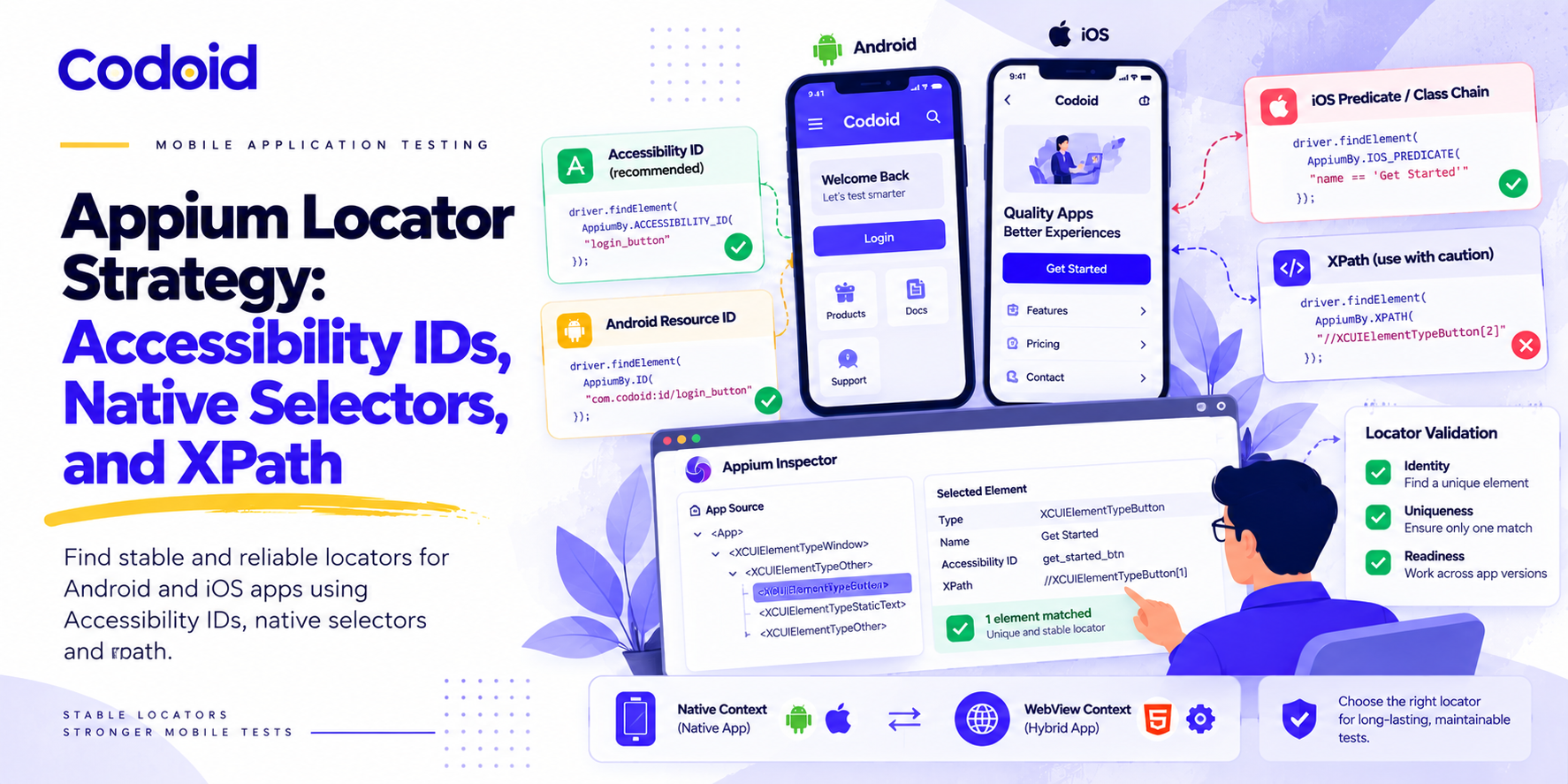
Element locating strategy is an important skill for a mobile app automation tester. To write a robust locator for an element, you need to view the element’s complete details. App Inspector is a simple yet effective mobile app testing tool that exposes the UI in a tree view and suggests XPath for Android and iOS. Skill is vital when it comes to testing and the tools used also becomes an important factor for successful test automation.
AWS Device Farm
AWS Device Farm is another cloud testing platform. You can access real devices for automation and manual testing and we have already mentioned the benefit of that. AWS Device Farm currently supports the following frameworks – Appium Java JUnit, Appium Java TestNG, Appium Python, Calabash, Instrumentation (Including JUnit, Espresso, Robotium, and any instrumentation-based tests), UI Automation, UI Automator, and XCTest (Including XCUI and KIF). This makes AWS Device Farm a mobile app testing tool to keep an eye out for.
Whatever apps and files you have uploaded will be removed after a span of 30 days. However, screenshots, videos, test reports, and logs are retained for 15 months.
Test Flight
Adding UDIDs for test devices and managing & tracking testing feedback from different mobile app testers were common problems for iOS developers. If you were one of those iOS developers then TestFlight is the answer to your long-running problem. In TestFlight, you can share builds for testing and the testers can share the testing feedback. In the latest TestFlight version, when there is a new build, it will be shared automatically for testing. This is why Test Flight makes the cut in our list of best mobile testing tools.
Perfecto Mobile
If you are a non-technical person and would like to explore code-less automation testing, you can use Perfecto IDE for mobile app testing. As an automation testing company, we don’t recommend code-less automation testing for large test suites. Sometimes you may not achieve complex E2E automation test scenarios using code-less automation testing. However, Perfecto supports Gherkin style frameworks. You can also integrate the Quantum BDD framework using it. Given these features and its ease of use, Perfecto Mobile becomes one of the best choices.
Perfecto provides highly secured cloud real devices for automation testing. If your testing needs audio or video inputs, you can inject the required files and get the job done. We, at Codoid, use Perfecto for ELearning Testing Services.
Espresso
Espresso is created by Google and bundled in the Android SDK. Espresso is best suited for Android UI testing. So if your team is developing only Android apps or a majority of Android apps, then Espresso is the way to go because everyone in the team can contribute to automation testing. We recommend Espresso for Android developers and not for testers because it is hard to find teams nowadays that develop only Android apps. So the biggest strength of Espresso is also its biggest pitfall.
Apptim
Apptim is a desktop application that is fairly new to the market of mobile app testing. Apptim lets you create a test session and test a mobile app. This feature is why Apptim is in this list of the best mobile app testing tools. Let’s say you have tested the mobile app’s V1 version in Test Session-1. When you are testing the app again for V2, you can compare the two test session’s performance to identify performance issues easily and work on fixing them. This makes Apptim one handy tool to keep at your disposal.
Conclusion
Many mobile app testing tools are emerging every year. However, choosing the best mobile app testing tools after a careful review will make your testing very efficient and effective. Wrong tool choices will waste your team’s time and may slow down the testing process. As a mobile app testing company, we recommend mobile testing tools for our clients based on their individual requirements. We hope that this article would help you in building your very own set of mobile app testing tools that fits best for you. Happy Testing!

by admin | Jan 1, 2021 | Mobile App Testing, Blog |
Developing software isn’t as easy as turning a blueprint into reality. It goes through numerous back and forths to find any potential issues that will prevent the program from performing its tasks. It may include multiple debugging phases to look for vulnerabilities and exploits that can be anything from minor inconveniences to major overhauls.
An added complexity to testing software is the current generation’s preference for mobile. Although most handheld devices are considerably more powerful now than before, some devices still outperform others. This is why there are many potential quirks that software testers need to address with mobile testing. Assessing these different conditions will help make a more seamless product that’s ready for release in the market.
How to make your mobile app ready for public release
Nothing damages a brand’s credibility more than a faulty product release, whether you’re a game developer releasing a half-finished title or a gourmet restaurant serving undercooked meals. Software development requires testing different environments, conditions, and interactions. For this reason, you must ensure that your software testers can look at all angles that can make or break your app.
If you’re planning to launch a successful mobile app, here are two critical aspects of software testing you should prioritize
1. Interrupt testing
By design, mobile devices cannot view multiple apps simultaneously. However, that doesn’t mean that it can’t handle various processes. This is why push notifications remind mobile users of any updates on running apps. It’s an efficient way of allowing a user to jump from one app to the next.
These notifications can come in different forms, from incoming phone calls to email updates. They can also be from the internal processes of the phone, such as volume and brightness sliders. These interruptions can cause various complications with your app’s usage. They can result in operational challenges like performance issues or even app crashes. Besides its functionality, you could also consider if your UI’s layout is accommodating to these mobile notifications. Sometimes, slightly repositioning your navigation buttons can significantly improve your customers’ UX.
2. Input testing
Unlike typical websites, you can do more when engaging with mobile apps through smart devices. Multi-finger touchscreen, voice recognition, and even its gyroscope can give you diverse ways to operate your app. However, keep in mind that the more complex your inputs, the more sophisticated your debugging process needs to be.
For example, gesture inputs need to account for speed and multi-finger inputs. Your app needs to respond accordingly when detecting your desired tapping gesture. Apps that can process sound aren’t uncommon to most modern devices. Built-in voice search is a common app that many mobile users use daily.
If your app wants to utilize this feature, you need to be mindful of your app’s detection levels in relation to external noise. Testing it in different environments will give you a better idea of designing a setting that allows correct input even in areas with varying noise levels.
Keep in mind that you should cater your input design to match your target demographic’s devices. Using complex detection solutions for sensors that aren’t even present in your customers’ devices will be a waste of effort.
Conclusion
The trend of developing apps is a popular practice for many establishments across different industries. This allows them to engage with mobile users of their products and services for better engagement and communication. However, not all companies are adept at detecting the weaknesses and inefficiencies of their finished apps. For this reason, business owners hire quality assurance companies to give them the sense of security that they’re putting a complete product out in public.
At Codoid, we offer the best app testing services to ensure that you’re selling a complete and functioning product to the market. Our performance testing services involve data analytics testing, web service testing, VR support, and more! Partner with us today to receive expert care for your software!

by admin | Dec 28, 2020 | Mobile App Testing, Fixed, Blog |
Using iOS, you can develop mobile apps. iOS development strongly follows the Model-View-Controller designs pattern, which separates data from visual objects. As a mobile app tester, if you are familiar with some basics of iOS development concepts, you will understand the importance of testing the iOS apps on real devices using different orientations. There are two UI frameworks available for iOS app development. One is UIKit, and the next one is SwiftUI. In iOS 13, SwiftUI was introduced. So any mobile apps which are developed using SwiftUI don’t work on older versions of iOS.
If you are participating in any discussions related to SwiftUI development, bring this drawback to the table as a discussion point. If your team is developing a brand new app and are not worried about older version compatibility, then SwiftUI framework is an excellent choice.
In this blog article, you will learn iOS App Testing approach.
App Types
Using iOS, you can develop six different types of apps.
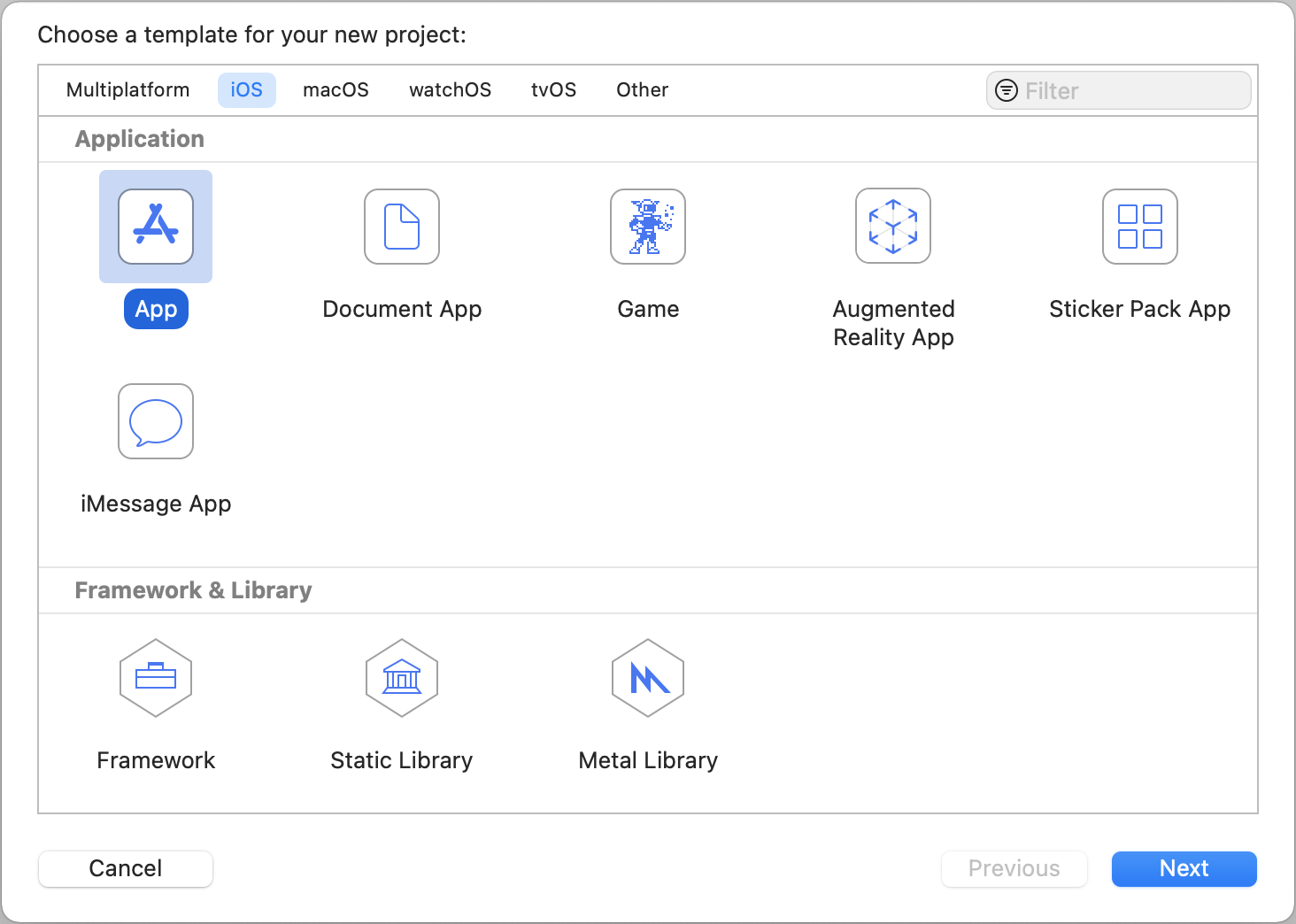
Default App – This is the widely used iOS app type. As we mentioned before, you can select either ‘Storyboard’ or ‘SwiftUI’ for the app interface. However, now, you can use the Document App option to create file management apps.
Game – In this app type, XCode will add the appropriate gaming kits for game app development.
Default App – This is the widely used iOS app type. As we mentioned before, you can select either ‘Storyboard’ or ‘SwiftUI’ for the app interface.
Augmented Reality App – You can create Augmented Reality Apps using RealityKit, SceneKit, SpriteKit, and MetalKit. RealityKit & SceneKit are used for 3D content. SpriteKit is for 2D content.
StickerApp & iMessage App – Message framework was introduced in iOS 10. Developing a Sticker App is easy. There is no coding involved. You can also create your own Standalone iMessage app.
Distributing App for Testing
The developed mobile apps can be distributed for testing before releasing in AppStore. To build the apps for testing purpose, you need to ask the mobile app developers to sign the mobile app for your device.
Once you get the build for testing, first check the content and images because users will easily spot the content issues. Let’s say the images in your app are broken. It will spoil your app’s reputation drastically.
If your team has decided to remove any old functionalities from the mobile app, make sure it does not impact the users when they upgrade. Before retiring any features from your mobile product, analyze the usage of the functionality and its importance. Sometimes app upgrading may lead to dissatisfaction.
After deployment in AppStore, use your device and install the app. Checking the download experience of a new version using Persona will help find bugs & new features for your app.
If your app supports multiple languages, then test the translation and other locale details.
Testing on Real Devices
As a mobile app testing company, we highly recommend testing mobile apps on Real Devices. Mobile developers use simulators or live preview to check the designs and functionalities during development. Deploying on a simulator is an easy job for a developer. Now, SwiftUI supports live preview for different device combinations.
Checking the designs and functionalities on real devices during development will slow-down the progress. Once the app is ready for testing, it should be tested on real devices.
Simulators use your computer’s network. So it does not mimic real-world network conditions. Sometimes, your apps may crash due to memory problems. Simulators run on Mac. So your app will not crash on simulators.
If your app connects with Bluetooth or Camera or IoT devices, then testing on a real device is a must.
iOS App Automation Testing
Executing a regression test suite manually on multiple devices is a tiresome task for a mobile app tester, and it is error-prone. So automating manual testing eases mobile app testing. Appium is the idle choice for mobile app automation testing.
To run your automated test scripts on real devices using Appium, you need the following tools.
HomeBrew – HomeBrew helps you to install and manage the required packages for Appium setup.
Xcode IDE – WebDriver agent app needs to be built and installed on your devices along with AUT (App Under Test). To build the WebDriver agent app, you need Xcode IDE.
NPM – Node.js package manager is required to install Appium. If you would like to install Appium using the Desktop app, you can try directly instead of trying the command line installation.
Appium Node Package – As an automation testing company, we use the Appium Node package instead of Appium Desktop App. If you are a novice mobile app tester, use the Appium Desktop app to learn mobile app automation testing.
Carthage – Carthage is a package that helps you to resolve framework dependencies. Before building the WebDriver agent app, Carthage needs to be installed because Carthage will resolve the dependency issues in the WebDriver Agent XCode project.
Once the WebDriver Agent app is installed successfully on the real device, you can execute Appium scripts.
Testing on Cloud Platforms
Managing mobile devices locally for testing purpose is an overhead cost for your team. For mobile app testing projects, we use BrowserStack App Live to test a mobile app on Cloud Real Devices.
You have the below advantages if you use Cloud Test Platform to test mobile apps.
Battery Charging – Let’s say you have 50+ mobile devices for testing. Before commencing the testing, you need to plug-in the charger for each device to have sufficient battery power during testing. If you test it on Cloud Real-devices, you need to bother about Battery Power. Everything will be taken care by the cloud vendor.
Video Recording – When you perform testing on the local device, you need to record and save the screen-cast as a piece of evidence. The cloud platforms will record your testing sessions automatically. You need to spend your time recording the test session.
Network Simulation – If you want to test your mobile app on low Internet Bandwidth, then you will have to set up a router to configure a low bandwidth Wi-Fi network. A tool like BrowserStack has a feature to launch the real device on various network conditions.
Orientation Testing
iOS has four orientation types. Based on how the user is holding the phone, the appropriate interface orientation of the apps will be changed.
The default selected orientations for an iOS app are Portrait, Landscape Left, and Landscape Right. Let’s take Facebook mobile app as an example. It has been set for only Portrait orientation. Landscape Left and Right are locked for Facebook mobile app.
There is another orientation available. That is Upside Down. It works only for the iPad. It means the iPad supports all four orientations.
It is always good to test orientation related test cases using real devices. Even with cloud real devices, we cannot 100% guarantee how the orientation works.
While testing the mobile app, change the mobile device orientation and see how the app is reacting.
UI Testing
- Test whether the user can fill the forms quickly.
- Check the buttons or clickable items are large enough.
- You are testing a mobile app. So the screens will be smaller. Ensure the smaller objects are separated enough to avoid accidental clicks.
- Try all the applicable gestures on UI objects.
Menu Touring
As soon as you get the build for testing, walk-through all the menus and dialog boxes in your mobile app.
Unit Testing
Unit Testing is for developers. iOS provides a Unit testing bundle to add tests to your mobile app code-base. When you have comprehensive unit tests, it will reduce the number of bugs. If your developers are following the Test Driven Development model, then you will know the importance of Unit tests and their benefits. Writing tests first and building the app to make the tests pass helps your developers to have a clear understanding of the features of functionalities that are being implemented.
Writing tests for everything will slow-down your development process. Let’s say there is a change in functionality. You will have to update the test and code. It is a time-consuming effort. However, the process helps you to build a reliable app with fewer bugs.
Performance Testing
Conducting performance testing only for Mobile App APIs is not sufficient. The poorly managed main thread may lead to unresponsive for user inputs. When a mobile app is performing poorly, the rating of the app will come down drastically.
Sometimes memory leaks can be detected only when the app is used for a longer duration. You can also use Appium scripts and execute them for longer hours to unearth memory leaks.
Some iOS apps may take time to draw UI screens. In automation test scripts, you can set the excepted screen loading time. So, the scripts will fail if the screens are loading more than the expected load time.
If your app has Tables, then test those screens to find performance issues. Users may notice the lag when the tables are scrolled if there is a performance issue.
You can use JMeter and Gatling performance testing tools to conduct performance testing from API stand-point. Involve multiple testers and ask them to use real devices to test the core functionalities simultaneously.
Monitoring mobile app crashes using crash reporting tools provide great inputs for mobile testers and developers. When new features are added to your mobile product, monitor app crashes because new functionalities may cause unexpected crashes at the initial stage.
App Security & Privacy
If your app needs device-related permissions from the user, then mention why the user needs to grant the permissions in the app description.
Check all possible data leaks to prevent data breaches.
Usability Testing
If the user does not like your app immediately after installing, he/she may never revisit. As a mobile app tester, you need to make sure the app adds value to the user.
Common Usability Issues
Multiple Steps – If your app has a lengthy registration or form filling, your users will be frustrated.
Scrolling – Your user should get the required information within the screen limit. However, it is not possible for all the scenarios. It would be great if never-scrolling is avoided.
Navigation – Great apps need proper navigation. Users will never consume your app if the app navigation is confusing.
Auto-Filling – If the app is an interesting one and users use daily, it needs to leverage the auto-filling feature. Because your app users will hate to type the same data again and again.
Unresponsive for Inputs – If a mobile screen is unresponsive for inputs or gestures, your users will be annoyed. Make sure no screen is unresponsive. If the screen is used for loading purpose, then display the relevant content to educate the users.
Conclusion
Before releasing an iOS app, you need to test it on multiple devices. Testing the app only from functional testing stand-point will never address the real-world issues. Test both functional and non-functional areas. Insufficient testing will allow users to experience the buggy app.
Once a mobile app’s reputation is lost due to bugs, it is hard to regain.
App quality starts from coding. If the unit testing covers all the code components, then it will reduce the number of bugs. Mobile app testing service is one of the core testing services of Codoid.
Web Applications has only a few browser combinations. However, mobile apps need to be tested on different OS, platforms, and versions. To release an app quickly, it needs to be tested quickly. Testing the same scenarios manually on multiple devices needs more testers and time. Automate all your regression test cases to speed-up the testing.
Automate all your regression test cases to speed-up the testing. Automation testing is not error-prone. Your team will get confidence if the regression testing is taken care of by automation testing.
Codoid is a software testing company. We have tested more than 1000+ mobile apps. All our mobile app testers are expertise in both manual and automation testing. We have our in-house mobile app testing lab, which contains 70+ mobile devices. Contact us for your mobile app testing needs.
by admin | Dec 24, 2020 | Mobile App Testing, Fixed, Blog |
You can find many blog articles and YouTube videos that demonstrate Appium iOS setup. However, in this blog article, you will learn about each installation step and its importance. Many automation testers follow Appium iOS installation steps blindly and install the required software without knowing its details and usage.
HomeBrew Installation:
HomeBrew is an open-source package manager for macOS. If you have HomeBrew, then it will ease Node and Carthage installations. We will discuss more Node and Carthage later. HomeBrew installation is straight-forward. Visit https://brew.sh/ website for more details.
Node Installation:
In order to install Appium node package, you need Node Package manager. Using brew install command, you can install Node package manager. Once npm is installed, you can verify the installation using node -v command.
XCode IDE:
To run your mobile test automation scripts on real iOS devices, you need to build and install webDriver agent app in your device. To build web driver agent app, you need XCode. You can install XCode from AppStore.
Appium Installation
If you have already installed npm, then installing Appium is a cake-walk. Use the following command to install Appium.
You can also install Appium Desktop instead of node package. As an automation testing company, use Appium node package to automate iOS app test automation. It is up to your flexibility.
Carthage Installation:
Carthage is required to install dependencies of WebDriver agent Xcode project. Once Appium is installed, you can find WebDriver agent project in node_modules folder. Previously, the WebDriver agent project was not shipped along with Appium package. Now, you can find it in the following folder.
/usr/local/lib/nodemodules/appium/nodemodules/appium-webdriveragent
Build WebDriver Agent project:
Goto appium-webdriveragent and run the following command.
mkdir -p Resources/WebDriverAgent.bundle
./Scripts/bootstrap.sh -d
The above commands will install the required dependencies of WebDriver Agent project using Carthage.
Now, open the WebDriver agent project in Xcode, connect your device and build the project. If the build is successful, you can see the WebDriver agent app on your phone.
Conclusion:
Appium Setup for iOS is not a simple task if you are a novice mobile app automation tester. However, If you follow all the steps one-by-one carefully, you can succeed in the first attempt.
Don’t worry if the installation didn’t go well. Just roll-back all the installation and try again from the beginning. Building WebDriver agent is a crucial step in Appium iOS setup. As a mobile app testing company, we use Appium for Android and iOS apps automation testing. Appium setup for iOS is a one-time activity. However, if you are familiar with the required tools and packages, you can recollect the installation steps in the future.
We hope you have learned the details of Appium iOS setup. After following up the installation steps from any YouTube videos, just go through this article to better understand. In the subsequent blog articles, we will be publishing more topics on Appium iOS automation testing.