



























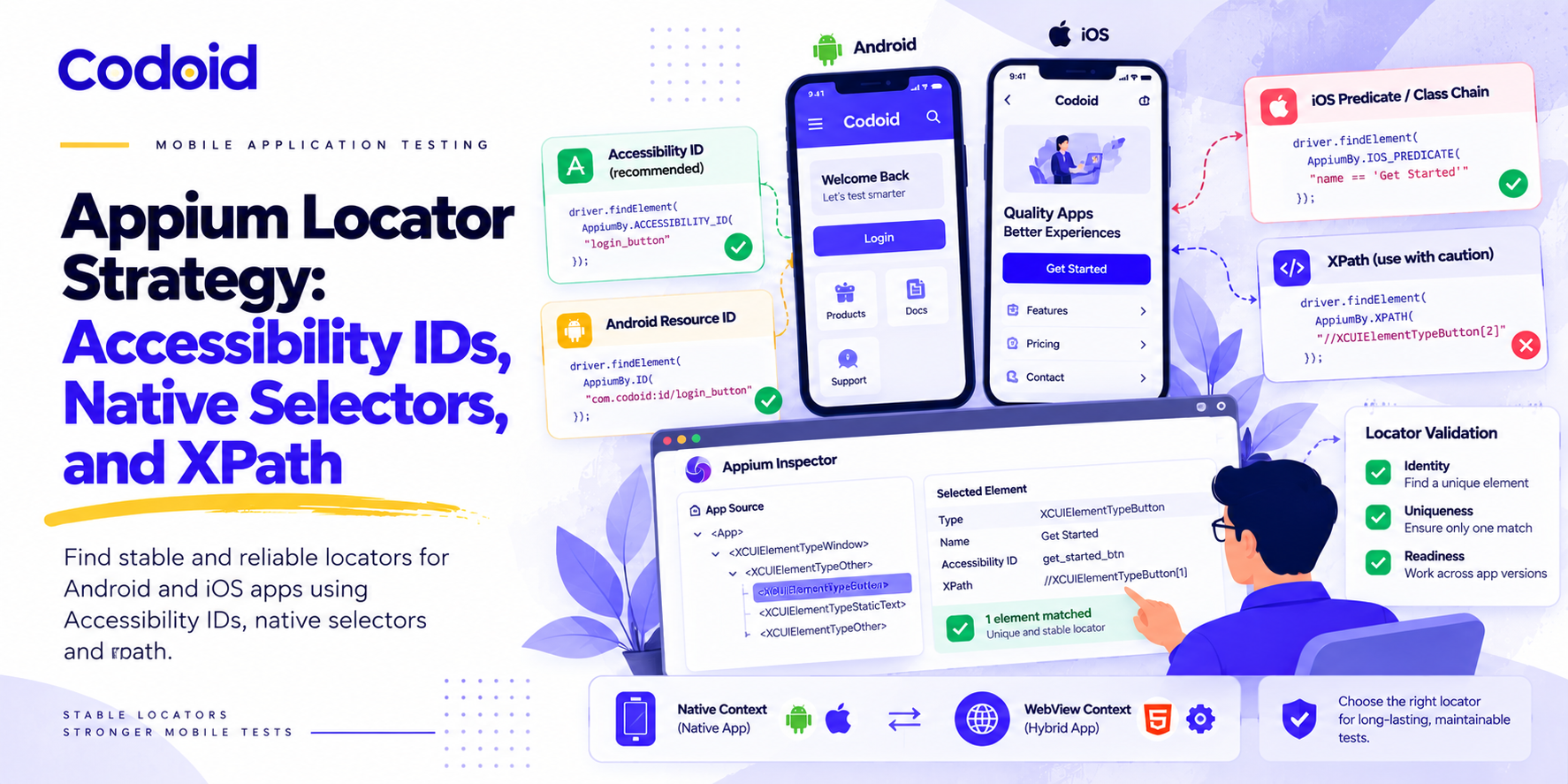
Imagine a checkout test that fails after a designer adds a new container around the payment button. The button still works. Its purpose has not changed. But the test was written to find “the second button inside the fourth layout,” so a harmless layout change breaks the automation. The problem is not necessarily Appium. It is the contract between the test and the interface. A reliable locator should identify what an element is, not merely where it happens to appear. That means choosing stable attributes first, using platform-specific queries when necessary, and treating hierarchy-dependent selectors as deliberate trade-offs. A sound Appium locator strategy makes this contract explicit rather than leaving it to accident.
This guide focuses on native Android automation with UiAutomator2 and native iOS automation with XCUITest, with a separate note on hybrid applications. Python examples use Appium’s AppiumBy API and assume an initialized driver session for the relevant platform. Codoid’s mobile app testing services apply these same principles to production automation suites.
- Choose the Attribute Before the Locator Syntax
- Accessibility IDs and Resource IDs: Start With Stable Identity
- Native Selectors: Add Specificity Without Defaulting to XPath
- XPath: A Deliberate Fallback, Not an Automatic Failure
- Design Stable Attributes as an Application Contract
- Separate Locator Correctness From Synchronization
- Validate in the Context and Environment That Will Run the Test
- The Best Appium Locator Strategy Is a Maintainable Contract
Choose the Attribute Before the Locator Syntax
A locator combines a search strategy with a value:
    from appium.webdriver.common.appiumby import AppiumBy

    continue_button = (
        AppiumBy.ID,
        "com.example.shop:id/continue_button",
    )
Before deciding whether to use an ID, a native selector, or XPath, ask a single question:
What property identifies this element independently of layout, language, and temporary application state?
Use the following table as a selection guide, not an absolute performance ranking. The platform mappings come from the respective Appium driver documentation.
| S. No | Strategy | Platform | Good starting point when | Main caution |
|---|---|---|---|---|
| 1 | Accessibility ID | Android and iOS | The exposed accessibility identity is stable and unambiguous. | Its underlying meaning differs by platform. |
| 2 | Resource ID | Android | The element exposes an application-owned resource name. | Repeated components may share an ID. |
| 3 | iOS predicate string | iOS | You need to combine the element’s own attributes. | A query based on changing text is still fragile. |
| 4 | iOS class chain | iOS | A stable container or descendant relationship identifies the target. | Positional chains still depend on layout. |
| 5 | Android UiAutomator selector | Android | Existing tests need native attribute combinations. | Account for the legacy API’s future deprecation. |
| 6 | XPath | Android and iOS | Relationships are difficult to express cleanly with other supported strategies. | Review both hierarchy coupling and lookup cost. |
The recommended policy for your Appium locator strategy is:
Prefer stable, application-owned identity. Add native query logic only when it resolves genuine ambiguity. Use XPath when its expressiveness justifies its dependencies.
A sophisticated selector does not rescue an unstable attribute. A simple selector does not guarantee uniqueness.
Accessibility IDs and Resource IDs: Start With Stable Identity
iOS: Separate the Testing Identifier From the Spoken Label
On iOS, developers can assign an accessibilityIdentifier for automation without changing the label used by accessibility services. Appium’s XCUITest documentation recommends this identifier over accessibilityLabel because the identifier should remain constant across locales.
For example, an application developer might assign:
continueButton.accessibilityIdentifier = "checkout_continue"
The test can then locate the element with:
    continue_button = (
        AppiumBy.ACCESSIBILITY_ID,
        "checkout_continue",
    )

    driver.find_element(*continue_button)
Keep the user-facing label meaningful and localized separately.
There is an important inspection detail. XCUITest’s name attribute can come from an element’s identifier or its label. The driver treats id and accessibility id as aliases of its name strategy. Consequently, a successful accessibility-ID lookup does not, by itself, prove that the application has a dedicated testing identifier.
For a multilingual test suite, verify how the value is populated. A locator that silently depends on the English label “Continue” is not equivalent to a deliberately assigned identifier such as “checkout_continue”.
Android: Accessibility IDs Are Content Descriptions
With UiAutomator2, ACCESSIBILITY_ID matches an element’s content description, exposed as content-desc. ID matches its resource name. These are different attributes, not interchangeable names for the same property.
For an appropriately labeled icon, a content-description lookup might be:
    search_icon = (
        AppiumBy.ACCESSIBILITY_ID,
        "Search",
    )
But content descriptions serve users, too. Android’s accessibility guidance calls for meaningful descriptions that explain an element’s purpose. Screen readers can announce those descriptions. Do not replace a helpful description with an opaque automation string solely to make a test easier to write.
For an application-controlled Android view, prefer a stable resource ID when it avoids that conflict:
    continue_button = (
        AppiumBy.ID,
        "com.example.shop:id/continue_button",
    )
UiAutomator2 automatically supplies the application package prefix for unqualified resource-ID lookups. Using an explicit resource name makes that dependency visible. Applications with different build-package names should configure it rather than scatter it through tests.
Share the Business Action, Not Necessarily the Locator
A cross-platform suite does not need identical locator strings to expose the same test behavior:
    CONTINUE_BUTTON = {
        "Android": (
            AppiumBy.ID,
            "com.example.shop:id/continue_button",
        ),
        "iOS": (
            AppiumBy.ACCESSIBILITY_ID,
            "checkout_continue",
        ),
    }
A screen object can provide continue_checkout() while keeping the platform-specific lookup inside its implementation.
This is a better abstraction target than forcing both applications to expose the same accessibility label. Share the intent of the test. Preserve the platform’s appropriate identification mechanism.
Native Selectors: Add Specificity Without Defaulting to XPath
“Native selector” describes how a query is evaluated. It does not automatically describe how stable that query is.
A native query that selects the third button still depends on ordering. A native query using a translated label still depends on language. Use native selector logic to express meaningful distinctions, not to disguise positional assumptions.
iOS Predicate Strings: Combine Attributes on the Target
An iOS predicate string is useful when an element’s own attributes are sufficient to identify it. The strategy supports comparisons and compound expressions evaluated through XCTest.
    continue_button = (
        AppiumBy.IOS_PREDICATE,
        "type == 'XCUIElementTypeButton' "
        "AND name == 'checkout_continue'",
    )

    driver.find_element(*continue_button)
Here, the identifier supplies identity and the type narrows the intended control.
Before adding conditions, decide what each one contributes. Adding enabled == true, for example, changes the query from “find this button” to “find this button only while enabled.” That may be appropriate, but it also changes how a failure is interpreted.
For clearer diagnostics, prefer keeping identity in the locator and checking readiness separately.
Avoid broad partial matches such as name CONTAINS ‘continue’ unless the naming contract genuinely guarantees that only the intended element can match.
iOS Class Chain: Use a Meaningful Container Relationship
Class chain queries combine element types, predicates, and hierarchy relationships. Their syntax distinguishes direct children from descendants. The pattern **/ requests a descendant search rather than a direct-child search.
Suppose a saved-address cell has a stable identifier and contains an edit button:
    edit_home_address = (
        AppiumBy.IOS_CLASS_CHAIN,
        '**/XCUIElementTypeCell[`name == "address_home"`]'
        '/**/XCUIElementTypeButton[`name == "edit_address"`]',
    )

    driver.find_element(*edit_home_address)
This expresses “the edit button belonging to the home-address cell,” rather than “the second edit button.”
Use this pattern only when the inspected hierarchy actually contains those elements and attributes. The example assumes that the application exposes the cell and button independently.
There is still a structural dependency: the button must remain a descendant of that cell. That dependency is reasonable when it reflects the component’s meaning. It is less reasonable when the query walks through several incidental layout wrappers.
Android UiAutomator Selectors: Useful, but Account for Legacy APIs
Appium supports UiSelector expressions through ANDROID_UIAUTOMATOR. They can express native selection criteria such as class and text matching.
    continue_button = (
        AppiumBy.ANDROID_UIAUTOMATOR,
        'new UiSelector()'
        '.className("android.widget.Button")'
        '.text("Continue")',
    )

    driver.find_element(*continue_button)
This can be a practical choice for an existing application without suitable IDs, particularly in a test that deliberately fixes the locale. It should not be described as language-independent. “Continue” is part of its identity condition.
Maintenance note: Google’s documentation states that UiSelector, UiScrollable, UiObject, and UiCollection are planned for deprecation in a future release. Appium still documents support for UiSelector-based locators. Treat this as a migration consideration, not a claim that all existing selectors have already stopped working.
For new automation, avoid introducing a dependency on a complex legacy selector when a direct ID lookup would express the same intent.
XPath: A Deliberate Fallback, Not an Automatic Failure
XPath deserves a more precise assessment than “always bad.”
Two separate concerns matter.
Structural fragility comes from depending on incidental hierarchy, sibling order, or changing attributes.
Execution cost comes from how the driver obtains and searches the hierarchy.
On iOS, XPath is evaluated against the XML tree produced by the XCUITest driver rather than a native XCTest XPath implementation. The driver documentation recommends more performant strategies where possible.
Avoid Selectors That Encode the Entire Screen Layout
Consider a locator shaped like this:
    brittle_button = (
        AppiumBy.XPATH,
        "/hierarchy/android.widget.FrameLayout"
        "/android.widget.LinearLayout"
        "/android.widget.FrameLayout"
        "/android.widget.LinearLayout"
        "/android.widget.Button[2]",
    )
Its meaning is effectively: follow these containers, then choose the second button.
Insert another wrapper or reorder the buttons, and the selector may stop matching, or identify a different target.
That is a dependency problem. Replacing XPath with an equally positional native query would not remove it.
Anchor XPath to Meaningful Attributes
An attribute-based expression makes a narrower promise:
    attribute_based_button = (
        AppiumBy.XPATH,
        "//android.widget.Button"
        "[@resource-id='com.example.shop:id/continue_button']",
    )
This example avoids a full ancestry path. However, it also demonstrates an unnecessary use of XPath. The same identity can be expressed with AppiumBy.ID.
Reserve XPath for cases where the relationship itself matters and another supported query would be less clear or less maintainable. Examples include identifying a control through a nearby label or navigating a relationship in an application you cannot modify.
When reviewing such a locator, ask which parts describe the component’s meaning and which parts merely describe today’s layout. Keep the former. Remove as much of the latter as possible.
Measure the Cost Instead of Repeating a Universal Speed Claim
Do not assume that every XPath query is a fixed number of times slower than every native lookup. XCUITest’s troubleshooting documentation identifies hierarchy size, active animations, and attribute calculation as contributors to snapshot cost.
Compare candidates under the same application state and session configuration. Separate a slow lookup from repeated waiting for an element that is absent.
For suite optimization, prioritize selectors that execute frequently or contribute to long-tail failures rather than rewriting every XPath expression indiscriminately.
Design Stable Attributes as an Application Contract
Locator reliability should be part of component design, not a repair task left until the test suite breaks.
A useful identifier answers a single question: which logical control or component is this?
Recommended names might include:
- login_email_input
- login_submit
- checkout_continue
- profile_save
- address_home
Avoid naming identities after temporary presentation details:
- blue_button
- second_card
- bottom_right_icon
- continue_english
The distinction becomes obvious during a redesign. A button can stop being blue without ceasing to be the checkout continuation control.
Keep Identity Separate From Content and State
Treat an identifier as the answer to “which element?”
Treat text, values, and enabled or selected state as answers to “what should be true about it now?”
For example, a test should ideally find a cart total by a stable identifier and then assert its displayed amount. Locating the total by the expected amount merges identification with verification. When the amount is wrong, the failure may look like a missing element instead of an incorrect total.
Likewise, a translated heading is a sensible assertion target in a localization test. It is a less suitable identity for navigating an unrelated checkout test.
Scope Repeated Elements by Business Meaning
Repeated components require an explicit uniqueness policy.
Suppose every address card contains a button called edit_address. The button name can remain reusable when the test first identifies the correct card.
Prefer “edit the home address” over “click the second edit button.” A suitable row identity might be a stable test-fixture key or a meaningful component identifier. Do not choose an incidental database value that changes every time the environment is reseeded.
For a single-element interaction, aim for one match within the intended search scope, not necessarily one occurrence across the entire application.
Verify How Framework-Level Test Hooks Reach Appium
A test tag in application code is useful only when the automation driver can observe the corresponding identity.
For Jetpack Compose, Android documents testTagsAsResourceId as a way to expose Modifier.testTag values through UiAutomator. The exposed resource name can be the tag itself, rather than a conventional package-qualified Android resource name.
That distinction affects Appium lookup configuration. For bare resource names, UiAutomator2’s disableIdLocatorAutocompletion setting prevents automatic package-prefix insertion.
Inspect the resulting element rather than assuming the application-side property name tells you which Appium strategy to use.
Also consider element exposure. XCUITest’s troubleshooting documentation explains that missing accessibility information can leave a visible control absent as an independently distinguishable automation element. A more elaborate XPath cannot select a node that is not present in the XML being searched.
Separate Locator Correctness From Synchronization
A correct identity does not establish that the application is ready for interaction.
A useful debugging distinction for any Appium locator strategy separates three questions.
Identity: Does this locator select the intended element?
Uniqueness: Does it select only the intended element in this scope?
Readiness: Is the element in the state required for the next action?
Use explicit waits for readiness rather than fixed sleeps. Selenium documents explicit waits as condition-based synchronization and warns that mixing implicit and explicit waits can produce unpredictable wait durations.
For an Android checkout button:
    from selenium.webdriver.support import expected_conditions as EC
    from selenium.webdriver.support.ui import WebDriverWait

    CONTINUE_BUTTON = (
        AppiumBy.ID,
        "com.example.shop:id/continue_button",
    )

    # Configure this once when creating the test session.
    driver.implicitly_wait(0)

    button = WebDriverWait(driver, 10).until(
        EC.element_to_be_clickable(CONTINUE_BUTTON),
        message="Checkout continue button did not become ready",
    )
    button.click()
Selenium’s element_to_be_clickable condition checks visibility and enabled state. It is not a comprehensive guarantee that a native mobile tap will succeed under every overlay, animation, or application-specific condition.
Add application-specific readiness checks when the flow requires them, and assert the expected outcome after interacting.
Validate Uniqueness Explicitly
During locator development, check the match count on a settled screen:
    matches = driver.find_elements(*CONTINUE_BUTTON)

    if len(matches) != 1:
        raise AssertionError(
            "Expected one checkout continue button; "
            f"found {len(matches)}"
        )
Treat this as a validation step, not a reason to automatically choose matches[0].
A locator that happens to return the correct first match today still leaves ambiguity unresolved. For critical actions, make ambiguity visible rather than allowing the test to proceed silently.
Store locator definitions in screen objects and obtain element references when needed. Keep the test-facing API focused on actions such as submit_login() or edit_home_address(), so platform-specific lookup changes remain localized.
Validate in the Context and Environment That Will Run the Test
Check Native Versus Webview Context
Hybrid applications add another dimension: the active Appium context.
Appium exposes APIs to list contexts, inspect the current context, and switch contexts. The driver’s behavior and supported locator strategies can change when moving from native content to a webview.
For an element inside a webview’s DOM, use the intended webview context and an appropriate web locator. Do not assume that an HTML ID or data-testid will be searchable as a native resource ID.
Likewise, switch back to the native context before addressing native controls outside that webview. A context mismatch should be investigated before replacing a sound locator with a broader XPath.
Use Inspector to Test a Locator Hypothesis
Appium Inspector can display page source and screenshots, search with supported locator strategies, suggest selectors, and compare lookup speeds.
Use those capabilities to validate a hypothesis, not simply to copy the first generated path.
For each important locator, confirm the actual attribute value, match count, and intended target. Then test it under relevant variations: another locale, different list contents, a reopened screen, and supported device layouts.
A locator that survives those variations provides stronger evidence than one successful click during inspection.
Make Failures Diagnosable
When a lookup fails, capture enough context to distinguish an identity problem from an application-state problem.
A useful failure record includes the locator strategy and value, active context, screenshot, page source when available, application build, driver version, device or simulator details, and locale.
Investigate whether the target is missing from the hierarchy, present under a different value, duplicated, or not yet ready. XCUITest’s troubleshooting guide specifically calls out accessibility exposure, hybrid context, race conditions, and environment mismatches as separate causes of lookup failures.
Avoid a fallback chain that silently tries ID, then text, then XPath, then coordinates. Such a chain can conceal a broken identification contract and may interact with an unintended control. Where different application versions genuinely require different selectors, make that version-dependent choice explicit. For broader mobile release validation, the checks in Codoid’s Android and iOS quality assurance guide complement locator stability work.
The Best Appium Locator Strategy Is a Maintainable Contract
Choose locators by the assumptions they make.
A stable identifier assumes that the application preserves a control’s logical identity. A text locator assumes that particular content remains appropriate. A hierarchy locator assumes that a relationship remains meaningful. A positional locator assumes that ordering remains unchanged.
The first task is not to ban a syntax. It is to decide which assumptions your test is entitled to make.
Start with application-owned identifiers, preserve meaningful accessibility labels, use native queries to resolve real ambiguity, and keep XPath expressions focused on necessary relationships. Validate uniqueness independently from readiness, and investigate context and hierarchy exposure before blaming the selector.
A strong locator continues to mean “this control” even when the screen around it changes. That is the goal of a durable Appium locator strategy.

Need Help Building a Maintainable Appium Locator Strategy?
Talk to a Mobile Automation ExpertFrequently Asked Questions
-
What is the best locator strategy in Appium?
There is no single best strategy. Prefer stable, application-owned identity such as accessibility IDs or resource IDs when they are available. Add native query logic only when it resolves genuine ambiguity. Use XPath when its expressiveness justifies its dependencies. The right choice depends on the assumptions your test is entitled to make about the application's interface.
-
What is the difference between accessibility ID and resource ID in Appium?
On Android, ACCESSIBILITY_ID matches an element's content description, while ID matches its resource name. These are different attributes. On iOS, ACCESSIBILITY_ID matches the element's accessibilityIdentifier or label through the XCUITest driver's name strategy. Choose the attribute that provides stable, application-owned identity for the platform you are testing.
-
Should I always avoid XPath in Appium?
No. XPath deserves a more precise assessment than "always bad." Two separate concerns matter: structural fragility from depending on incidental hierarchy, and execution cost from how the driver searches the hierarchy. Reserve XPath for cases where the relationship itself matters and another supported query would be less clear or less maintainable.
-
Why does my Appium test break after a layout change?
The locator is probably encoding today's layout rather than the element's identity. A locator shaped like "the second button inside the fourth layout" will break when a container is added or buttons are reordered. Replace hierarchy-dependent selectors with stable application-owned identifiers whenever possible.
-
How do I check that my Appium locator is unique?
During locator development, use find_elements and verify the match count on a settled screen. If the count is not one, make the ambiguity visible rather than proceeding silently with the first match. Treat uniqueness as a validation step separate from readiness checks.
-
What is the difference between locator correctness and synchronization in Appium?
Locator correctness answers whether the locator selects the intended element. Synchronization answers whether the element is in the state required for the next action. A correct identity does not establish readiness. Use explicit waits for readiness rather than fixed sleeps, and avoid mixing implicit and explicit waits.
-
How should I handle repeated elements with the same identifier?
Scope repeated elements by business meaning. Prefer "edit the home address" over "click the second edit button." Use a stable row or component identity to select the correct container first, then look for the repeated control inside that scope. Aim for one match within the intended search scope, not necessarily one occurrence across the entire application.
-
Why does my Appium locator work in Inspector but fail in the test suite?
Inspector validates a locator at a single moment against a single application state. The test suite runs against different locales, list contents, screen states, and device layouts. Validate each important locator under representative variations before relying on it in the suite.




























Comments(0)