

















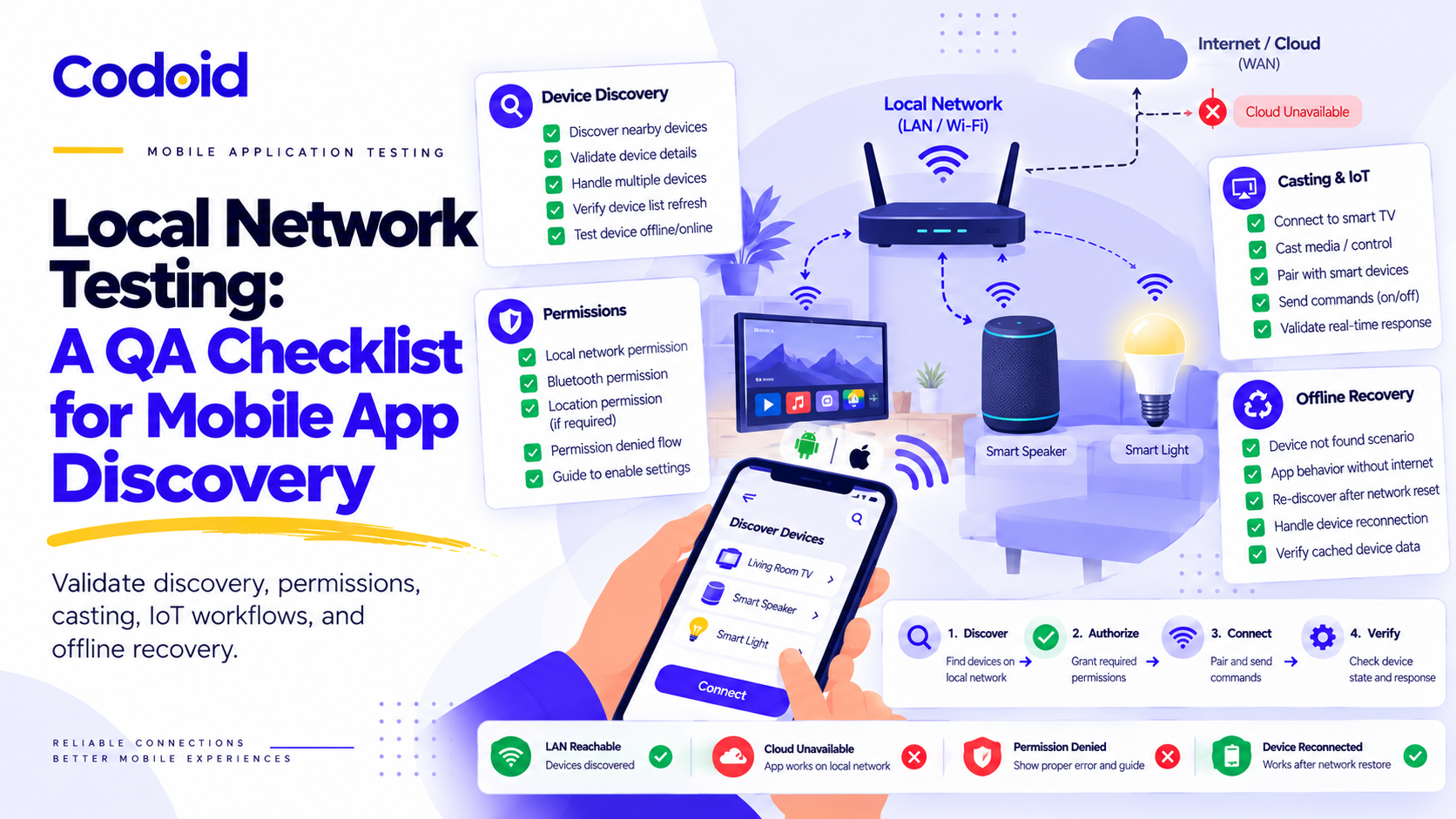
Imagine tapping Cast and seeing no television, even when it is powered on. Or opening a smart-home app that cannot control a nearby lamp after the internet drops, even though both devices remain on Wi-Fi. Did discovery fail? Was local access denied? Did the app confuse an internet outage with a LAN outage? These are different failures and require different tests.Local network testing for mobile apps verifies how an app discovers, connects to, authorizes, and controls nearby devices, and how it reports and recovers from interruption. This guide provides copy-ready test cases and fault-injection checks for Android, iOS, casting, and IoT workflows.
Start with the test checklist, then validate network paths, platform permissions including Android 17, discovery, casting, IoT access, and offline recovery. Codoid’s mobile app testing services apply this same discipline to production releases.
Table of Contents
- What Is Mobile App Local Network Testing?
- Copy-Ready Mobile Local Network Test Cases
- Build a Test Environment That Separates Failure Types
- Validate Local Network Permissions on iOS and Android
- iOS: Test Direct Access and System-Managed Features
- Android: Include Both OS Version and Target SDK
- Test Device Discovery Beyond the Happy Path
- Validate Casting Across Discovery, Playback, and Recovery
- Test IoT Access From Onboarding to Confirmed State
- Test Offline Recovery Without Losing the Meaning of an Action
- Automate the UI, Network Conditions, and Device Assertions
- Capture Evidence That Explains the Failure
- Define Release Gates Around User Outcomes
What Is Mobile App Local Network Testing?
Local network testing checks device discovery, connection, permission state, authorization, command delivery, and recovery across a phone and nearby target device. In this article, a Cast receiver plays media. An IoT accessory executes a device command. The term “target device” covers either when a test applies to both.
Local network availability is not the same as internet availability. On a network with NET_CAPABILITY_INTERNET, the NET_CAPABILITY_VALIDATED flag indicates successful internet validation. It does not prove that a particular local accessory is reachable (Android API reference).
For testing purposes, assess these questions separately:
- Can the app use the relevant network and discover the target?
- Can it establish an authorized connection and complete the requested operation?
- Can it determine the outcome and recover when communication is interrupted?
A connected Wi-Fi icon cannot answer all three. Neither can a successful request to a cloud API.
Before testing, agree which features must work on the LAN without cloud access, which need a backend, and which may fall back to another transport. The expected behavior below is conditional on that contract.
Copy-Ready Mobile Local Network Test Cases
Use one pass or fail verdict for the app and another for the target device. Run each scenario with known permission, cellular, and network states. Retain the listed evidence.
| S. No | ID | Precondition | Action or fault | Expected mobile UI | Expected device result | Independent evidence |
|---|---|---|---|---|---|---|
| 1 | TC-01 | Paired lamp. Phone cellular off. LAN healthy. | Disconnect only router WAN | Local control works. Cloud-only feature shows limited status | Brightness changes once | Cloud probe fails. Local endpoint probe and accessory log pass |
| 2 | TC-02 | Phone and target on controllable AP | Enable AP and client isolation | Shows LAN issue or documented fallback, not “no internet” | Direct LAN blocked. Cloud fallback only if product supports it | Internet probe passes. Peer traffic fails at AP or firewall |
| 3 | TC-03 | mDNS discovery and active session in place | Filter UDP 5353 for discovery | New discovery fails. Active session follows its contract | Existing control remains if control path is open | Discovery capture absent. Endpoint probe succeeds |
| 4 | TC-04 | Direct LAN app. Permission initially denied | Open discovery or control screen | Explains permission state and recovery option | No unauthorized connection occurs | OS permission and connection error trace |
| 5 | TC-05 | Connected Cast session | Restart or power off receiver | Reports lost session. No false playback success | Receiver stops. Can be rediscovered on return | Receiver lifecycle log and sender status |
| 6 | TC-06 | Receiver fetched remote media successfully | Block media host, not local control | Identifies load or playback failure | Receiver shows media fetch failure | Local control probe OK. Media fetch probe fails |
| 7 | TC-07 | Paired accessory. Observable command | Execute command, drop its acknowledgment | Shows pending or unknown until reconciled | Target state changes at most once | Device state, operation ID, or audit log |
| 8 | TC-08 | Previously interrupted local workflow | Restore path. Relaunch app | Refreshes state. Canceled work stays canceled | Latest state retained. No stale replay | Before and after device readback plus teardown log |
Rule: Evidence that a cloud probe failed does not prove the LAN still works. Record a separate discovery or control-path probe and a receiver or accessory assertion.
Build a Test Environment That Separates Failure Types
Use representative phones, casting receivers or IoT accessories, and an AP or router you can configure. Record build, OS version, Android target SDK, accessory firmware, AP or router firmware, network segments, IP family, baseline permission grants, and whether cellular data is disabled.
In every fault test, prove the fault was isolated. “App looks offline” is not evidence of whether the WAN, multicast discovery, or target endpoint is unavailable. Also test a backend-only outage while independent WAN and LAN probes succeed.
| S. No | Fault or injection | Independent probe | Device-side proof | Pass criterion |
|---|---|---|---|---|
| 1 | WAN down: remove upstream route, leave LAN active | Cloud endpoint fails. Discovery and local control endpoint still reachable. Cellular off | Local feature changes actual target state | Supported LAN feature works. Cloud-only failure explained |
| 2 | AP or client isolation: enable WLAN peer isolation | Internet check passes. Phone-to-target traffic blocked by AP | No command applied on target | App shows LAN failure or documented cloud fallback, not a WAN-loss error |
| 3 | Discovery blocked: filter only mDNS UDP 5353 if applicable | mDNS queries and responses absent. Known endpoint remains reachable | Existing authorized session behaves per contract | Discovery and control failures are not conflated |
| 4 | Control endpoint blocked: target port firewall rule | Discovery response present. Targeted connection fails | No command executed | App does not report a successful operation |
| 5 | Receiver powered off or restarted | Healthy router, lost target service. Target returns after restart | Device offline or online evidence or receiver boot log | Stale UI corrected and recovery works |
Probe selection depends on protocol. mDNS packet capture is relevant only if the product uses mDNS. SSDP, BLE, Wi-Fi Direct, and proprietary protocols require corresponding observability. ICMP ping alone does not prove that an app’s control port is usable.
Test AP and client isolation. The phone may still reach the internet while the access point blocks communication with nearby devices. Record whether the router isolates wireless clients, Ethernet-connected devices, or both (Google Cast troubleshooting).
Cover the supported mix of 2.4 GHz and 5 GHz clients, mesh handoff, Ethernet receivers, IPv4 and IPv6, and representative router firmware. Wi-Fi frequency band alone does not establish network segmentation. Add captive-portal, VPN, or roaming cases when the product supports them.
For segmented or guest networks, separately verify multicast discovery forwarding and routable access to the control endpoint. Bonjour discovery does not automatically cross subnet boundaries. A successful discovery response is not a connection guarantee.
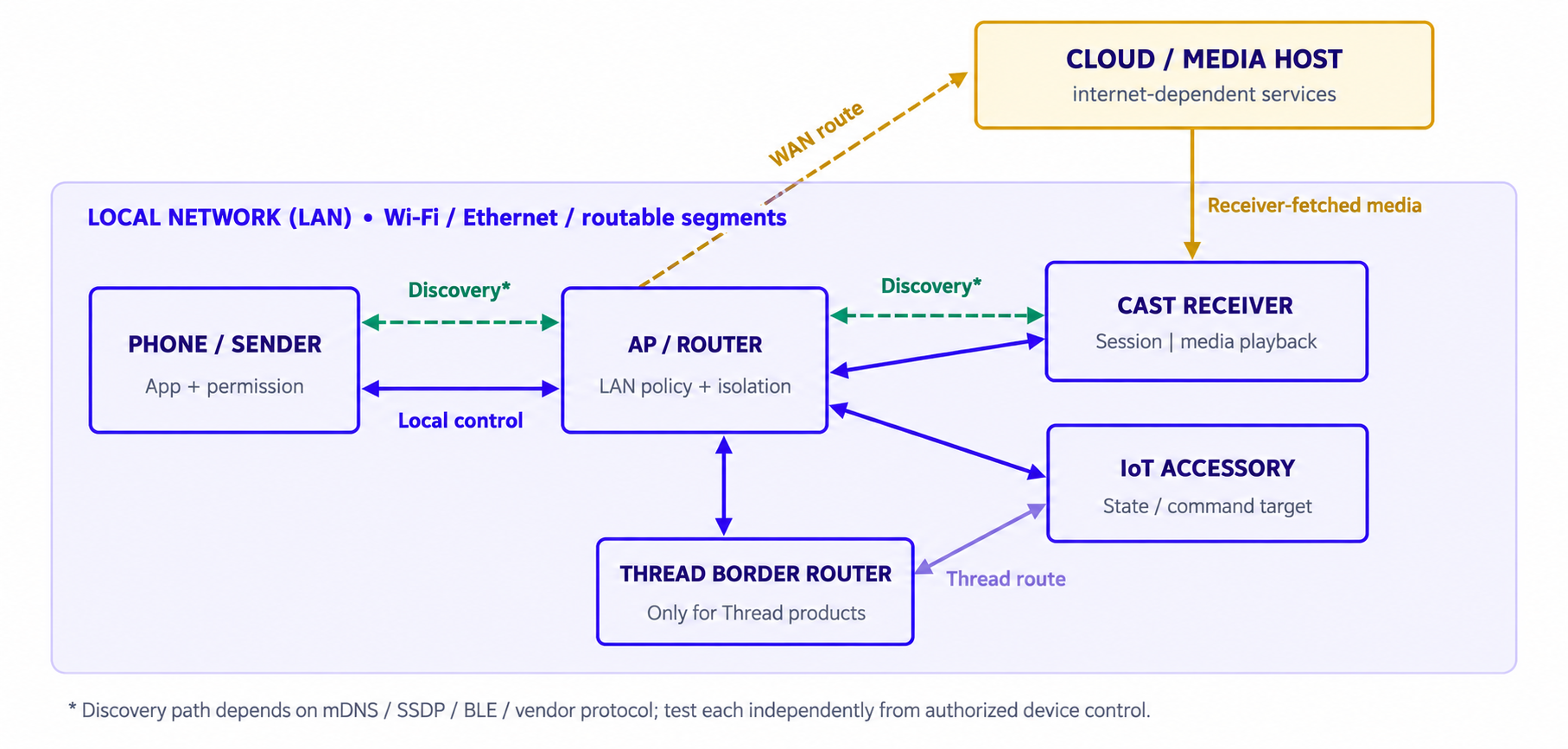
Figure 1. Isolate discovery, local control, WAN media, and optional Thread paths.
Validate Local Network Permissions on iOS and Android
Test first-use prompts, approvals, denials, Settings changes, and existing grants according to the exact OS, target SDK, and discovery API. A successful device list is not proof that the permission flow was correct.
iOS: Test Direct Access and System-Managed Features Separately
On iOS, direct Bonjour browsing or advertising typically requires NSLocalNetworkUsageDescription and appropriate NSBonjourServices entries in Info.plist. Certain custom multicast operations need an additional entitlement. System-managed AirPlay can follow a different path. Do not assume one dialog model for all features (Apple TN3179).
For Google Cast iOS senders, verify NSBonjourServices contains both _googlecast._tcp and the receiver-app-specific service entry, for example _ABCD1234._googlecast._tcp, along with NSLocalNetworkUsageDescription. Test the point at which SDK discovery actually begins (Google Cast iOS permissions).
| S. No | Discovery or feature | Implementation expectation | QA verdict to check |
|---|---|---|---|
| 1 | Direct Bonjour scan | Usage explanation plus relevant Bonjour service declarations | First-use OS prompt where triggered. Deny and re-enable through Settings. Unrelated UI stays usable |
| 2 | Google Cast iOS | Declare _googlecast._tcp and receiver-app-specific service plus usage string |
Cast discovery requests launches expected privacy flow. List refreshes after grant |
| 3 | System-managed AirPlay | OS-managed route selection. Do not infer a required app-specific prompt | System picker selection and cancel. Peer-to-peer variant only on supported devices |
| 4 | Custom multicast traffic | Confirm entitlements and API requirements for the implementation | Controlled network capture distinguishes entitlement or permission issue from empty network |
Exercise the complete permission journey: first use, approval, denial, later approval in Settings, and revocation after a successful connection. Repeat important cases after an app update and after relaunching the process.
Check that the explanation names the actual feature, such as finding televisions or connecting to a camera, rather than presenting a vague request. Also verify that declining access does not block unrelated app functionality.
Permission unresolved, access denied, no compatible device, and a discovered but unreachable endpoint require different diagnostics. When iOS has not yet resolved the request, allow for asynchronous discovery rather than immediately declaring denial (Apple local network privacy).
Android: Include Both OS Version and Target SDK
The OS version, app target SDK, and whether the app uses direct sockets or a system-mediated picker determine the expected Android permission behavior. Android 17 makes this decision especially important.
| S. No | Installed OS | Target SDK or path | Permission decision | Prompt or test expectation |
|---|---|---|---|---|
| 1 | Android 16 | Opt-in restriction enabled for compat test | Temporarily gated through NEARBY_WIFI_DEVICES | Permission denial blocks affected in-process LAN traffic. Verify out-of-process API caveat |
| 2 | Android 17 | SDK 36 or lower. Legacy direct LAN | INTERNET compatibility implicit LAN grant | No ACCESS_LOCAL_NETWORK runtime prompt. Direct LAN behavior still regression-tested |
| 3 | Android 17 | SDK 37 or higher. App-managed sockets, broad scan or control | Declare and request ACCESS_LOCAL_NETWORK | Nearby devices prompt if not pre-granted. Denial or revocation prevents local traffic |
| 4 | Android 17 | SDK 37 or higher. Existing Nearby devices group grant | ACCESS_LOCAL_NETWORK in same permission group | No repeat prompt can be expected. Verify access and later revoke or deny behavior |
| 5 | Android 17 | SDK 37 or higher. Supported system-managed picker | Cast output switcher or NsdManager discovery picker | Picker UI, select and cancel, and scoped access. No broad LAN prompt required |
Read these tests against the official Android 17 permission guidance. A missing permission dialog is not by itself a defect. Target SDK, existing Nearby devices grants, and use of a supported picker all matter (Android Developers documentation).
Android 13 and later Wi-Fi management APIs may involve NEARBY_WIFI_DEVICES. Some scanning operations still require location permission. That API-specific rule should not be used as a blanket rule for direct Android 17 LAN sockets (Android Wi-Fi permissions).
Android 16 supports an optional compatibility mode for local-network restrictions. In that mode, NEARBY_WIFI_DEVICES is temporarily used. APIs operating outside the app process, including some NsdManager paths, may not be affected in the same way. Test the opt-in limitations explicitly.
Starting with Android 17, apps targeting SDK 37 or higher that use broad local-network access must declare and request ACCESS_LOCAL_NETWORK, unless they adopt an applicable privacy-preserving picker. The system can skip a new prompt when permission in the Nearby devices group is already granted (Android 17 behavior changes).
Android 17 supports privacy-preserving approaches such as the media output switcher for supported casting and the NsdManager system-run service picker using FLAG_SHOW_PICKER for appropriate mDNS discovery. A picker can avoid the broad local-network permission, but it does not authorize arbitrary unrelated sockets.
Apps targeting SDK 36 or lower retain a temporary legacy path with INTERNET-based implicit LAN access. Do not request ACCESS_LOCAL_NETWORK in that build. Migration to target 37 must be tested independently.
Test Device Discovery Beyond the Happy Path
First identify the actual discovery stack: mDNS or Bonjour, SSDP, BLE, Wi-Fi Direct, a vendor protocol, or a hybrid. Choose probes and cache-expiry expectations for that stack rather than applying mDNS-specific assumptions to every product.
For mDNS only, multicast DNS uses UDP port 5353 and supports time-to-live-based record expiration. A clean shutdown may advertise a goodbye record, while unexpected power loss cannot. Evaluate stale-list behavior against the implemented stack (RFC 6762).
Appearance, Updates, and Disappearance
Start discovery with no devices available, then bring a compatible device online. Repeat with several devices, including two with identical display names.
Rename a device, change its network address, restart its discovery service, and reconnect it after an outage. Check that the app updates the correct entry instead of creating duplicates or retaining an obsolete endpoint.
Test clean disconnection and sudden power loss separately. Define an acceptable stale-device interval based on the protocol and product behavior. Do not require every device to disappear instantaneously.
Compatibility and Identity
Advertise a device that lacks a required capability or uses an unsupported firmware version. Verify whether the product should hide it, label it as incompatible, or explain the limitation during connection.
Do not use a display name or cached IP address as proof of trusted identity. A test device advertising a familiar name must not automatically inherit another device’s authorization.
Include unusually long names, non-Latin characters, missing metadata, and malformed discovery responses in a controlled test environment. The app should remain responsive and avoid displaying untrusted metadata unsafely.
Discovery Versus Connection
Test these as separate outcomes. A device can appear in the list while its control service is unavailable.
Block the control endpoint after successful discovery. Conversely, interrupt discovery while an authenticated session is already active. Validate the behavior promised for each condition instead of assuming that discovery and session connectivity always fail together.
For Cast troubleshooting, compare your app with a suitable reference sender. Google cautions that YouTube and Netflix may use specialized discovery methods, so they are not reliable generic discovery baselines.
Diagnose the Symptom Before Filing a Network Defect
| S. No | Observed symptom | Independent diagnostic probe | What the app should convey |
|---|---|---|---|
| 1 | Permission denied or unresolved | Check OS privacy state and whether discovery request was initiated | Specific permission guidance or a temporary discovery state, not a generic “no devices” claim |
| 2 | Device never listed | Capture relevant protocol query or response at observable LAN point | Discovery failure separated from device compatibility or filtering |
| 3 | Device listed, connection fails | Probe known endpoint or service with authorized test client | Discovered but unreachable, rather than “no internet” |
| 4 | Cast connected, playback missing | Compare receiver session status, media fetch logs, and content URL reachability | Control session may exist while playback load fails |
| 5 | Device disappeared late | Check cache TTL, clean goodbye versus sudden power loss, and actual reachability | Stale UI corrected within product-defined recovery window |
Validate Casting Across Discovery, Playback, and Session Recovery
A successful device selection is not a complete casting test.
Google Cast has a sender app that selects and controls a receiver and a receiver that handles playback. Verify the receiver session and content delivery independently from sender-side UI and device discovery (Google Cast overview).
Test the full journey: select the intended receiver, establish the session, load content, confirm playback, change playback state, disconnect, and reconnect.
Verify What Happens on the Receiver
For play, pause, seek, volume, subtitles, and content changes, compare the mobile UI with the receiver’s reported and observable state. A button changing appearance proves only that the interface changed.
Include unsupported media, expired authorization, unavailable content, and receiver-side load failures. Confirm that the application reports the failed stage rather than remaining indefinitely in “Connecting.”
Interrupt the Sender and Receiver Independently
Background the mobile app, lock the phone, terminate its process, disconnect the phone from Wi-Fi, and restart the receiver.
For each interruption, define whether playback should continue, pause, or stop. On return, require the app to reconcile with the active receiver session rather than blindly replaying its previous local state.
Test a second controller joining or changing an existing session where the product supports it. Verify that stale sender state does not overwrite a more recent action.
Avoid a Single Rule for Every Casting Technology
Receiver-fetched streams, phone-hosted media, and mirroring rely on different content routes. Test each supported mode separately. A reachable local control session does not imply that a media URL is accessible.
| S. No | Casting mode | Control and media path | Outage test and evidence |
|---|---|---|---|
| 1 | Receiver-fetched streaming | Sender-to-receiver session local. Receiver may fetch video from cloud or CDN | Block media origin only. Confirm session can persist while receiver load reports media error |
| 2 | Phone-hosted local media | Receiver retrieves content hosted on phone or local server. Local phone path matters | Remove sender LAN access or stop local server. Confirm receiver stops or fails as defined |
| 3 | Screen or audio mirroring | Device-specific real-time phone-to-display transport, possibly peer-to-peer | Switch network or background app where supported. Verify rendered frames and recovery |
AirPlay also needs separate coverage. Apple supports discovery and peer-to-peer modes with device and deployment constraints, so “same infrastructure Wi-Fi is always required” is not a universal AirPlay test oracle (Apple AirPlay deployment).
Related Blogs
Test IoT Access From Onboarding to Confirmed Device State
For an IoT companion app, discovery is only the beginning. Extend testing through onboarding, authorization, command execution, state reporting, and device removal.
Separate Onboarding From Normal Operation
Interrupt setup at each documented phase: invalid pairing code, rejected Wi-Fi credentials, denied network permission, accessory restart, and app termination. A canceled permission or onboarding request must not leave an apparently commissioned device.
After each interruption, verify that retrying does not create duplicate device records, leave misleading “Setup complete” messages, or require an unnecessary factory reset.
Matter uses IP, including IPv6, for operational communication, while Bluetooth Low Energy may be used for commissioning. Passing BLE setup alone does not prove the subsequent IP control path (Matter primer).
For Thread products, include the border router, which connects the Thread mesh with infrastructure IP networks. Restart the border router separately from the phone and accessory to isolate topology-specific failures (OpenThread border router).
Confirm the Device’s Actual State
Use a safe, observable test action, such as setting a lamp to a known brightness.
Verify the requested state, the device’s reported state, and the visible result. Where the app uses optimistic updates, require a clear pending state and an accurate correction after failure.
Also change the accessory through another controller or its physical controls. Confirm that the app reflects the new state rather than repeatedly restoring an outdated value.
Test Authorization Boundaries
In a controlled, authorized lab, try an unpaired app instance, an accessory with a spoofed display name, a removed household member, and an account that has lost access. Check certificate or key or pairing-identity validation where used, expired tokens, saved credentials, and safe credential storage.
Offline access after ownership changes requires a defined product policy. Document the allowable revocation delay if devices cannot reach a cloud authority. Do not assume that sharing a LAN or reusing a cached IP address establishes identity or authorization.
Test Offline Recovery Without Losing the Meaning of an Action
Offline recovery means determining whether the target device applied the action, not simply reconnecting a socket. The most dangerous case is a command that executes before its acknowledgment is lost.
Consider a command that reaches an accessory just before the response is lost. From the app’s perspective, the outcome may be unknown, not necessarily unsuccessful.
Classify each command attempt as confirmed success, confirmed failure, or unresolved. These outcomes require different UI messages and safe-retry policies.
| S. No | Observed outcome | App or UI response | Reconciliation and retry oracle |
|---|---|---|---|
| 1 | Confirmed success, ack and state match | Show completed operation | Verify actual state. Never duplicate solely due to a later network change |
| 2 | Confirmed failure, explicit rejection | Show failure with specific retry option | Do not claim device change. Retry only under documented rules |
| 3 | Unresolved, ack lost and target may have acted | Show pending or checking status, or unresolved result | Query device state or operation ID first. Never blindly replay a non-idempotent command |
For unresolved operations, reconcile using a fresh device readback, a durable operation identifier, or a protocol-supported status query. If the outcome cannot be established, preserve uncertainty and offer a controlled retry path. Do not silently execute a second action.
Where supported, test a repeatable “set brightness to 40%” action separately from a relative “increase brightness” action. Repeating those requests can have different consequences.
For queued actions, test expiry, canceling, ordering, and ownership. A command canceled by the user must not run after reconnection, and an old queued command must not execute in a different account or household context.
Finally, restore connectivity and verify the entire recovery sequence: rediscovery if required, endpoint refresh, authorization, state reconciliation, and a usable interface. Remove stale error banners only when the relevant condition has actually recovered.
Worked WAN-Outage Walkthrough
- Establish baseline. Query the lamp directly through an authorized device fixture and change brightness. Capture app UI plus confirmed lamp state.
- Inject only a WAN fault. Disconnect the router uplink or block its upstream route, without switching off the AP, LAN switching, or phone Wi-Fi.
- Prove isolation independently. Cloud request must fail. mDNS or other discovery and the known local control endpoint must remain reachable. Record the phone cellular-off state and router rule.
- Exercise the promised offline action. Set a new brightness in the app. Verify a fresh direct lamp state readback and confirm no duplicate execution.
- Relaunch during WAN failure. Confirm that the app uses the product’s authorized local recovery path and labels cloud-only features accurately.
- Restore and clean up. Remove router rules, confirm cloud recovery, resynchronize state, and check that canceled or unresolved commands were not silently replayed. Repeat the scenario separately with cellular data enabled. That second test evaluates network selection and fallback. It should not replace the controlled WAN-outage test.
Automate the UI, Network Conditions, and Device Assertions
Use Appium to drive mobile UI and inspect app feedback, but use separate network fixtures and receiver or accessory assertions to prove the real effect. UI-only success is insufficient for local-device QA (Appium drivers).
Keep the three layers distinct: UI driver for actions, router or AP controller for repeatable fault injection, and receiver or accessory fixture for independent state confirmation. Codoid’s QA automation services explain the broader role of scalable mobile test automation.
    prepare(phone, target, permissions, expected_state)
    inject_fault(router, scope="WAN_ONLY")
    assert_probes(cloud="DOWN", lan_control="UP")
    appium.tap("Set brightness")
    assert_target_state(expected_state); reconcile_if_unknown()
    finally: restore_router(); reset_target(); save_evidence()
Use observable conditions instead of long fixed delays. Wait for a device to become selectable, a session to reach its expected state, or an accessory to report the requested value, with a defined timeout for each.
Keep permission tests separate from suites that automatically grant permissions. Otherwise, the automation may bypass the very behavior it is supposed to validate.
For repeatability, reset network rules, app state, accessory state, permissions, and queued commands as appropriate. Place cleanup in a guaranteed teardown path so a failed run does not contaminate the next one.
Use mocks for malformed discovery records and controlled edge cases, but keep representative physical receivers and accessories in release-critical suites. Confirm that a remote device lab can actually observe peer discovery, not merely call the backend.
Capture Evidence That Explains the Failure
“Device not found” is a symptom, not a sufficient defect report.
For each run, record app build, device OS and target SDK, permission path, router or AP and receiver firmware, protocol, IPv4 and IPv6 setup, cellular state, fault rule, independent probes, and device-side observations. Preserve screenshots and correlated app and accessory logs.
Correlate application logs, receiver or accessory logs, network observations, and screen recordings through a test-run identifier and aligned timestamps.
When packet evidence is needed, first verify that the capture point can observe the relevant traffic. Collect only what is necessary, and redact credentials, pairing material, household information, and device identifiers from shared reports.
A useful defect description is specific.
After upstream internet access is removed, local discovery still returns the lamp, but the app disables its control screen before attempting a local command. The same authorized command succeeds through the test fixture.
That evidence directs investigation toward the app’s connectivity decision rather than an assumed discovery failure.
Define Release Gates Around User Outcomes
Replace “local networking works” with measurable acceptance criteria.
Measure discovery latency starting after permission resolution, authorized-session establishment, command confirmation, stale-device cleanup, and reconnection. Count every initiated attempt separately from successful latency samples. Report failures, blocked tests, aborted runs, and timeouts explicitly.
Set thresholds using product requirements and representative-device measurements rather than presenting arbitrary timings as industry standards.
| S. No | Gate field | Required record |
|---|---|---|
| 1 | Configuration | Build, OS, target SDK, device and firmware, router, protocol, and feature contract |
| 2 | Attempt accounting | Started N, Passed N, Failed N, Timed out N, Blocked or aborted N |
| 3 | Timing population | p95 of successful attempts only. Show successful sample size alongside failures and timeouts |
| 4 | Decision and owner | Threshold is product-defined. Owner is QA or product. Exceptions and residual risks link to defects |
Block release for unauthorized control, wrong-device connections, false success, unsafe replay after canceling, or violation of a documented offline promise. Agree numerical time limits with the product owner based on supported hardware and measured risk.
Also test the recovery experience for accessibility. Permission guidance, device selection, connection status, and retry controls should remain understandable and usable with the supported assistive technologies.
Codoid’s outsourced mobile testing scope and deliverables guide covers engagement expectations for teams building this capability.

Need Help Building Your Mobile Local Network Testing Strategy?
Talk to a Mobile Testing ExpertFrequently Asked Questions
-
Can a mobile app communicate with local devices without internet access?
Yes, if the local path, authorization, and product design permit it. An internet validation check does not establish whether a specific LAN accessory can be reached. Use independent local probes.
-
Why can casting fail when both devices appear connected to Wi-Fi?
Typical causes include local access permission, AP or client isolation, discovery incompatibility, and receiver availability. Check sender, receiver, and router separately before filing a casting defect.
-
Is Appium enough for local network testing?
Appium can drive app UI and verify messages, but does not by itself confirm device behavior. Pair it with fault injection and an independent receiver or accessory assertion.
-
What is the most important offline-recovery test?
Lose the acknowledgment after a command executes. The app must distinguish an unknown outcome, reconcile with the target, and avoid blind replay.
-
Does Android 17 require ACCESS_LOCAL_NETWORK?
For apps targeting SDK 37 or higher that need broad LAN access, yes, unless a supported system-managed picker covers the operation. Apps targeting SDK 36 or lower retain a temporary compatibility path, while existing Nearby devices grants can suppress a new prompt.
-
Is permission denied the same as "no devices found"?
No. Denied or unresolved access, an empty discovery response, and an endpoint that cannot be reached after discovery are different states. Verify the OS privacy setting and underlying discovery or control probes before deciding what message to show.


























Comments(0)