

























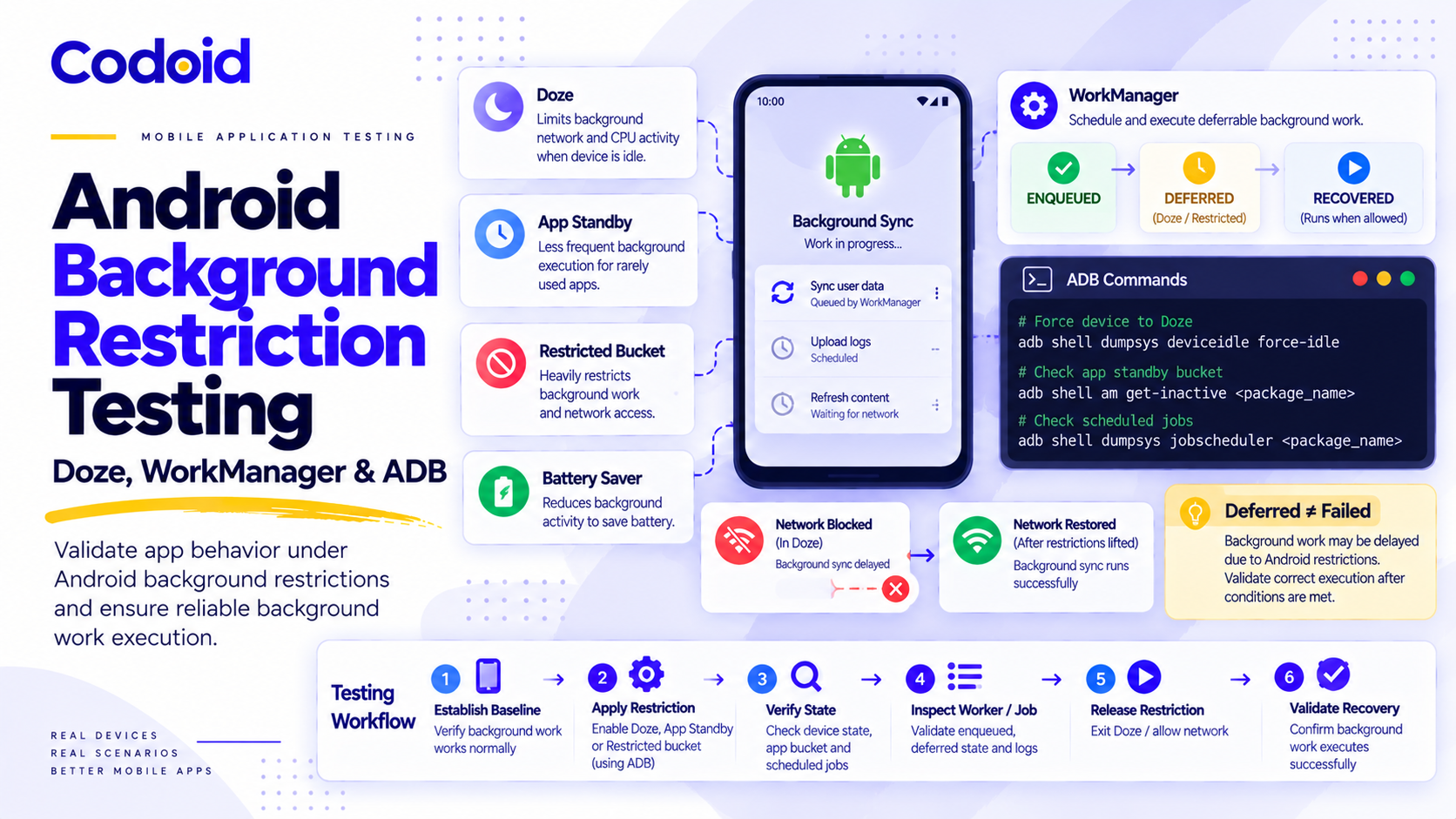
Android background restriction testing is most useful when it treats Doze, App Standby, App Standby Buckets, user-applied battery restriction, and Battery Saver as different operating-system states. Start with an unrestricted baseline, apply one deliberate restriction, verify that the state is actually active, trigger the production path, collect app, scheduler, and backend evidence, remove the restriction, and then verify recovery. Android can legitimately defer jobs, alarms, network access, and other background work. That means the central QA question is not simply whether the work ran immediately. It is whether the app preserved the user’s intent, reported the state truthfully, and recovered without loss or duplication when Android allowed work again. Android documents both the background limits and the ADB controls needed to reproduce several of these states in a test environment (Optimize for Doze and App Standby: Test power-related issues). Codoid’s mobile app testing services apply this same state-based discipline to production Android releases.
Updated for Android 17 and API 37. Research refreshed 7 October 2026.
Table of Contents
- What Android Background Restriction Actually Means
- Doze vs App Standby
- App Standby Buckets and the Restricted Bucket
- User-Applied Background Battery Restriction
- Battery Saver and Charging State
- Why Foreground State Changes the Expected Result
- Exceptions That Change the Expected Doze Result
- Prepare a Repeatable Background-Restriction Test
- ADB Command Cookbook for Each Android Restriction
- How to Test JobScheduler and WorkManager Under Restrictions
- Android 16 and 17 Quota and Pending-Job Diagnostics
- How to Test Alarms Under Doze and Background Limits
- Android 14+ Exact-Alarm Access Test Matrix
- How to Validate Background Network Calls and Sync
- Test Recovery When Android Releases the Restriction
- A Practical Android Background-Restriction Test Matrix
- Common False Positives in Android Background Testing
- Automating Background-Restriction Tests in a Device Pipeline
- Copy-Ready Defect Evidence Bundle
- Android Background-Restriction Release Checklist
- Conclusion
Need the commands first? Use the quick-reference table below, then return to the detailed sections for version gates, exceptions, assertions, and recovery checks.
Test invariant: deferred is not failed. A restricted-state test can pass even when work does not run immediately. The pass condition is that the operation remains durable, the app does not claim success prematurely, the block is explainable from evidence, and recovery reaches the correct final state.
| S. No | Restriction | Apply | Verify | Expected high-level behavior | Cleanup |
|---|---|---|---|---|---|
| 1 | Doze | deviceidle force-idle |
dumpsys deviceidle |
Jobs, network, and standard alarms may defer | deviceidle unforce, battery reset |
| 2 | App Standby | set-inactive true |
get-inactive |
App-specific work and network may defer | Restore prior inactive state, battery reset |
| 3 | Restricted bucket | set-standby-bucket ... restricted |
get-standby-bucket |
Strong job, alarm, and network limits | Restore the original bucket |
| 4 | User restriction | RUN_ANY_IN_BACKGROUND ignore |
App-side restriction flag plus app-op evidence | Jobs and alarms may be blocked. OEMs differ | Restore the original app-op mode |
| 5 | Battery Saver | unplug; low_power to 1 |
Verify low_power |
Device-wide low-power behavior | Battery reset, verify final state |
The table is a shortcut, not a substitute for state verification. In particular, exit code 0 from an ADB command does not prove that an OEM build mapped the command to the state you intended to test.
What Android Background Restriction Actually Means
The first testing mistake to avoid is collapsing every power-management feature into one generic “background mode.” The mechanisms are related, but their triggers and contracts differ.
| S. No | Android state | What it represents | What QA should expect to be affected |
|---|---|---|---|
| 1 | Doze | Device-wide idle power saving, introduced in Android 6.0 | Android suspends ordinary background network access, defers standard alarms, and prevents JobScheduler and WorkManager work from running until maintenance opportunities or Doze exit |
| 2 | App Standby | App-specific inactivity when the user has not recently interacted with the app | Background network access and pending jobs or syncs can be deferred. Normal standby can be released by user activity or charging |
| 3 | App Standby Bucket | A usage bucket such as Active, Working Set, Frequent, Rare, or Restricted | Job, alarm, and network opportunities become more restrictive as the app moves into less active buckets |
| 4 | User-applied background battery restriction | A per-app restriction selected by the user or system | On AOSP, background jobs and alarms can be prevented from executing. Precise behavior can vary by manufacturer |
| 5 | Battery Saver | Device-wide low-power mode | A separate device condition that can alter background behavior and should be tested independently |
Doze vs App Standby
Doze is mainly a device state. Android enters idle power-saving behavior when the device is unused, and it defers battery-intensive activity such as jobs, syncs, standard alarms, and ordinary background network access. Android provides dumpsys deviceidle force-idle specifically so testers can reproduce this behavior rather than waiting for natural idle conditions.
App Standby is mainly an app state. The system can treat one app as inactive when the user has not recently interacted with it. A test result should therefore identify whether the whole device was forced into Doze, one app was marked inactive, or a different restriction was active. “The worker did not run” is not enough diagnostic information.
App Standby Buckets and the Restricted Bucket
App Standby Buckets add a usage-based resource policy on top of basic standby. The Restricted bucket is the most aggressive standard bucket for background limits. Android notes that Restricted-bucket limits continue even while the device is charging, although some conditions can loosen specific restrictions.
For QA, that means a charging device is not a universal “restrictions off” state. Record charging status, but keep Restricted-bucket tests distinct from ordinary App Standby tests.
User-Applied Background Battery Restriction
A user can place an app in a Restricted battery state through system settings. Android states that the precise restriction is manufacturer-dependent. On AOSP builds, jobs and alarms may not execute in the background, and foreground service behavior is also constrained.
On API 28 and higher, the app can query ActivityManager.isBackgroundRestricted() to determine whether the user has enforced background restrictions. Android also states that these user restrictions remain in effect even when the device is charging.
A Pixel or emulator result is therefore a reference point, not proof of behavior across Samsung, Xiaomi, Oppo, Vivo, or other supported OEM builds. Repeat the highest-risk cases on representative physical devices from the product’s support matrix.
Battery Saver and Charging State
Battery Saver is a separate device-wide condition. Charging can release ordinary App Standby and removes many resource limits, but Android’s current resource table explicitly keeps job execution limits for the Restricted standby bucket and notes that user-applied background restriction can still constrain alarms while charging.
Record charging, Battery Saver, standby bucket, and user-restricted state as separate fields. Do not reduce them to one boolean such as batteryRestricted = true.
Why Foreground State Changes the Expected Result
Foreground state changes the contract because Android treats a visible app, an app with a foreground service, and a background app differently. Android 16 also changed job runtime quota enforcement so jobs that start while an app is visible or while a foreground service is running can still become subject to runtime quota after conditions change.
Record the app state both when work is scheduled and when the restriction takes effect. Otherwise, a pass or failure can be attributed to the wrong mechanism.
Exceptions That Change the Expected Doze Result
Two exceptions deserve explicit preconditions because they can make a valid Doze test look wrong.
- Battery-optimization exemption. A partially exempt app can use the network and hold partial wake locks during Doze and App Standby, although other restrictions still apply. Android exposes
PowerManager.isIgnoringBatteryOptimizations()so an app can report whether it is on the exemption list. Capture that value before any Doze network assertion. - Firebase Cloud Messaging priority. Normal-priority FCM can be delayed during Doze. High-priority FCM can wake the app and temporarily provide limited network access or partial wake-lock opportunity so the app can deliver time-sensitive, user-visible notifications. Google warns that high priority should be reserved for appropriate user-visible messages. Misuse can lead to deprioritization.
If the product uses FCM, test these paths separately.
- Normal-priority message while the device is in Doze
- High-priority message that produces the intended user-visible notification
- Any follow-up WorkManager work scheduled from the message handler
- Behavior when the app is or is not exempt from battery optimization
A generic assertion such as “network must be unavailable in Doze” is therefore too broad unless exemption and FCM conditions are known.
Prepare a Repeatable Background-Restriction Test
Before applying any restriction, run the same job, alarm, or network operation in an unrestricted baseline. If the flow already fails, a power-management test cannot isolate the cause.
Capture these fields for every case.
| S. No | Evidence | What to record |
|---|---|---|
| 1 | Device and platform | Device model, Android or API version, build number, emulator vs physical device |
| 2 | App build | Version and build, package name, targetSdk, relevant WorkManager version |
| 3 | Background unit | Worker name or ID, JobScheduler job ID, alarm identifier, sync operation, or correlation ID |
| 4 | Preconditions | Charging, screen and app state, network, standby bucket, Battery Saver, exact-alarm access, battery-optimization exemption, FCM priority where relevant |
| 5 | Trigger | Exact user action or application event that schedules work |
| 6 | Expected OS behavior | Run now, defer, stop, retry, or remain queued |
| 7 | App evidence | Logcat, WorkInfo state, app queue or database state, notification or UI status |
| 8 | System evidence | dumpsys job scheduler, device idle state, standby bucket, inactive state, app-side restriction signal |
| 9 | Backend evidence | Request ID, committed mutation, response, duplicate count, server timestamp |
| 10 | Recovery | Result after the restriction is removed or the app becomes eligible again |
Use synthetic records and a unique correlation ID. For example, qa-bg-2026-10-07-001 makes it possible to determine whether the operation was sent once, retried safely, duplicated, or never sent.
A practical record format is:
    Precondition
        ↓
    Trigger
        ↓
    Restriction
        ↓
    Verify restriction
        ↓
    App assertion
        ↓
    Scheduler evidence
        ↓
    Backend evidence
        ↓
    Release restriction
        ↓
    Recovery assertion
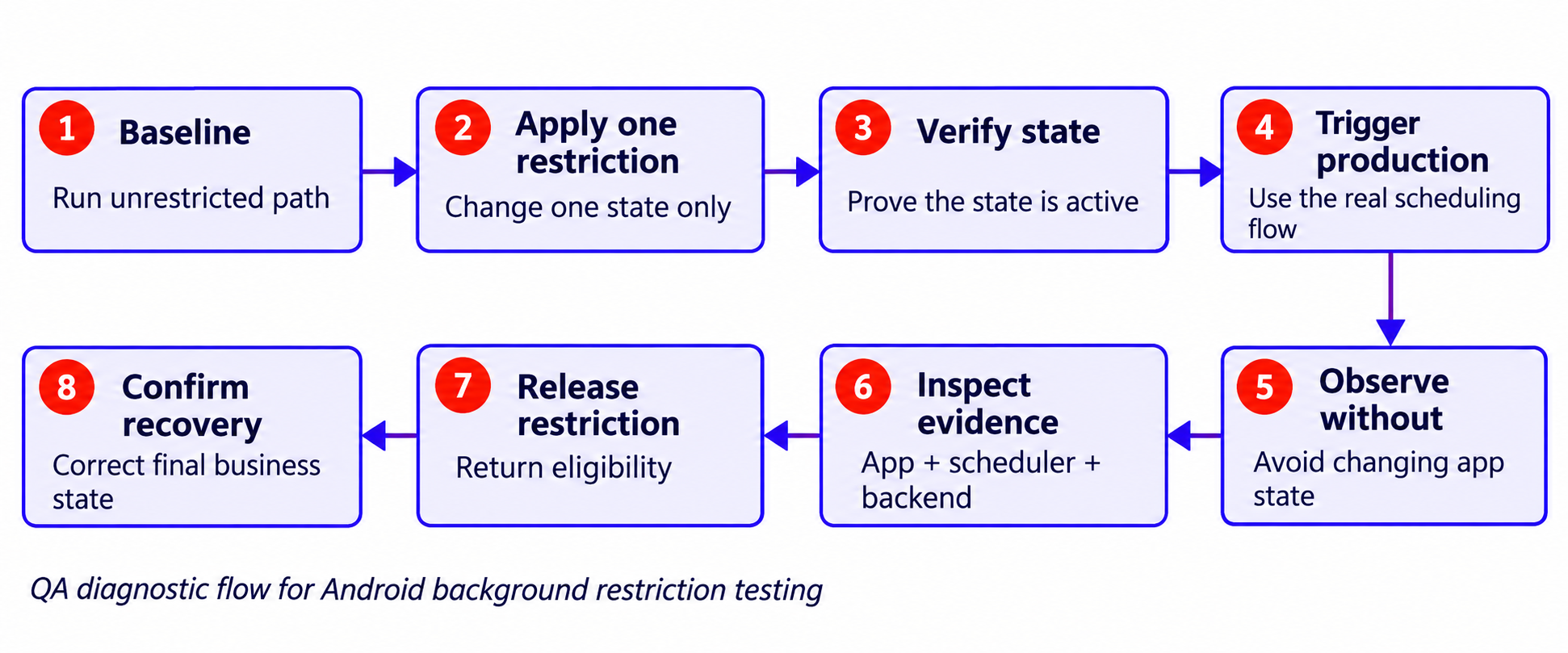
Figure 1. QA diagnostic flow for Android background restriction testing. The evidence sequence is more important than any single ADB command.
ADB Command Cookbook for Each Android Restriction
The commands below assume a connected test device or emulator and a known package name. Production automation should version-gate commands and verify the resulting state.
PACKAGE=com.example.app
Force and Exit Doze
Android documents the following Doze sequence on API 23 and higher.
adb shell dumpsys deviceidle force-idle
Before interpreting the result, also record whether the app is on the battery-optimization exemption list and whether an FCM message is normal or high priority. Those conditions can change the expected network behavior.
When the observation window ends:
    adb shell dumpsys deviceidle unforce
    adb shell dumpsys battery reset
The restricted-phase assertion should focus on whether work remains durable and correctly represented. Recovery is checked after leaving Doze.
Place One App in App Standby
    adb shell dumpsys battery unplug
    adb shell am set-inactive "$PACKAGE" true
    adb shell am get-inactive "$PACKAGE"
Restore the pre-test inactive state rather than blindly assuming false was the original value. A simple exploratory test can manually restore false. A shared or automated lab should snapshot first.
Move an App Through Standby Buckets
For supported versions:
    adb shell dumpsys battery unplug
    adb shell am set-standby-bucket "$PACKAGE" restricted
    adb shell am get-standby-bucket "$PACKAGE"
When testing manually, record the original bucket before mutation. In automation, restore that exact bucket after the case. Avoid fixed timing assertions for Rare or Restricted unless the product requirement and platform contract actually promise that timing.
Apply and Verify Manual Background Restriction
Android’s power-testing page currently uses RUN_ANY_IN_BACKGROUND ignore to apply the restriction and allow to remove it.
adb shell cmd appops set "$PACKAGE" RUN_ANY_IN_BACKGROUND ignore
Another current Android page uses deny, so treat the app-op token as build-dependent supporting evidence rather than proof by itself.
For API 28 and higher, expose or log the app-side signal:
    val activityManager = getSystemService(ActivityManager::class.java)
    Log.d("BgRestriction",
      "restricted-${activityManager.isBackgroundRestricted}")
Use ActivityManager.isBackgroundRestricted() as an application-visible check for user-enforced restriction. In automated labs, also capture the relevant appops output because OEM and build behavior can differ.
Simulate Background-Service and Implicit-Broadcast Restrictions
RUN_IN_BACKGROUND is a different app-op and should have a different test case:
adb shell cmd appops set "$PACKAGE" RUN_IN_BACKGROUND ignore
Restore the original mode after testing. Do not label this result as Doze.
Test Battery Saver
Android documents:
    adb shell dumpsys battery unplug
    adb shell settings put global low_power 1
    adb shell settings get global low_power
The documented cleanup is:
adb shell dumpsys battery reset
After cleanup, verify the resulting state. In a shared lab, record the initial power-simulation state before mutation so the test does not silently inherit or overwrite another scenario.
How to Test JobScheduler and WorkManager Under Restrictions
For JobScheduler and WorkManager, distinguish scheduled, eligible, running, stopped, retried, and completed. A worker that remains queued while the OS deliberately blocks it may be correct.
Start with one known unit of work and one correlation ID. Trigger it through the production scheduling path, then apply one restriction at a time.
Assert Deferred, Running, Stopped, Retried, and Completed States
| S. No | Observation | QA interpretation |
|---|---|---|
| 1 | Work remains ENQUEUED | Check whether an app constraint or OS restriction explains the pending state |
| 2 | Worker starts, then is stopped | Capture stop reason and verify partial work remains recoverable |
| 3 | Worker retries | Verify backoff and duplicate-safe behavior |
| 4 | Work becomes SUCCEEDED | Verify the actual local and server side effect, not WorkInfo state alone |
| 5 | Work becomes FAILED | Confirm the failure is intentional and user-recoverable rather than silent loss |
When a job does not run, verify in this order:
- Confirm the app scheduled the work.
- Confirm WorkManager or JobScheduler still knows about it.
- Confirm the intended restriction is active.
- Inspect pending or stop reasons where available.
- Release the restriction and verify the same logical operation recovers.
Stop-Reason Version Gates
Be explicit about dependency and platform gates.
WorkInfo.getStopReason()andListenableWorker.getStopReason()were added in WorkManager 2.9.0 and are annotated for API 31 and higher.JobParameters.getStopReason()is a platform API available from API 31.
If a stop reason is unavailable on an older device or older WorkManager dependency, that is a platform or dependency limitation, not automatically an app defect.
Treat stop reasons as diagnostics. They are not a substitute for determining whether a user transaction is safe to retry.
Android 16 and 17 Quota and Pending-Job Diagnostics
Android 16 Runtime-Quota Scenarios
Android 16 and API 36 changed runtime quota enforcement for regular and expedited jobs, including work started while the app was visible or while a foreground service was running. Google states that the behavior affects WorkManager, JobScheduler, and DownloadManager.
Add at least these transitions for Android 16 and higher.
- Start a job while the activity is visible, then background the app.
- Run a job while a foreground service is active and observe quota-related stopping.
- Repeat high-risk jobs across relevant standby buckets.
Android 17 Pending-Job Diagnostics
Android 16 added pending-job reason APIs. Android 17 and API 37 adds getPendingJobReasonStats(), which aggregates time spent pending for reasons such as App Standby, background restriction, connectivity, device state, or quota.
Use this information as diagnostic evidence, not as a product SLA. Android notes that the statistics are not persisted across reboot and can be cleared by completion or cancellation.
Why jobscheduler run -f Is Diagnostic Only
Android documents:
adb shell cmd jobscheduler run -f APP_PACKAGE_NAME JOB_ID
for forcing a job to run or retry, and:
adb shell cmd jobscheduler timeout APP_PACKAGE_NAME JOB_ID
for simulating a system stop.
These commands are useful failure-injection tools. A forced run proves that the job implementation can execute. It does not prove that natural scheduling works under the restriction being tested.
How to Test Alarms Under Doze and Background Limits
Alarm testing needs its own assertion model because Android treats inexact, exact, allow-while-idle, and alarm-clock alarms differently.
| S. No | Alarm API | What to test under restrictions |
|---|---|---|
| 1 | set(), setWindow(), setInexactRepeating() |
Expect batching and deferral. Assert product-acceptable eventual behavior rather than an invented exact timestamp |
| 2 | setExact() |
Verify precision when power restrictions do not intervene. Do not assume it bypasses Doze |
| 3 | setAndAllowWhileIdle() |
Verify idle delivery according to its inexact contract and system rate limits |
| 4 | setExactAndAllowWhileIdle() |
Verify exact-alarm capability plus idle behavior for truly time-critical cases |
| 5 | setAlarmClock() |
Validate the user-visible alarm-clock experience and process recovery |
Inexact Alarms
Record scheduled trigger time, actual delivery time, the active restriction, and the application outcome. The acceptable window should come from the product requirement and Android’s API contract, not from a tester-created “within five seconds” rule.
Exact and Allow-While-Idle Alarms
setExact() and setExactAndAllowWhileIdle() are different contracts. Test both normal and Doze conditions. If a use case must fire during idle, validate the allow-while-idle path and any associated exact-alarm access.
Android 14+ Exact-Alarm Access: The Modern Test Matrix
For apps targeting Android 13 and API 33 or higher, Android allows either SCHEDULE_EXACT_ALARM or USE_EXACT_ALARM, but their grant models differ.
| S. No | Condition | QA expectation |
|---|---|---|
| 1 | SCHEDULE_EXACT_ALARM on a fresh install targeting API 33 or higher on Android 14 or higher |
Not pre-granted for most apps. Test the denied state first |
| 2 | Existing app that already had SCHEDULE_EXACT_ALARM and upgrades to Android 14 |
Permission can remain pre-granted |
| 3 | Backup or restore onto Android 14 | SCHEDULE_EXACT_ALARM is denied on the restored device |
| 4 | USE_EXACT_ALARM |
Granted automatically. Cannot be revoked by the user. Limited to qualifying use cases and policy constraints |
A practical exact-alarm test sequence:
- Install fresh on Android 14 or higher with the relevant target SDK.
- Confirm
canScheduleExactAlarms()is false where denial is expected. - Verify graceful fallback and user guidance.
- Grant Alarms and reminders access.
- Verify capability becomes true and required alarms are recreated.
- Revoke access again.
- Verify stale “scheduled” UI is not shown and future behavior remains consistent.
Permission denial and Doze deferral are different failure classes. Keep them separate in defect evidence.
setAlarmClock()
Alarm-clock alarms are intended for explicitly user-visible, time-critical experiences. Test visible alarm information, sound and vibration as applicable, dismiss and snooze behavior, and process recovery. Do not test only the callback timestamp.
How to Validate Background Network Calls and Synchronization
Treat every background network operation as interruptible. It may be delayed, stopped, retried, or committed server-side before the client records success. Test for correctness at each interruption point.
Uncertain Outcome Rule
If the server outcome is unknown, a retry must be duplicate-safe. Use idempotency keys, correlation IDs, server-side deduplication, or another product-appropriate mechanism. The QA assertion is the business outcome: one order, one message, one upload, one state transition. Not merely that the retry returned 200.
Illustrative Sync-Worker Scenario
This is an illustrative example, not measured client data.
| S. No | Test element | Example |
|---|---|---|
| 1 | Preconditions | Android 16 or 17 device. App backgrounded. Network available. Baseline passed. Local queue empty. Exemption and FCM conditions recorded if relevant |
| 2 | Input | Create synthetic record qa-bg-sync-001 and enqueue one production-path sync worker |
| 3 | Restriction | Apply the selected restriction before normal execution opportunity |
| 4 | Restricted-state expectation | Record remains durable locally. UI shows pending or queued rather than synced |
| 5 | Evidence | WorkInfo, stop or pending reason where supported, dumpsys job scheduler, Logcat, local queue, backend correlation ID |
| 6 | Recovery | Remove restriction without manually creating a second logical operation |
| 7 | Final assertion | One correct server outcome and reconciled local state |
Network Call Already in Progress When Restriction Begins
Start a uniquely identifiable server operation, then apply the restriction while the call is in flight. Determine whether the server committed the operation, whether the client recorded the response, and whether recovery causes a duplicate. Do not assume the OS must terminate every already-open socket at the moment a restriction is applied.
New Network Work Scheduled While Restricted
Schedule network-constrained work after the restriction is already active. In Doze, ordinary JobScheduler and WorkManager work and background network access can be deferred. With user-applied restriction, AOSP can also block normal background execution. The app should represent this as queued or pending until it has evidence of server success.
Connectivity Returns Before the OS Releases the Job
Disconnect the network, queue work, restore connectivity, but keep the app in the OS-restricted state. This verifies that the app does not confuse “network reachable” with “background operation completed.”
Restriction Ends After Multiple Queued Operations
Queue several dependent or conflicting operations while restricted. After release, verify ordering, conflict resolution, bounded retries, and the uncertain-outcome rule above. For deeper reconnect and sync-conflict coverage, see Codoid’s offline and online mobile behavior testing guide.
Test Recovery When Android Releases the Restriction
Recovery is part of the feature contract. A restricted-state case is incomplete until the final state is verified.
Check that:
- Eligible work resumes without unnecessary user intervention unless the product intentionally requires it.
- Retries do not duplicate already committed operations.
- Temporary files, queue rows, locks, or “syncing” UI settle into a stable state.
- Notifications are not emitted more than once for one logical event.
- User-visible status moves from pending to confirmed only after completion evidence exists.
Repeat the restrict and release cycle more than once. Lifecycle defects often appear on the second or third transition because counters, listeners, or locks were not reset.
Reboot Recovery for Target SDK 33+ Apps
If the product relies on BOOT_COMPLETED or LOCKED_BOOT_COMPLETED to reschedule alarms or jobs after reboot, add this conditional scenario for apps targeting Android 13 and API 33 or higher.
- Put the app in the user-restricted battery state.
- Reboot the device.
- Verify that expected boot-time work does not incorrectly appear to have been scheduled.
- Start the app for another reason.
- Verify the deferred startup or reconciliation path now restores the required state.
Android documents that, for target SDK 33+ apps in the Restricted state, BOOT_COMPLETED and LOCKED_BOOT_COMPLETED are withheld until the app starts for another reason.
A Practical Android Background-Restriction Test Matrix
For web publication, this matrix is best implemented as a responsive table. The grouped structure below separates the control from the evidence so each row stays scannable.
State and Control
| S. No | Test state | Work to exercise | Primary control |
|---|---|---|---|
| 1 | Normal baseline | Job, alarm, network | No artificial restriction |
| 2 | Doze | Job or WorkManager, ordinary alarm, network | deviceidle force-idle |
| 3 | App Standby | Scheduled sync or job | am set-inactive |
| 4 | Restricted standby bucket | Job, alarm, network | am set-standby-bucket ... restricted |
| 5 | User battery restriction | Job, alarm, background network | User setting or app-op simulation plus app-side verification |
| 6 | Battery Saver | Product-critical background flow | low-power mode |
| 7 | Charging transition | Same high-risk work | Change power state without changing other variables |
| 8 | Representative OEM device | Highest-risk cases | Repeat on physical supported OEM hardware |
Expected Evidence and Recovery
| S. No | Test state | Main assertion | Minimum evidence |
|---|---|---|---|
| 1 | Normal baseline | Production path succeeds | App and backend correlation |
| 2 | Doze | Ordinary work defers unless a documented exception applies | Idle state plus exemption or FCM precondition plus scheduler and backend evidence |
| 3 | App Standby | App-specific work is deferred or released as expected | Inactive state plus scheduler and backend evidence |
| 4 | Restricted bucket | Resource limits persist even when some other limits relax | Bucket plus charging state plus scheduler evidence |
| 5 | User restriction | App-side restriction signal and behavior agree on the tested build | App-side restriction signal plus app-op or build evidence |
| 6 | Battery Saver | App remains correct under device-wide low power | Low-power state plus app outcome |
| 7 | Release and recovery | One correct final business outcome | Correlation ID plus local state plus server state |
| 8 | OEM repeat | Vendor behavior is recorded, not generalized | Device and build plus same application assertions |
Codoid’s Mobile Testing Strategy: Coverage, Risks and Gates provides a broader framework for deciding which device and OS combinations and release gates deserve recurring coverage.
Common False Positives in Android Background Testing
| S. No | False positive | Why it misleads | Better assertion |
|---|---|---|---|
| 1 | App is still foreground or visible | Foreground state can change scheduling and restriction behavior | Record app state at trigger and restriction time |
| 2 | Device is charging | Many limits relax, but Restricted bucket and user-applied restriction are exceptions | Record charging and test those exceptions explicitly |
| 3 | Every power mode is called Doze | Different mechanisms have different contracts | Put the exact state in the test ID |
| 4 | job scheduler run -f is treated as proof |
Forced execution bypasses natural scheduling | Test the unforced path first. Use -f only diagnostically |
| 5 | Only Logcat is checked | Logs do not prove the business side effect happened once | Correlate app, scheduler, local, and backend evidence |
| 6 | Emulator result is generalized | OEMs can impose different policies | Repeat high-risk cases on representative physical OEM devices |
| 7 | Cleanup hard-codes active or allow | The test may silently mutate the lab’s original state | Snapshot, restore, and verify the original state |
| 8 | Inexact work is given exact timing assertions | Android deliberately batches and defers work | Assert the platform and product contract, not an invented stopwatch |
| 9 | Worker constraints are ignored | App constraints can explain a pending job independently of OS restriction | Inspect declared constraints and pending reason |
| 10 | Exemption or FCM priority is not recorded | Valid exception paths can make Doze network assertions look wrong | Record battery-optimization exemption state and message priority where relevant |
Avoid foregrounding the app just to “see whether it synced” during the restricted observation period. That user interaction can change App Standby or give the app a foreground opportunity.
Automating Background-Restriction Tests in a Device Pipeline
Automation should preserve the device’s pre-test state. A hard-coded teardown that resets to active and allow is convenient for a disposable emulator but is risky in a shared lab because it can overwrite a realistic pre-existing state.
Snapshot Before Mutation
At minimum, capture the raw outputs you intend to change:
    PACKAGE="com.example.app"
    adb shell am get-inactive "$PACKAGE"
    adb shell am get-standby-bucket "$PACKAGE"
    adb shell cmd appops get "$PACKAGE" RUN_ANY_IN_BACKGROUND
    adb shell cmd appops get "$PACKAGE" RUN_IN_BACKGROUND
    adb shell dumpsys battery
Persist these raw outputs before mutation. Because appops and bucket output formats can differ across Android builds, a production harness should parse only recognized modes and buckets and abort before mutation if it cannot map the original value safely.
A safe cleanup sequence should:
- Leave forced Doze if the test entered it.
- Restore the original inactive state.
- Restore the original standby bucket.
- Restore the original app-op modes.
- Reset only the battery simulation the test owns.
- Re-run the same get and diagnostic commands and compare the final values with the snapshot.
A shared device-lab test should fail cleanup if it cannot prove that the state was restored. “Best effort” cleanup is not enough when a leaked restriction can invalidate later cases.
A practical pipeline should also record API level, device and build, app build, targetSdk, WorkManager version, correlation ID, restriction verification, WorkInfo state and attempt count, stop or pending reason where supported, and backend evidence.
Do not wait indefinitely for OS-scheduled work. Use a defined observation window, prove that work remains safely pending when appropriate, then deliberately release the restriction and test recovery.
Copy-Ready Defect Evidence Bundle
When filing a background-execution defect, include:
- Device model, OEM, build, and Android API level
- App build, targetSdk, and WorkManager version
- Exact restriction and how it was verified
- Charging, Battery Saver, exemption, and FCM priority state
- Worker, job, or alarm ID and correlation ID
- Relevant WorkInfo or JobScheduler pending or stop reason
- Logcat excerpt around scheduling, stop, and recovery
- Local queue or database state
- Backend request, result, and duplicate count
- Cleanup verification and final recovery result
This makes “background sync failed” reproducible enough for Android developers and backend engineers to diagnose without guessing which layer blocked the work.
Related Blogs
Android Background-Restriction Release Checklist
Before release, confirm that:
| S. No | Check | Detail |
|---|---|---|
| 1 | Baseline and restriction coverage | Every critical background flow has an unrestricted baseline and a relevant restricted-state case |
| 2 | Doze preconditions recorded | Doze and network cases record battery-optimization exemption and FCM priority when applicable |
| 3 | Jobs remain durable | Jobs remain durable when Android defers them |
| 4 | Retry safety | Retry logic is duplicate-safe for uncertain network outcomes |
| 5 | Version gates | WorkManager and JobScheduler diagnostics are interpreted with the correct WorkManager and API version gates |
| 6 | Alarm contracts | Ordinary alarms are not tested with exact-time guarantees Android does not make |
| 7 | Android 14 exact alarms | Android 14 and higher exact-alarm tests cover fresh-install denial, canScheduleExactAlarms(), grant and revoke recovery, and the app’s actual alarm API path |
| 8 | Separate mechanisms | App Standby, standby buckets, Battery Saver, and user restriction are tested as separate mechanisms |
| 9 | Charging is not universal reset | Charging is not treated as a universal reset for Restricted bucket or user-applied restriction |
| 10 | Reboot recovery | Target SDK 33+ apps that depend on boot recovery have the restricted reboot scenario |
| 11 | OEM coverage | Highest-risk cases run on representative OEM devices, not only an emulator or reference device |
| 12 | Automation state restore | Automation restores and verifies the original device and app state |
The release question remains simple: when Android delays or stops background execution as designed, does the app preserve the user’s intent and recover to a correct, explainable state?
Conclusion
Effective Android background restriction testing requires treating each power-management mechanism as a distinct state with its own contract. Apply one restriction at a time, prove it is active, trigger the production path, capture app, scheduler, and backend evidence, then release the restriction and verify recovery. The release question is simple: when Android delays or stops background execution as designed, does the app preserve the user’s intent and recover to a correct, explainable state?
If your release depends on reliable background jobs, alarms, sync, or recovery across an Android device matrix, Codoid’s mobile app testing services and mobile test automation services can help turn these state-based checks into repeatable release evidence. Keep the engagement scoped to the product’s actual supported Android versions, OEMs, and background-work risks.

Need Help Testing Android Background Restrictions?
Talk to a Mobile Testing ExpertFrequently Asked Questions
-
How do I force Doze mode with ADB?
Use adb shell dumpsys deviceidle force-idle, verify the device idle state, run the observation, then use adb shell dumpsys deviceidle unforce and adb shell dumpsys battery reset. Before interpreting network behavior, record whether the app is exempt from battery optimization and whether FCM is involved.
-
How do I verify the restriction is actually active?
Use a verification signal that matches the mechanism. am get-inactive for App Standby, am get-standby-bucket for buckets, device-idle diagnostics for Doze, and ActivityManager.isBackgroundRestricted() for user-enforced background restriction on API 28 and higher. Keep build-specific appops output as supporting evidence rather than treating shell exit code alone as proof.
-
Does charging remove Android background restrictions?
Not all of them. Charging releases ordinary App Standby and removes many resource limits, but Android explicitly keeps job limits for the Restricted standby bucket, and user-enforced background restriction remains in effect even while charging.
-
Does WorkManager run while a device is in Doze?
Ordinary WorkManager work is subject to Android's Doze behavior because WorkManager uses JobScheduler on modern Android. The useful QA assertion is that the work stays durable and later recovers, unless a documented exception path changes the behavior.
-
What ADB command simulates Android Restricted background battery usage?
Android's dedicated power-testing page documents adb shell cmd appops set PACKAGE_NAME RUN_ANY_IN_BACKGROUND ignore and uses allow to remove the restriction. Another current Android page uses deny, so verify the effective state on the target build instead of relying on the token alone.
-
How do exact alarms behave during Doze?
setExact() does not mean "bypass Doze." If the use case needs an alarm opportunity while idle, test the relevant allow-while-idle API and exact-alarm capability. On Android 14 and higher fresh installs targeting API 33 or higher, SCHEDULE_EXACT_ALARM is not pre-granted for most apps, so permission state must be part of the test.
-
Is adb shell cmd jobscheduler run -f a valid background-restriction test?
It is a valid diagnostic and failure-injection command, but it forces execution. Use it after the natural scheduling path to distinguish implementation failure from scheduler deferral.
-
What changed for JobScheduler in Android 16 and Android 17?
Android 16 and API 36 changed job runtime quota behavior, including jobs associated with visible apps or foreground services. Android 17 and API 37 adds richer pending-job statistics through getPendingJobReasonStats() for diagnostic analysis.
-
Which Android versions should QA include?
Include the oldest supported Android version, current versions that materially represent the user base, and platform releases where background behavior changed for the app. As of October 2026, Android 17 and API 37 is released. Android 16 and API 36 is especially relevant for JobScheduler quota changes. Add representative OEM devices for user-applied battery restrictions.



























Comments(0)