
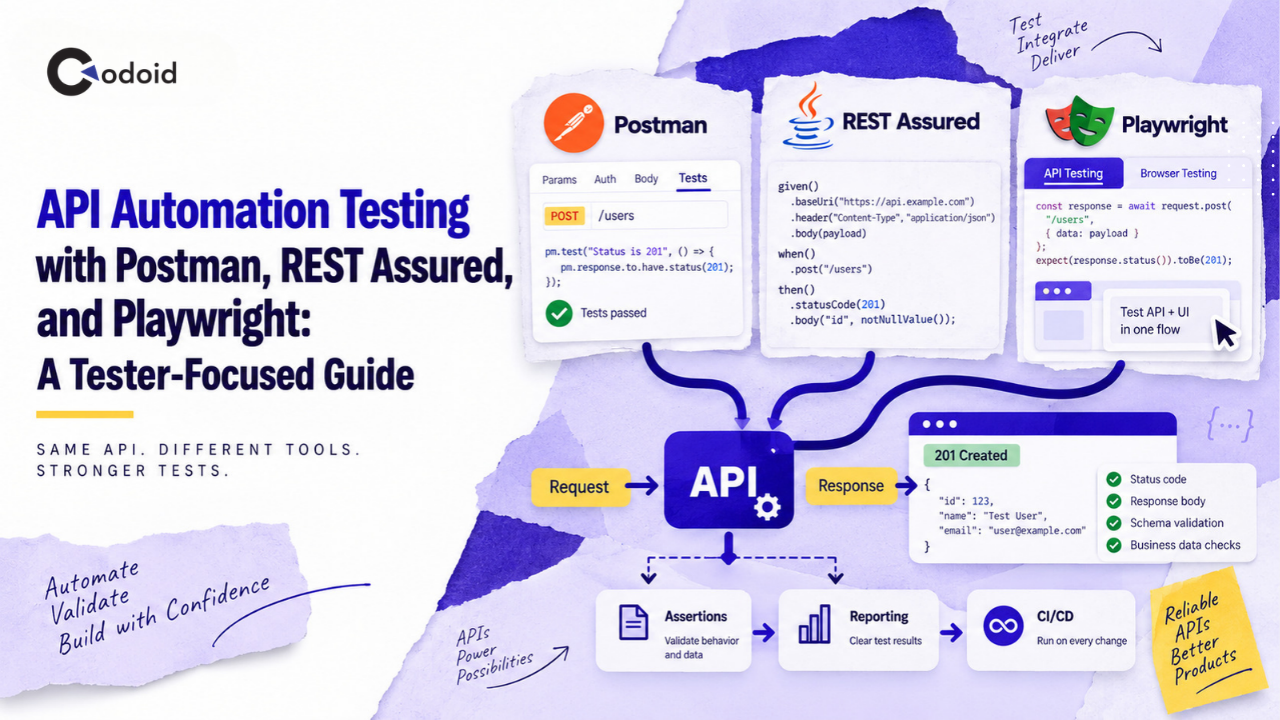
API automation testing gives testers a faster way to validate business logic, data contracts, authentication, error handling, and service integrations without waiting for a user interface. For many QA teams, the harder question is not whether to automate APIs, but which tool to use. Postman, REST Assured, and Playwright can all automate REST API tests, but they fit different workflows. Postman is collection-oriented and accessible to mixed-skill QA teams, REST Assured is designed around Java test code, and Playwright allows API tests to live alongside browser automation.
This guide explains each approach from a tester’s perspective and uses the same API scenario throughout so you can compare implementation, maintainability, debugging, and CI/CD usage directly.
Version note: This article was technically reviewed against Postman documentation v12, REST Assured 6.0.1, and @playwright/test 1.62.1 as available on September 2, 2026.
Related Blogs
API and Backend Testing Services: Build Reliable, Secure Systems
REST API Testing Checklist: What QA Engineers and Developers Need to Test
What is API automation testing?
API automation testing is the use of executable tests to send requests to an API, inspect its responses, and automatically verify expected behavior such as status codes, response data, schemas, authentication, and business rules.
Unlike UI automation, API tests communicate directly with application services. This generally lets a tester identify whether a failure belongs to the backend contract or to the user-interface layer before debugging the complete application stack.
Key takeaways
- Use Postman when testers need fast API exploration, readable collections, reusable environments, and a relatively low barrier to automation.
- Use REST Assured when the automation stack is Java-based and API tests need to behave like maintainable application code.
- Use Playwright when the team uses JavaScript or TypeScript and wants API and browser tests in the same automation project.
- Validate more than HTTP status codes: assert business data, headers, required fields, negative behavior, and contracts where appropriate.
- Keep authentication secrets and environment-specific URLs outside test code.
- Avoid implementing the same regression suite independently in all three tools. Select a primary automation framework and use other tools where they add distinct value.
Why does API automation testing matter to testers?
API defects frequently affect multiple application layers at once.
Consider an e-commerce checkout. A button may work correctly in the browser while the order API:
- creates duplicate orders,
- calculates an incorrect total,
- accepts invalid product IDs,
- exposes fields that should not be returned,
- returns 200 OK even though the operation failed,
- accepts an expired authentication token, or
- stores incorrect data that appears only in a later workflow.
UI automation alone can detect some of these failures, but it normally observes them indirectly.
API automation lets testers inspect the service contract itself. If you’re new to this area, our REST API Testing Checklist is a good companion resource for the fundamentals this guide builds on.
A practical API suite can validate:
- HTTP behavior: status codes, headers, methods, redirects.
- Data correctness: returned values, calculated fields, IDs and state changes.
- Contract correctness: required properties, types and response structure.
- Authentication and authorization: valid, invalid, missing and insufficient credentials.
- Negative behavior: malformed payloads, missing parameters and unsupported operations.
- Workflow behavior: create a resource, retrieve it, update it and delete it.
- Integration behavior: whether one operation produces the state required by the next system.
For a tester, that means defects can often be isolated before a browser, mobile client, or other consumer becomes part of the investigation.
How does API automation testing work?
A typical automated API test follows this flow:
Test data
    ↓
Request
    ↓
API
    ↓
Response
    ↓
Assertions
    ↓
Cleanup/reporting
For example:
- Generate a unique email address for the test.
- Send POST /users.
- Verify that the server returns 201.
- Verify that the response contains the expected name and email.
- Extract the generated user ID.
- Send GET /users/{id}.
- Confirm that the stored record matches the original request.
- Send DELETE /users/{id} during cleanup.
- Report the result to the test runner or CI pipeline.
The mechanics are almost identical in Postman, REST Assured, and Playwright. The main difference is how the test is represented and maintained.
Practical API scenario used in this guide
Assume the application under test exposes a user-management API.
Preconditions
Base URL:
https://api.example.com
Authentication:
Authorization: Bearer <token>
Create user:
POST /users
Request:
{
"name": "Asha Tester",
"email": "[email protected]"
}
Expected response:
{
"id": "usr_12345",
"name": "Asha Tester",
"email": "[email protected]",
"status": "active"
}
Expected HTTP status:
201 Created
Retrieve user:
GET /users/{id}
Delete user:
DELETE /users/{id}
The API in this scenario is illustrative. Replace its URL, fields, authentication method, and expected responses with the contract of your application.
How to automate API testing with Postman
Postman allows testers to add JavaScript post-response scripts to requests, folders, or collections. Assertions use APIs such as pm.test, pm.expect, and pm.response. Collections can then be executed interactively, through the Collection Runner, or from CI/CD using the Postman CLI.
1. Create the Postman environment
Create an environment called QA with:
baseUrl = https://api.example.com
token = <runtime token>
Reference them in requests as:
{{baseUrl}}
{{token}}
Keep reusable configuration such as URLs separate from test assertions. For credentials, prefer your organization’s approved secrets mechanism rather than committing tokens to exported collections or source control.
2. Create the POST request
Method:
POST
URL:
{{baseUrl}}/users
Authorization header:
Authorization: Bearer {{token}}
Body:
{
"name": "Asha Tester",
"email": "[email protected]"
}
3. Add response assertions
In Scripts → Post-response, add:
pm.test("Create user returns 201", () => {
    pm.response.to.have.status(201);
});
pm.test("Response is JSON", () => {
    pm.response.to.be.json;
});
const body = pm.response.json();
pm.test("Created user contains an ID", () => {
    pm.expect(body.id).to.be.a("string").and.not.empty;
});
pm.test("Created user has expected values", () => {
    pm.expect(body.name).to.eql("Asha Tester");
    pm.expect(body.email).to.eql("[email protected]");
    pm.expect(body.status).to.eql("active");
});
pm.collectionVariables.set("userId", body.id);
Postman’s pm.response exposes the status code, headers, response time and parsed response body, while pm.test and pm.expect provide assertion support, per Postman’s scripting documentation.
Expected result
The request should:
- return 201,
- produce JSON,
- return the expected user details, and
- store the generated ID in userId.
That ID can now be consumed by the next request.
4. Validate the response contract
For APIs where response structure matters, add a schema assertion:
const schema = {
    type: "object",
    required: ["id", "name", "email", "status"],
    properties: {
        id: { type: "string" },
        name: { type: "string" },
        email: { type: "string" },
        status: { type: "string" }
    }
};
pm.test("Response matches the user schema", () => {
    pm.response.to.have.jsonSchema(schema);
});
Postman’s current response API supports JSON Schema validation through pm.response...jsonSchema(...).
A schema test complements business assertions; it should not replace them. A response can match the schema and still contain incorrect business values.
5. Retrieve the user
Create:
GET {{baseUrl}}/users/{{userId}}
Then add:
pm.test("Get user returns 200", () => {
    pm.response.to.have.status(200);
});
const body = pm.response.json();
pm.test("Retrieved user is the created user", () => {
    pm.expect(body.id).to.eql(pm.collectionVariables.get("userId"));
    pm.expect(body.name).to.eql("Asha Tester");
});
6. Delete the test user
Create:
DELETE {{baseUrl}}/users/{{userId}}
Assert the status expected by your API, for example:
pm.test("Delete user succeeds", () => {
    pm.expect(pm.response.code).to.be.oneOf([200, 204]);
});
Do not assume both codes are correct for your application. The expected status should come from the API contract.
7. Run the Postman suite from the command line
The current Postman CLI supports collection files or collection IDs and accepts an environment through --environment or -e.
For a local exported collection:
postman collection run ./User-API.postman_collection.json \
  -e ./QA.postman_environment.json
A CI pipeline can execute the same command and fail when test assertions fail.
When Postman works particularly well
Postman is a strong fit when:
- manual testers are moving gradually into automation,
- developers and testers collaborate around shared API examples,
- exploratory requests need to become regression checks,
- collections also serve as executable documentation,
- non-Java teams need an API testing solution without building a complete test framework first.
Related Blogs
How to automate API testing with REST Assured
REST Assured is a Java DSL for testing REST services. Its commonly used syntax follows a readable given → when → then structure, and it supports request configuration, authentication, response assertions, extraction and JSON Schema validation, per the REST Assured getting-started documentation.
The REST Assured project’s current getting-started documentation uses version 6.0.1.
1. Add REST Assured to the Java test project
Assuming JUnit 5 or another Java test framework is already configured:
<dependency>
    <groupId>io.rest-assured</groupId>
    <artifactId>rest-assured</artifactId>
    <version>6.0.1</version>
    <scope>test</scope>
</dependency>
REST Assured includes its JsonPath and XmlPath support transitively. A separate json-schema-validator module is available when schema validation is required.
2. Build reusable request configuration
import io.restassured.http.ContentType;
import io.restassured.specification.RequestSpecification;
import io.restassured.builder.RequestSpecBuilder;
import org.junit.jupiter.api.BeforeAll;

class UserApiTest {
    private static RequestSpecification api;

    @BeforeAll
    static void configureApi() {
        api = new RequestSpecBuilder()
                .setBaseUri(System.getenv("API_BASE_URL"))
                .addHeader(
                    "Authorization",
                    "Bearer " + System.getenv("API_TOKEN")
                )
                .setContentType(ContentType.JSON)
                .build();
    }
}
This keeps base URL, authentication, and content type out of individual test cases.
In CI, configure:
API_BASE_URL
API_TOKEN
as pipeline variables or secrets.
3. Automate create, retrieve, and delete
import org.junit.jupiter.api.Test;
import java.util.Map;
import static io.restassured.RestAssured.given;
import static org.hamcrest.Matchers.*;

class UserApiTest {
    // api specification configured as shown above

    @Test
    void userCanBeCreatedRetrievedAndDeleted() {
        String email =
                "asha+" + System.currentTimeMillis() + "@example.com";

        String userId =
            given()
                .spec(api)
                .body(Map.of(
                    "name", "Asha Tester",
                    "email", email
                ))
            .when()
                .post("/users")
            .then()
                .statusCode(201)
                .contentType(ContentType.JSON)
                .body("id", not(emptyOrNullString()))
                .body("name", equalTo("Asha Tester"))
                .body("email", equalTo(email))
                .body("status", equalTo("active"))
                .extract()
                .path("id");

        given()
            .spec(api)
            .pathParam("userId", userId)
        .when()
            .get("/users/{userId}")
        .then()
            .statusCode(200)
            .body("id", equalTo(userId))
            .body("email", equalTo(email));

        given()
            .spec(api)
            .pathParam("userId", userId)
        .when()
            .delete("/users/{userId}")
        .then()
            .statusCode(anyOf(is(200), is(204)));
    }
}
REST Assured supports response extraction, JsonPath-style access, request specifications and assertions over status, headers, body and other response information.
Why generate a unique email?
Hard-coded test data creates avoidable failures.
If every run attempts:
the second execution may fail because the first execution already created it.
Generating unique data reduces collisions, especially when tests run concurrently.
4. Add schema validation when required
Add the REST Assured module:
<dependency>
    <groupId>io.rest-assured</groupId>
    <artifactId>json-schema-validator</artifactId>
    <version>6.0.1</version>
    <scope>test</scope>
</dependency>
Then:
import static io.restassured.module.jsv.JsonSchemaValidator
        .matchesJsonSchemaInClasspath;

given()
    .spec(api)
.when()
    .get("/users/{userId}", userId)
.then()
    .statusCode(200)
    .body(matchesJsonSchemaInClasspath("user-schema.json"));
REST Assured documents JSON Schema validation as a separate module and provides the matchesJsonSchemaInClasspath matcher for classpath schemas.
5. Run the REST Assured suite in CI
For a Maven-based project:
mvn test
For larger suites, use test tags or naming conventions to separate smoke, regression, integration, and destructive tests.
When REST Assured works particularly well
Choose REST Assured when:
- the organization’s engineering stack is Java,
- testers are comfortable maintaining code,
- tests require reusable Java utilities and domain objects,
- API automation must integrate deeply with JUnit or TestNG,
- source-control review and conventional software engineering practices are priorities.
How to automate API testing with Playwright
Playwright provides APIRequestContext specifically for direct HTTP(S) requests, per Playwright’s API documentation. Playwright Test also includes a built-in request fixture that can inherit configuration such as baseURL and extraHTTPHeaders, as described in the API testing overview.
This is particularly useful for teams that already use Playwright for web UI testing because the API and browser layers can share one runner, configuration model, fixtures, reporting strategy, and programming language.
1. Configure the API connection
In playwright.config.ts
import { defineConfig } from '@playwright/test';

export default defineConfig({
  use: {
    baseURL: process.env.API_BASE_URL,
    extraHTTPHeaders: {
      Authorization: `Bearer ${process.env.API_TOKEN}`,
      'Content-Type': 'application/json'
    }
  }
});
Playwright officially documents both baseURL and extraHTTPHeaders as configuration consumed by the API request fixture.
2. Write the API workflow
Create:
tests/api/users.spec.ts
Then:
import { test, expect } from '@playwright/test';

test('user can be created, retrieved, and deleted',
  async ({ request }) => {

    const email =
      `asha+${Date.now()}@example.com`;

    const createResponse = await request.post('/users', {
      data: {
        name: 'Asha Tester',
        email
      }
    });

    expect(createResponse.status()).toBe(201);

    const createdUser = await createResponse.json();

    expect(createdUser).toMatchObject({
      name: 'Asha Tester',
      email,
      status: 'active'
    });

    expect(createdUser.id).toEqual(expect.any(String));

    const getResponse =
      await request.get(`/users/${createdUser.id}`);

    expect(getResponse.status()).toBe(200);

    const retrievedUser = await getResponse.json();

    expect(retrievedUser).toMatchObject({
      id: createdUser.id,
      name: 'Asha Tester',
      email
    });

    const deleteResponse =
      await request.delete(`/users/${createdUser.id}`);

    expect([200, 204]).toContain(deleteResponse.status());
});
Playwright also provides expect(response).toBeOK(), which verifies that an API response is in the 200–299 range. When the exact contract requires 201, 204, or another specific status, an exact status() assertion communicates the requirement more precisely.
3. Use APIs to create UI test state
One of Playwright’s most useful patterns for testers is:
API setup → UI action → API verification
For example:
test('newly created user appears in admin UI',
  async ({ request, page }) => {

    const createResponse = await request.post('/users', {
      data: {
        name: 'UI API Test User',
        email: `ui-api-${Date.now()}@example.com`
      }
    });

    expect(createResponse.status()).toBe(201);

    const user = await createResponse.json();

    await page.goto('/admin/users');

    await expect(
      page.getByText(user.email)
    ).toBeVisible();
});
This pattern avoids navigating through several UI screens merely to establish test data.
Playwright explicitly documents API requests as a way to establish server-side preconditions before UI tests and validate server-side postconditions after browser actions.
4. Understand API and browser authentication sharing
page.request and browserContext.request share cookie storage with their browser context. If the test requires completely separate authentication state, Playwright can create an isolated APIRequestContext using apiRequest.newContext().
This distinction matters when testing:
- multiple users,
- authorization boundaries,
- anonymous versus authenticated behavior,
- admin versus customer roles.
5. Run Playwright API tests
Run the entire suite:
npx playwright test
Or keep API tests in a dedicated folder or project so they can run separately from browser tests. Once your suite is running in CI, StageWright is worth a look for making the resulting reports easier to triage.
When Playwright works particularly well
Choose Playwright for API testing when:
- the automation project already uses Playwright,
- testers work in JavaScript or TypeScript,
- API setup and UI validation frequently appear in the same scenario,
- one test runner for API and browser automation simplifies the pipeline,
- API state needs to be created quickly before E2E tests.

Need Help Building Your API Automation Framework?
Talk to Our API Testing ExpertsPostman vs REST Assured vs Playwright for API testing
| S. No | Factor | Postman | REST Assured | Playwright |
|---|---|---|---|---|
| 1 | Primary style | Collections + JavaScript scripts | Java code/DSL | TypeScript/JavaScript test code |
| 2 | Best fit | Mixed-skill API teams | Java automation teams | Web/API automation teams |
| 3 | Beginner accessibility | High | Moderate | Moderate |
| 4 | Strong code architecture | Possible, but collection-oriented | Strong | Strong |
| 5 | UI + API in one framework | Limited compared with dedicated browser frameworks | Requires another UI tool | Strong |
| 6 | Interactive API exploration | Excellent | Code-first | Code-first |
| 7 | CI/CD execution | Postman CLI | Maven/Gradle | Playwright Test CLI |
| 8 | Reusable environments | Built in | Framework/configuration code | Playwright config/fixtures |
| 9 | JSON Schema validation | Supported | Dedicated module | Typically add a schema validator when required |
| 10 | Request/response debugging | Very accessible UI | Logs/debugger/IDE | Test runner, traces/logging and debugger |
| 11 | Ideal tester profile | Manual/API tester moving into automation | Java SDET/automation engineer | JS/TS QA engineer or Playwright user |
| 12 | Main tradeoff | Complex collections can become difficult to govern like code | Requires Java development skills | API-only teams may not need the browser-focused ecosystem |
The tools overlap, but they are not interchangeable in every organization.
The right choice depends more on team workflow and maintainability than on whether a tool can technically send a GET or POST request. If your services communicate over gRPC instead of REST, the tooling picture changes further see our gRPC API Testing guide for that scenario.
Which API automation tool should testers choose?
Use this decision framework.
Choose Postman when the workflow begins with exploratory API testing
Postman works well when testers first inspect endpoints manually, experiment with payloads, save examples, and progressively add automation.
A collection can become the bridge between:
exploration
    ↓
documentation
    ↓
regression testing
    ↓
CI
Choose REST Assured when Java is already the engineering standard
If developers and test engineers work primarily in Java, introducing a JavaScript-based API framework may create unnecessary fragmentation.
REST Assured allows the API suite to use familiar:
- Java models,
- build tools,
- assertion libraries,
- test runners,
- code-review workflows,
- dependency management.
Choose Playwright when API and UI automation belong together
If the same QA team owns browser automation and service validation, Playwright can reduce framework duplication.
A tester can create data through an API, execute a browser workflow, and query the API afterward to confirm persistence, all within one test.
A practical mixed-tool strategy
A mature team might use:
Postman
    ↓
exploration, shared requests, examples and troubleshooting

REST Assured OR Playwright
    ↓
primary automated regression suite
The important word is OR.
Maintaining identical regression suites in Postman, REST Assured, and Playwright usually creates three versions of the same testing problem.
Use multiple tools only when they perform distinct jobs.
Best practices for API automation testing
1. Test business behavior, not just status codes
This is too weak:
expect(response.status()).toBe(200);
A response can return 200 with:
{
"success": false,
"error": "Order was not created"
}
Verify the fields that prove the operation succeeded.
2. Design negative tests deliberately
For a create-user endpoint, cover cases such as:
Missing email
Invalid email
Duplicate email
Missing token
Expired token
Read-only user token
Malformed JSON
Unsupported Content-Type
Unexpected additional field
Maximum-length input
Negative cases frequently reveal contract inconsistencies that happy-path automation misses. Payment-related endpoints deserve particularly deliberate negative coverage — see our guide on testing payment APIs for how duplicate-charge and idempotency scenarios fit into this same pattern.
3. Separate test configuration from test logic
Do not hardcode:
https://qa.internal.company.example
throughout hundreds of tests.
Use:
baseUrl
API_BASE_URL
environment configuration
depending on the framework.
This lets the same suite target controlled environments without rewriting test logic.
4. Generate isolated test data
Prefer:
over:
when duplicate values are prohibited.
Parallel execution becomes much safer when each test owns its resources.
5. Clean up created data
If a test creates:
users
orders
projects
accounts
subscriptions
delete them where the environment and business rules allow it.
Test pollution eventually makes failures harder to reproduce.
6. Make tests independently executable
A regression test should not require:
Test 14 must execute before Test 15.
Instead, create required state through fixtures, setup methods, APIs, or dedicated test-data helpers.
Collection workflows sometimes intentionally chain requests, but independent regression scenarios remain easier to parallelize and diagnose.
7. Assert contracts selectively
Avoid comparing an entire dynamic response literally:
{
"id": "123",
"timestamp": "2026-09-02T04:45:15Z",
"requestId": "xyz"
}
when several values change on every request.
Assert stable business requirements and validate structural fields separately.
8. Treat response-time checks carefully
A functional API framework can identify extreme latency or enforce a coarse threshold.
It does not replace a controlled performance test.
Client location, network latency, framework overhead, server warm-up and CI infrastructure can all influence individual request timings. REST Assured’s own documentation similarly notes that measured response time includes more than server processing alone.
Common API automation mistakes
| S. No | Mistake | Why it happens | Impact | Recommended fix |
|---|---|---|---|---|
| 1 | Checking only 200 | Test is quick to write | Functional defects pass unnoticed | Assert business data and state |
| 2 | Hardcoding tokens | Convenient locally | Security risk and CI failures | Inject secrets at runtime |
| 3 | Reusing the same test data | Easy initial setup | Duplicate-data failures | Generate isolated data |
| 4 | Depending on test execution order | Tests share state | Flaky parallel runs | Make tests self-contained |
| 5 | Skipping cleanup | Cleanup seems nonessential | Environment becomes polluted | Delete created resources safely |
| 6 | Retrying every failure | Retries hide instability | Defects become flaky “passes” | Retry only appropriate transient failures |
| 7 | Asserting the full JSON response | Appears comprehensive | Dynamic fields break tests | Assert stable fields + contract |
| 8 | Treating API tests as security tests | Functional checks exercise auth | Security coverage is overstated | Maintain separate security testing |
| 9 | Treating API latency assertions as load tests | Both measure time | Misleading performance conclusions | Use a performance-testing tool for load |
Troubleshooting API automation failures
Why does the API return 401 even though the token looks valid?
The token may be valid syntactically but invalid for the target service.
Check:
- token expiration,
- issuer,
- audience,
- scopes or roles,
- environment,
- authorization header format,
- whether the token belongs to a different API host.
A token that succeeds against development may legitimately fail against QA.
Why does the test work locally but fail in CI?
Start by comparing environmental differences.
Check:
Base URL
Secret availability
Proxy configuration
DNS
Firewall rules
Certificates
Environment variables
Test data
Time zone
Parallel execution
For Postman specifically, confirm that the environment file or environment UID supplied to the CLI is the intended one. For Playwright and REST Assured, verify that required environment variables exist in the CI job rather than only in the developer’s terminal.
Why does a test pass alone but fail in the complete suite?
The most common cause is shared mutable state.
Look for:
A shared user
A shared cart
A shared database record
A globally modified token
A reused collection variable
A fixed email address
Tests relying on execution order
Run the suite concurrently and log the identifiers each test creates. If two tests modify the same resource, isolate the data.
Why does my API test return the correct status but the assertion still fails?
Inspect the response type before comparing values.
Common mismatches include:
"10" versus 10
null versus missing field
false versus "false"
UTC timestamp versus local timestamp
array versus object
Do not convert every value to a string simply to make the assertion pass. Confirm what the API contract says the type should be.
Why does an API-created record not immediately appear in the UI?
The system may use asynchronous processing or eventual consistency.
For example:
POST order
    ↓
message queue
    ↓
background processor
    ↓
search index
    ↓
UI query
The API can successfully accept a request before another data store becomes current.
Verify the architecture before adding arbitrary sleeps. Prefer polling for the expected state with a defined timeout.
Why do Playwright API calls behave as though the browser is already logged in?
If you use page.request or browserContext.request, the API request context shares cookies with that browser context.
Create a separate apiRequest.newContext() when the API test needs isolated authentication or anonymous state.
How should API tests be organized in CI/CD?
A practical pipeline often separates tests by purpose.
For example:
Pull request
    ↓
Fast API smoke tests
    ↓
Build
    ↓
Deployment to QA
    ↓
API regression suite
    ↓
UI critical-flow suite
    ↓
Optional integration/performance/security stages
The API smoke suite should answer a narrow question:
Is this build healthy enough for deeper testing?
Good smoke candidates include:
- authentication,
- one critical read operation,
- one critical write operation,
- essential downstream integration,
- a high-value business transaction.
Large edge-case matrices belong in regression rather than blocking every developer feedback loop unnecessarily.
Limitations and risks of API automation
API automation is powerful, but it does not prove that the entire application works.
It does not validate the complete user experience
An API may work while the browser:
- sends the wrong payload,
- maps a field incorrectly,
- blocks a valid workflow,
- renders the wrong state.
UI tests remain necessary for critical user journeys.
It is not automatically security testing
Checking:
401 for missing token
403 for insufficient permission
is valuable functional coverage.
It does not replace systematic testing for vulnerabilities such as broken object-level authorization, injection, credential handling, rate-limit abuse, or other security weaknesses.
It is not automatically performance testing
A single API call completing below a threshold is not evidence that the system supports thousands of concurrent users.
Test environments can produce misleading failures
External systems, shared data, deployment transitions, queues, caches and unavailable dependencies can all cause failures unrelated to the application code being tested.
Good automation therefore records enough context to make failures diagnosable.
Conclusion
API automation testing with Postman, REST Assured, and Playwright can all produce reliable results, but they solve the maintenance problem differently. Postman provides the most accessible route from API exploration to automated collections. REST Assured is a strong option for Java teams that want API automation treated as conventional test code.
Playwright is especially useful when API and browser automation need to work together in the same TypeScript or JavaScript test ecosystem. For testers, the tool is only part of the solution. Reliable API automation also requires isolated data, meaningful assertions, deliberate negative coverage, secure configuration, predictable cleanup, and tests that can run independently. The most practical next step is to select one critical API workflow and implement the same create-verify-retrieve-cleanup pattern in the framework that best matches your team’s existing automation stack.
Frequently Asked Questions
-
Is Postman enough for API automation testing?
Yes, Postman can support meaningful automated API suites, including response assertions, collection execution, environments and command-line runs. For very large engineering-heavy test suites, teams should still evaluate whether collection-based maintenance or a conventional code framework better matches their development workflow.
-
Is REST Assured better than Postman?
Neither tool is universally better. REST Assured is typically a better architectural fit for Java test-automation teams that want their API tests maintained as code. Postman is typically easier for interactive exploration, shared API requests and testers who want to move incrementally from manual API testing into automation. The right decision depends on skills, source-control practices and how the suite will be maintained.
-
Can Playwright replace REST Assured for API testing?
Yes, for many TypeScript or JavaScript teams. Playwright's APIRequestContext supports direct HTTP API testing, and its request fixture integrates naturally with Playwright Test. A Java organization may still prefer REST Assured because it keeps the automation stack aligned with existing Java frameworks and libraries.
-
Should API tests run before UI automation?
Critical API smoke tests often should. If authentication, user creation, checkout, or another fundamental service is unavailable, running a large browser suite may generate dozens of secondary failures. An API health gate can detect the underlying problem earlier and make pipeline feedback clearer.
-
Should every API response have a JSON Schema test?
No. Schema validation is most valuable where the contract matters to multiple consumers or accidental structural changes create meaningful risk. Business assertions remain necessary because a perfectly valid schema can still contain logically incorrect data.
-
Should testers automate the same API scenarios in Postman and Playwright?
Generally, not without a specific reason. Duplicating every scenario increases maintenance cost without automatically increasing useful coverage. A better strategy might use Postman for collaborative API exploration and Playwright for the primary automated API/UI regression suite.
-
What should a beginner automate first?
Start with one stable business workflow: create resource, verify response, retrieve resource, verify persisted state, delete resource. Then add invalid input, missing authentication, boundary values, authorization checks, duplicate operations, and contract validation. This teaches request construction, assertions, data extraction, chaining, test isolation and cleanup without requiring a large framework immediately.































Comments(0)