



























No one likes a slow application. Users do not care whether the issue comes from your database, your API, or a server that could not handle a sudden spike in traffic. They just know the app feels sluggish, pages take too long to load, and key actions fail when they need them most. That is why cloud performance testing matters so much. In many teams, performance testing still begins on a local machine. That is fine for creating scripts, validating requests, and catching obvious issues early. But local testing only takes you so far. It cannot truly show how an application behaves when thousands of people are logging in at the same time, hitting APIs from different regions, or completing transactions during a traffic surge.
Modern applications live in dynamic environments. They support remote users, mobile devices, distributed systems, and cloud-native architectures. In that kind of setup, performance testing needs to reflect real-world conditions. That is where cloud performance testing becomes useful. It gives teams a practical way to simulate larger loads, test realistic user behavior, and understand how systems perform under pressure.
In this guide, we will look at how to run cloud performance testing using Apache JMeter. You will learn what cloud performance testing really means, why JMeter remains a strong choice, how distributed testing works, and which best practices help teams achieve reliable results. Whether you are a QA engineer, test automation specialist, DevOps engineer, or product lead, this guide will help you approach performance testing in a more practical, production-ready way.
Related Blogs
JMeter Tutorial: An End-to-End Guide
Top Performance Testing Tools: Essential Features & Benefits.
What Is Cloud Performance Testing?
At its core, cloud performance testing means testing your application’s speed, scalability, and stability using cloud-based infrastructure.
Instead of generating load from one laptop or one internal machine, you use cloud servers to simulate real traffic. That makes it easier to test how your application behaves when usage grows beyond a small controlled setup.
This kind of testing is useful when you want to simulate the following:
- Thousands of concurrent users
- Peak business traffic
- High-volume API calls
- Long test runs over time
- Users coming from different locations
The main idea is simple. If your users interact with your app at scale, your tests should reflect that reality as closely as possible.
A simple way to think about it
Imagine testing a new stadium by inviting only ten people inside. Everything will seem smooth. Entry is quick, bathrooms are empty, and food lines move fast. But that tells you very little about what happens on match day when 40,000 people arrive.
Applications work the same way. Small tests can hide big problems. Cloud performance testing helps you see what happens when real pressure is applied.
When Cloud Performance Testing Becomes Necessary
Not every test needs the cloud. But there comes a point where local execution stops being enough.
You should strongly consider cloud performance testing when:
- Your application supports users in multiple regions
- You expect sudden traffic spikes during launches or campaigns
- You want to test production-like scale before release
- Your application depends on cloud infrastructure and autoscaling
- You need more confidence in performance before a critical rollout
A lot of teams do not realize they need cloud testing until the application starts struggling in staging or production. By then, the business impact is already visible. Running these tests earlier helps teams catch those issues before users feel them.
What You Need Before You Start
Before setting up cloud performance testing with JMeter, make sure you have the basics in place.
Checklist
- Java installed
- Apache JMeter installed
- Access to a cloud provider such as AWS, Azure, or GCP
- A testable web app or API
- Defined performance goals
- Safe test data
- Basic monitoring in place
It also helps to be clear about what success looks like. Without that, teams often run a test, collect a lot of numbers, and still do not know whether the application passed or failed.
Good performance goals might include:
- Average response time under 2 seconds
- 95th percentile under 4 seconds
- Error rate below 1%
- Stable throughput during peak load
Start with a Realistic User Journey
One of the biggest mistakes in performance testing is creating a test around a single request and assuming it represents actual user behavior.
Real users do not behave like that.
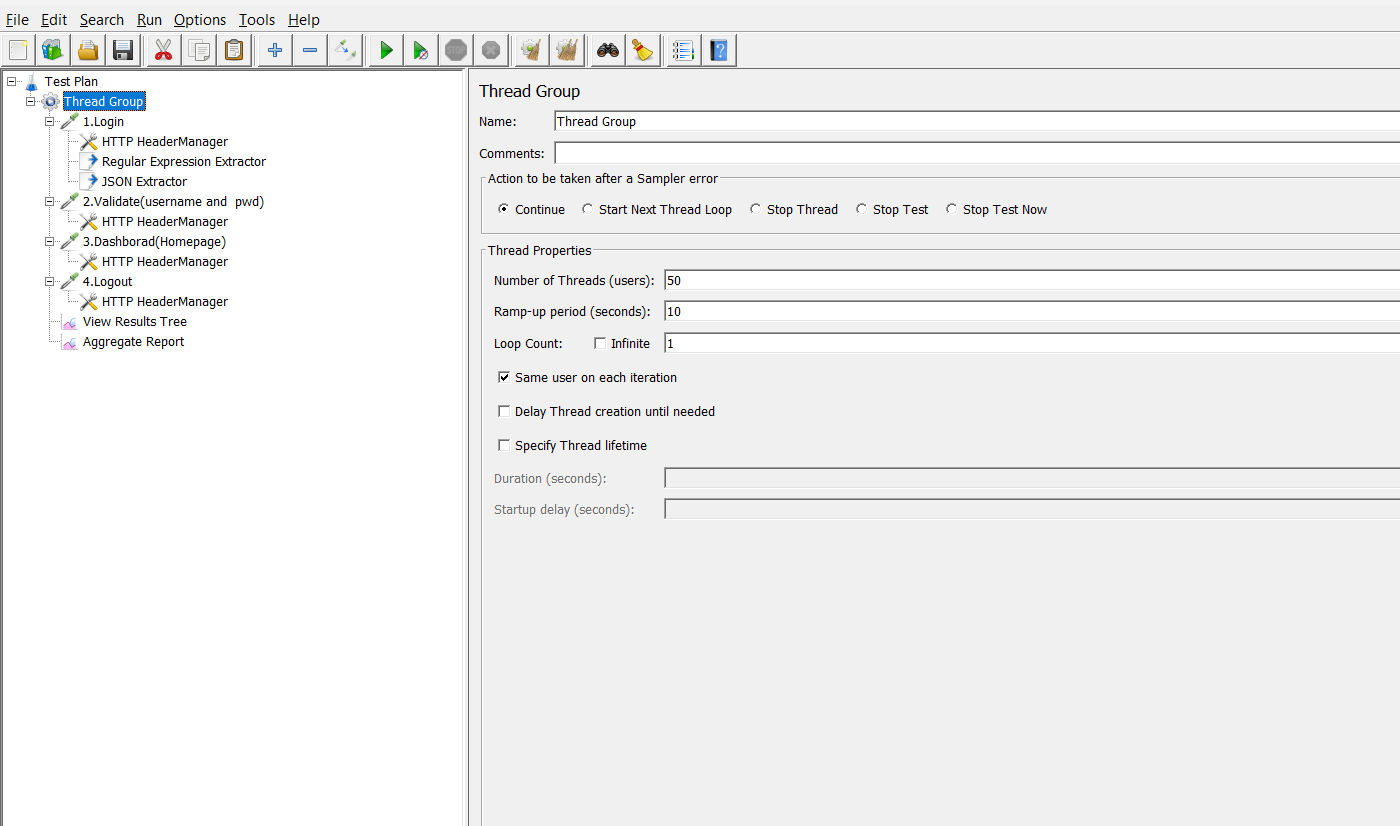
They log in, open dashboards, search, save data, submit forms, and move through several pages or services in one session. That is why a realistic flow matters so much.
Example scenario
A simple but useful example is testing an HR application like OrangeHRM.
User journey:
- Open the login page
- Sign in with valid credentials
- Navigate to the dashboard
- Perform one or two actions
- Log out
That flow is far more meaningful than hitting only the login endpoint over and over again.
Why realistic flows matter
They help you measure:
- End-to-end response time
- Authentication performance
- Session stability
- Dependency behavior
- Bottlenecks across the full experience
This is important because users do not experience your system one request at a time. They experience it as a journey.
How to Build a JMeter Test Plan
If you are new to JMeter, think of a test plan as the blueprint for how your virtual users will behave.
Step 1: Add a Thread Group
A Thread Group tells JMeter:
- How many virtual users to run
- How fast should they start
- How many times should they repeat the scenario
This is where you define the shape of the test.
Step 2: Add HTTP Requests
Now add the requests that represent your user flow, such as:
- Login
- Dashboard load
- Search or action request
- Logout
Step 3: Add Config Elements
These make your test easier to maintain.
Useful ones include:
- HTTP Request Defaults
- Cookie Manager
- Header Manager
- CSV Data Set Config
This is especially helpful when you want to use dynamic test data instead of repeating the same user for every request.
Step 4: Add Assertions
Assertions make sure the system is not only responding, but responding correctly.
For example, you can check:
- HTTP status codes
- Expected response text
- Successful page loads
- Valid login confirmation
Without assertions, a fast failure can sometimes look like a good result.
Step 5: Add Timers
Real users do not click every button instantly. Timers help create a more human pattern by adding pauses between actions.
Step 6: Validate Locally First
Before taking anything to the cloud, run a small local test to confirm:
- Requests are working
- Session handling is correct
- Data is being passed properly
- Assertions are behaving as expected
This saves time, cost, and confusion later.
Why Local Testing Has Limits
Local testing is useful, but it has clear boundaries.
It works well for:
- Script debugging
- Early validation
- Small-scale checks
It does not work as well for:
- Large user volumes
- Long-duration tests
- Distributed traffic
- Production-like behavior
- Cloud-native environments
At some point, the local machine becomes the bottleneck. When that happens, the test stops measuring the application and starts measuring the limits of the load generator.
Running JMeter in the Cloud
Once your test plan is stable, you can move it into a cloud environment and begin distributed execution.
Popular choices include:
- Amazon Web Services
- Microsoft Azure
- Google Cloud Platform
The basic idea is to spread the load across several machines instead of pushing everything through one system.
Understanding Distributed Load Testing
Distributed load testing means using multiple machines to generate traffic together.
Instead of asking one machine to simulate 3,000 users, you divide that load across several nodes.
Simple example
| S. No | Machine | Users |
|---|---|---|
| 1 | Node 1 | 1000 users |
| 2 | Node 2 | 1000 users |
| 3 | Node 3 | 1000 users |
Total simulated load: 3000 users
In JMeter, this usually means:
- Master node: controls the test
- Slave nodes: generate the actual load
This approach is more stable and more realistic for larger test runs.
Note: The cloud setup screenshots are used for demonstration purposes to explain the architecture and workflow.
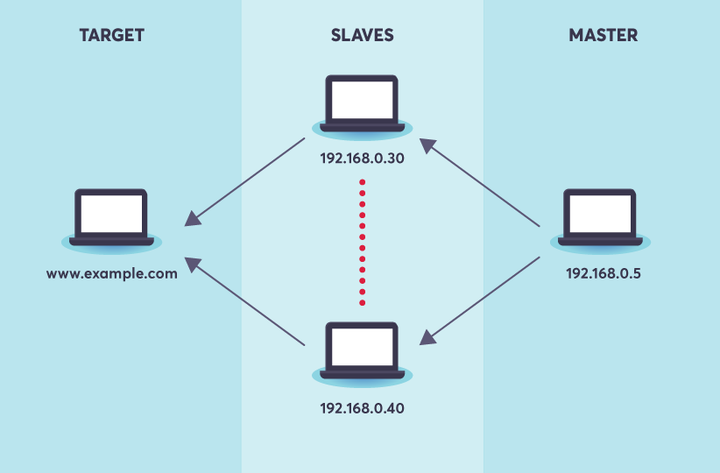
Master Node
- Controls test execution
- Sends test scripts to slave machines
- Collects results
Slave Nodes
- Generate virtual users
- Execute the test scripts
- Send requests to the application server
Step-by-Step: Running JMeter in the Cloud
1. Provision the servers
Create the machines you need in your cloud environment.
A basic setup often includes:
- One controller node
- Two or more load generator nodes
The right number depends on your user target, script complexity, and infrastructure capacity.
2. Install Java and JMeter
sudo apt install openjdk-11-jdk

wget https://downloads.apache.org/jmeter/binaries/apache-jmeter-5.6.zip
3. Start JMeter on the load generators
jmeter-server
4. Configure the remote hosts
remote_hosts=IP1,IP2,IP3
5. Upload the test plan
Copy your .jmx file to the controller node.
6. Run the test in non-GUI mode
jmeter -n -t test_plan.jmx -R IP1,IP2 -l results.jtl
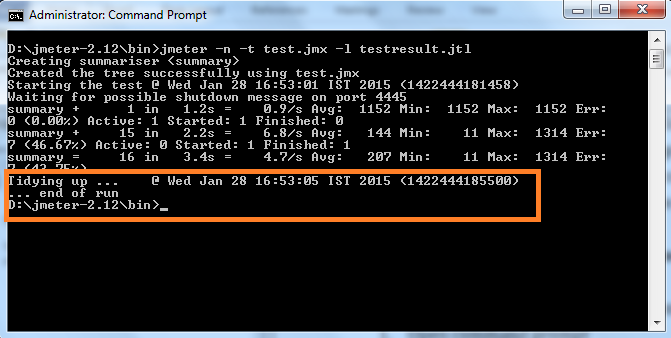
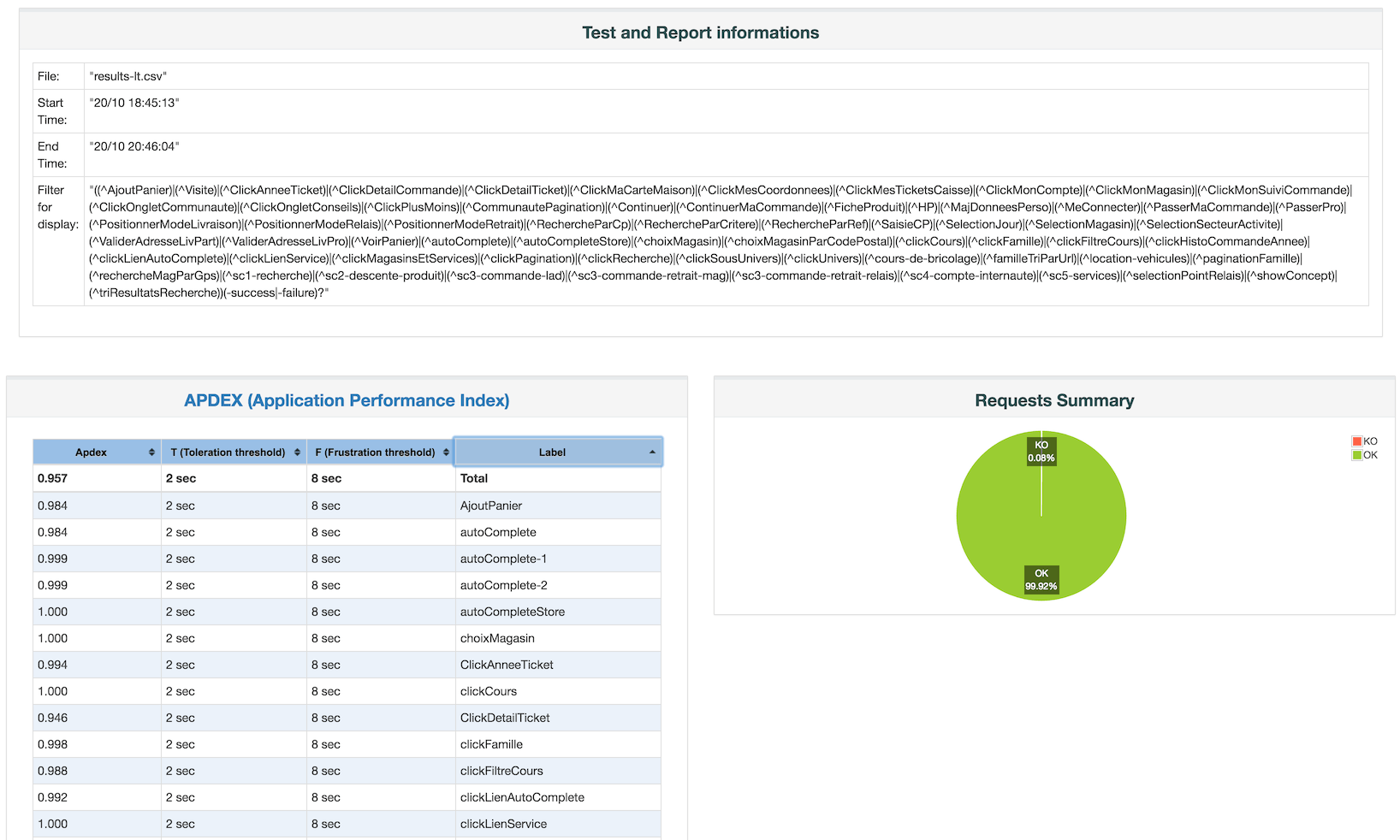
7. Generate the report
jmeter -g results.jtl -o report
That report helps you review response times, throughput, failures, and trends more clearly.
Cloud Performance Testing vs Local Testing
| S. No | Feature | Local Testing | Could Performance Testing |
|---|---|---|---|
| 1 | Scale | Limited | High |
| 2 | Real-world realism | Low to moderate | High |
| 3 | Geographic simulation | No | Yes |
| 4 | Concurrent user capacity | Limited | Much higher |
| 5 | Infrastructure visibility | Basic | Better |
| 6 | Release confidence | Moderate | Stronger |
Conclusion
Performance issues are rarely obvious until real traffic arrives. That is why testing at a realistic scale matters. Cloud performance testing gives teams a better way to understand how applications behave when real users, real volume, and real pressure come into play. It helps you go beyond basic script execution and move toward performance validation that actually supports release decisions.
When you combine Apache JMeter with cloud infrastructure, you get a practical and scalable way to simulate demand, identify bottlenecks, and improve system reliability before production issues affect your users. The biggest benefit is not just better numbers. It is better confidence. Your team can release with a clearer view of what the system can handle, where it may struggle, and what needs to be improved next.

Start cloud performance testing with JMeter for reliable, scalable application delivery.
Start Testing NowFrequently Asked Questions
-
What is cloud performance testing?
Cloud performance testing is the process of evaluating an application’s speed, scalability, and stability using cloud-based infrastructure. It allows teams to simulate real-world traffic with thousands of users from different locations.
-
Why is cloud performance testing important?
Cloud performance testing helps identify bottlenecks, ensures system reliability under heavy load, and improves user experience before production release.
-
What is Apache JMeter used for?
Apache JMeter is an open-source performance testing tool used to simulate user traffic, test APIs, measure response times, and analyze application performance under load.
-
How is cloud performance testing different from local testing?
Local testing is limited in scale and realism, while cloud testing enables large-scale, distributed load simulation with real-world traffic patterns and geographic diversity.
-
When should you use cloud performance testing?
You should use cloud performance testing when expecting high traffic, global users, production-scale validation, or when local systems cannot generate sufficient load.
-
What are the prerequisites for cloud performance testing?
Key prerequisites include Java, Apache JMeter, access to a cloud provider (AWS, Azure, or GCP), defined performance goals, and monitoring tools.
-
What are best practices for cloud performance testing?
Best practices include using realistic user journeys, running tests in non-GUI mode, monitoring infrastructure, validating results with assertions, and scaling tests gradually.
































Comments(0)