by Mollie Brown | Apr 22, 2021 | Mobile App Testing, Blog |
Appium is one of the best mobile app automation tools in the market and knowing how to automate OTP in Appium is a fundamental technique every automation tester must know. If you are wondering why we need to automate OTP in Appium when we can simply have the developer make the OTP static and proceed with our script. There is a big catch in such a method because the above solution will work only for the STAGE or DEV environment. But when it comes to a production environment, we can’t just run the same static OTP automation script over and over again as it’s simply not practical. Being a leading Test Automation Company we always believe in successfully implementing automation that enhances the overall quality. So in this blog, we will be explaining how to automate OTP in Appium by following 4 simple steps.
How to automate OTP in Appium
There are two ways to automate the OTP scenario using Appium in an Android device;
- We can either make use of our notification bar to retrieve the OTP.
- Or, we can open up our ‘messages’ app and retrieve the OTP.
In this blog, we will be focusing on how to retrieve the OTP from the notification bar, as it is a less complex approach that keeps the focus of testing on the intended app. Let’s start with the basic prerequisites you need to get the job done.
Pre-Requisite
- Install the application you work with (Example., Amazon)
- Connect your mobile (Android) to the PC either through cable or Wi-Fi.
- Install Appium on your PC.
4 Steps to Automate OTP in Apppium
We have mentioned the code that we have used for this example below. We have also broken down the main parts of the code and explained them one by one so that you will be able to get a crystal-clear understanding of the process. Make sure you don’t skip the specific notes that we have mentioned below the explanations as well. Now let’s find out how to automate OTP in Appium.
Step 1: Open the notification panel and clear the previous notifications
driver.openNotifications();

try {
   AndroidElement notification = driver.findElementById("com.android.systemui:id/clear_notifications");

   if (notification.isDisplayed()) {
      notification.click();
      return new EnterPhoneNumber(driver);
   }

} catch (Exception e) {
   System.out.println(e);
   driver.pressKey(new KeyEvent(AndroidKey.BACK));
}
Code Explanation
- driver.openNotifications() – Opens Android notifications (Emulator only)
- AndroidElement notification = driver.findElementById(“com.android.systemui:id/clear_notifications”) – This line will find and store the element in “notification”.
- if (notification.isDisplayed()) – checks whether the “clear_notification” element is present.
- notification.click() – if present, clear the notification by clicking on it.
- driver.pressKey(new KeyEvent(AndroidKey.BACK)) – if no notification is present, then press back to the application.
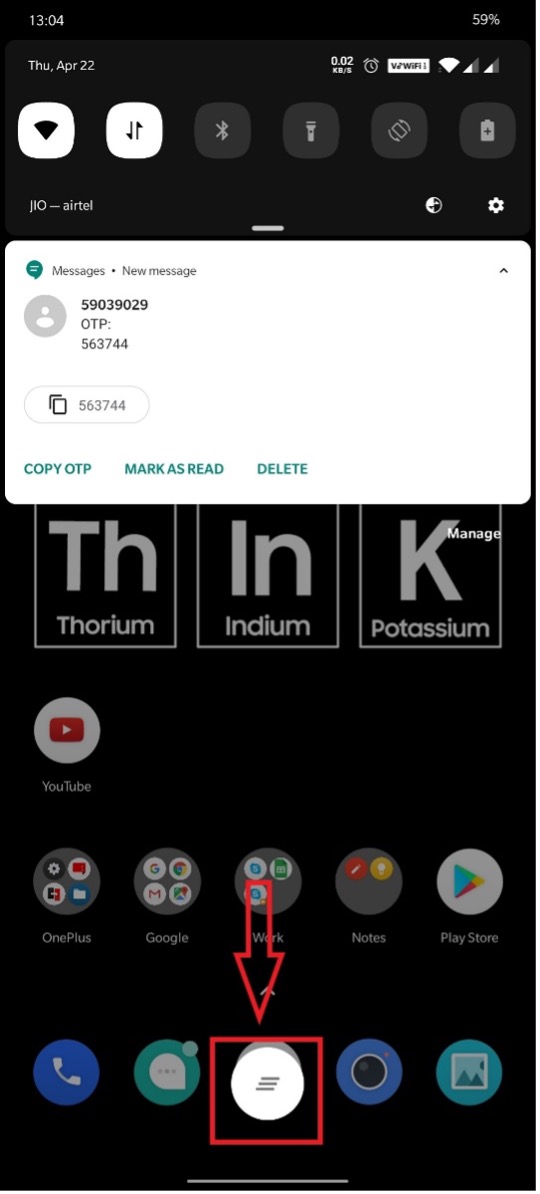
Note: Kindly change the locator according to your mobile element. We have taken the “clear_notification” locator for the following element.
Step 2: Write the code to the point where you are asked to enter the mobile number.
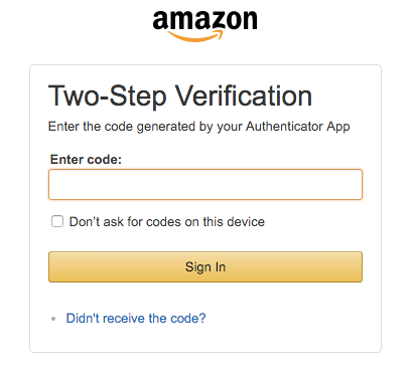
Step 3: Once you have entered the mobile number, open the notification panel and wait for the OTP to appear, and retrieve it.
String OTP = new String();

   try {

   driver.openNotifications();

   Thread.sleep(3000);

   List<AndroidElement> messageText =     driver.findElementsById("android:id/message_text");
   int Size = messageText.size();
   System.out.println("Size =" + Size);

   for(int i=0; i<=3; i++) {

      Thread.sleep(2000);
      if(OTP.length()==0) {
         OTP = OTPloop(Size, messageText);
      }else {
         System.out.println("OTP Found");
         break;
      }
   }

   if(OTP.length()<6) {
      System.out.println("---- Failed to retrieve OTP ----");
      driver.pressKey(new KeyEvent(AndroidKey.BACK));
      return "";
   }else {
      OTP = extractOTP(OTP);
   }

   if(OTP.length()==0) {
      Assert.fail("OTP not received");
   }else {

      System.out.println("OTP is: " +  OTP);
   }

   driver.pressKey(new KeyEvent(AndroidKey.BACK));

   } catch (Exception e) {
      e.printStackTrace();
      return "";
   }
   return OTP;
}
private String OTPloop(int size, List<AndroidElement> element) {
   System.out.println("Inside OTP Loop method");
   for (int i = 0; i < size; i++) {
      System.out.println("Current position = " + i);
      if (element.get(i).getText().contains("OTP: ")) {
         return element.get(i).getText();
      }
   }
   return "";
}
private String extractOTP(String OTP) {

   Pattern p = Pattern.compile("\\d+");
   Matcher m = p.matcher(OTP);

   while(m.find()) {

      System.out.println(m.group().length());
      System.out.println(m.group());

      if(m.group().length()==6) {
         System.out.println("The OTP is: " + m.group());
         return m.group();
      }
   }return "";
}
Code Explanation
- List messageText = driver.findElementsById(“android:id/message_text”) – This code will get the OTP message from the notification bar
- OTP = OTPloop(Size, messageText) – It is a method, which will search for the given text “OTP: ” in that “messageText”. If found, it will retrieve the text from that element.
- if(OTP.length()<6) - Used for verifying the size of the OTP (Change it according to your OTP as it varies from app to app)
- OTP = extractOTP(OTP); >> To extract the OTP using Regex
Note: Kindly change the locator according to your mobile element. We have taken the “messageText” locator for the following element.
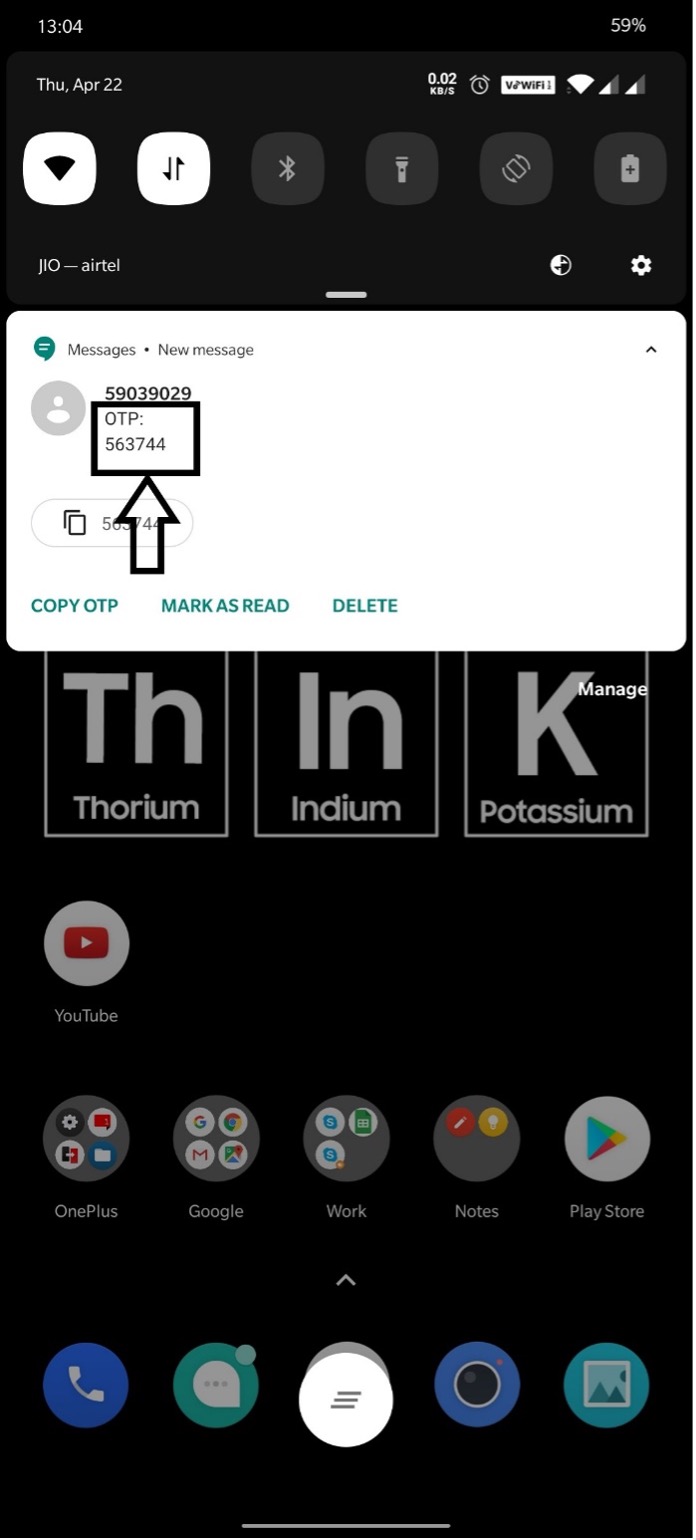
Step 4: Enter the retrieved OTP in the OTP textbox.
try {
   AndroidElement otpBox = driver.findElement(By.id("in.amazon.mShop.android.shopping:id/otp_edit_text"));
   if (otpBox.isDisplayed()) {
      System.out.println("--------- Entering OTP ---------");
      if(otp != null) {
         otpBox.sendKeys(otp);
      }
   }

} catch (NoSuchElementException e) {
   System.out.println("OTP textbox not displayed");
}
Code Explanation
- AndroidElement otpBox = driver.findElement(By.id(“in.amazon.mShop.android.shopping:id/otp_edit_text”)) – This line will get the OTP textbox element and store it in the “otpBox”
- otpBox.sendKeys(otp); – Enter the retrieved OTP to the “otpBox”.
For the latest Android versions (From Android 14)
OTP will be automatically fetched in certain scenarios such as signup, login, or password recovery. However, for other cases like two-step verification, authenticator apps, or payment-related scenarios, you can follow the steps outlined above to automate OTP retrieval.
Conclusion
So those are the 4 simple steps that you can use to successfully automate OTP in Appium. Thank you for your time, we hope this blog has been informative and that you have enjoyed reading it. We also hope you are clear on how to automate OTP in Appium as it is a must-know technique that will come in handy for all automation testers. It has also been useful for us in helping us deliver the best Test Automation Services to our clients. We will constantly be updating such useful and technically sound blog articles on our website. So make sure you subscribe to our Newsletter so you don’t miss out on any of it. If you have any doubts about the above-discussed methods, or if you have any inputs that could make the process even more efficient, kindly head over to the comments section and let us know.
Frequently Asked Questions
-
How do you test OTP functionality?
One can test the OTP functionality by checking how long it takes for the user to receive the OTP, if the OTP expires after the specified time, if the resend OTP option works, if the OTP is accepted, and if the transaction gets canceled after the defined number of invalid entries.
-
How to Automate OTP scenarios?
OTP scenarios in Android can be automated using Appium either by retrieving the code from the notification bar or from the messages app used on the phone.
-
What does OTP stand for?
OTP stands for One-time Password and as the name suggests, it is a single-use code received as an SMS or email to enable a secure verification process.

by admin | Apr 8, 2021 | Mobile App Testing, Blog |
Mobile apps have taken the world by storm over the last decade, thanks to the incredible utility they provide billions of users worldwide. They’re exceptionally powerful, easy to use, and accessible from what is essentially a tiny supercomputer that allows people to carry out all sorts of functions. However, due to mobile apps’ high performance, users expect an exceptional experience from all apps on the market. That means companies must devote significant resources to delivering a well-designed application with rich functionality.
While this may sound intimidating, this is where synthetic monitoring comes in handy. When used in tandem with mobile application testing services, it can help you catch bugs and make it easier to provide a much better user experience for your target audience. Here are four advantages of using synthetic monitoring on your mobile application:
It Identifies Issues Before Your Users Find Them
When users find a bug and report it, they fully expect mobile developers to resolve them right away. Although this is normal for most apps, why not take your app to the next level by anticipating these bugs before your users find them? With synthetic monitoring, you can simulate user interactions and identify problems they may encounter. You can then consult with QA companies to address the issues before your users ever get to experience them. They’ll enjoy using your app more, leading to a loyal user base and better ratings on the marketplace.
It Tracks Complex Transactions and Processes
Mobile apps are growing only more powerful by the year, but they’re also getting more and more complex. They can now be used to perform all sorts of functions, like business transactions and processes. Since these capabilities deal with money, you need to make sure that it works perfectly and isn’t prone to bugs. The last thing you want is to hear complaints of users debited for the purchase despite the transaction not pushing through.
Luckily, with synthetic monitoring, you can also reproduce business processes like logging in, browsing, adding items to the cart, and checking out from different locations. You can also use this method to track the app’s performance and compare it across various operating systems to optimize them.
It Ensures Application Updates Function Properly
No mobile app is perfect, which means that it will require an update to improve its security and compatibility with new operating system updates every once in a while. However, some mobile app updates have compromised the smartphone’s performance in some shape or manner because they weren’t tested properly. Without keeping a close eye on these updates, they may cause unintended effects on your users’ smartphones, leaving them frustrated and potentially causing them to delete the app to resolve the problem.
Fortunately, synthetic monitoring is a wonderful way to test out updates thoroughly before rolling them out to the marketplace. That way, you’ll catch any bugs or errors the update may cause and ensure that it functions as intended.
It Benchmarks Testing and Performance Metrics
Lastly, synthetic monitoring helps consolidate your monitoring, testing, and performance metrics in one dashboard. Instead of having to shuttle back and forth to get the data you need, everything will be in one place. It also generates higher-quality data, allowing your team to enjoy a more comprehensive view of the tests you’re scheduled to run on your mobile app.
Conclusion
Test automation services are vital to producing a mobile app that will suit your target audience’s preferences and deliver an exceptional experience. By integrating synthetic monitoring into it, you’ll enjoy a more holistic approach to your app, ensuring that you set it up for success.
Codoid is an industry leader in quality assurance, offering the best app testing services around. We use our Grade-A testing to ensure that your growing product fulfills its highest potential and meets the needs of your end-users. Contact us today to find out how we can help you polish your mobile app!

by admin | Mar 31, 2021 | Mobile App Testing, Blog |
Rigorously testing your mobile application doesn’t just involve testing it multiple times; it also includes various kinds of testing, like exploratory testing. It evaluates the application by exploring numerous test scenarios by requiring a tester to uncover flaws and mistakes through their natural use and report on their experience. It is often summarized as simultaneous learning, test design, and execution.
Exploratory testing allows mobile app creators to identify significant discrepancies quickly, accelerating the app’s development to ensure that it meets the real needs and requirements of end-users. Since it does not create test cases in advance, testers can check the system right away, offering more accurate and real-time insight to uncover defects and kinks that developers must iron out before launching. Here’s what you need to know about exploratory testing for your mobile app:
When Is Exploratory Testing Necessary?
Deploying exploratory testing for your mobile app can help you in various scenarios. For instance, it enables you to understand how your application actually works, what the interface looks like, and how functional it is to your end-users. It is also helpful for identifying the app’s untested, error-prone functionality, allowing you to resolve the issue right away.
You can also use exploratory testing to minimize test script writing, look for more insights, and get diverse feedback from new testers. Overall, if you’re hoping to polish your app and make sure it’s ready to launch on various marketplaces, exploratory testing will help you set it up for a successful release.
What Are the Stages of Exploratory Test Management?
Exploratory test management goes through five stages. The first is the classification of bugs, which categorizes the most prominent errors or defects that the previous testing identified. It analyzes the main causes, detects risks, and comes up with ways to assess the app further.
The second stage is the test charter, which puts forward what to test, the process, and areas that need to be considered. It also factors how the end-user can make the most out of the application.
The third stage is the time box, involving two testers working together to test the application for up to 90 minutes without any interruption. In this stage, testers must react to how the application responds and catalog their experiences for the fourth stage, reviewing the results. Lastly, the fifth stage, or debriefing, compiles the results, compares them with the charter, and verifies the need for more testing.
The Importance of Exploratory Testing
Improving your app with exploratory testing allows you to leverage feedback from real testers, who analyze the application’s essential functions and evaluate how they work to help the end-user achieve their goals. The testers will learn more about the application, uncover defects and errors, and confirm whether the app performs as intended or falls short of the developer’s goals.
Using the information acquired from the testers, you’ll then have to decide whether you require further mobile application testing services to meet your desired results. Without investing in exploratory testing, you may risk a lukewarm reception to your application when you officially launch it, which can result in extensive blowback to your company’s reputation. However, by carefully assessing the app, gathering enough feedback, and employing exploratory testing, you’ll ensure that it is fit to launch and meet your end user’s needs.
Codoid is among the best performance testing companies offering test automation services, ensuring that your app is refined and ready to use by your target audience. Our Grade-A testing ensures that your growing product receives the care, attention, and assessment it needs to put your vision into action. Contact us today to find out more about what we can do for your app!
by admin | Mar 22, 2021 | Mobile App Testing, Blog |
The world is largely digital, and it will only continue to shift towards an almost entirely online landscape as people’s dependency on technology increases. Thanks to the power and accessibility of smartphones, most people use these tiny but mighty supercomputers to complete a host of activities, such as bank transactions, ordering groceries, or even monitoring their physical activity, all made possible by mobile apps.
Mobile applications have transformed thousands of businesses, which have helped them deliver their services more efficiently to their customers. However, given the oversaturation of mobile applications on the market, companies need to step up their game and ensure they create an app that’s rigorously tested and bug-free. Without providing flawless performance and top-tier customer experience, these mobile apps will tank, taking the company’s reputation along with it. As such, you’ll need mobile app testing services to polish your app and make sure it’s the best it can be before launching it on the marketplace.
Here are four factors to consider for mobile application testing:
Carrier Networks and Network Bandwidth
A customer’s Internet bandwidth significantly affects their access to mobile applications. Poor or slow Internet connection negatively impacts the mobile application behavior. When the app takes longer than a few seconds to load, users are more likely to get frustrated and close it. Due to this, you’ll have to make sure you conduct rigorous mobile app testing to review the effects of network interruptions and fluctuations.
Testing your mobile app for interruption means you’ll need to repeat abrupt or unexpected disruption in the app, like a power drain, device shutdown, battery removal, network loss, and an operating system upgrade. That way, you can guarantee that your mobile app supports various scenarios and continues to deliver despite a change in multiple factors.
Excellent User Experience
All mobile apps are expected to present a clean, attractive, and intuitive user interface. It should be simple yet easy to navigate for users; if they have trouble finding their way, they’ll be more likely to drop your app altogether. The best way to test this is to work with mobile testing companies and opt for crowd-testing, which will give you access to valuable feedback from real customers and ensure your app works in real-life conditions.
Speedy Performance
As technology continues to advance at a breakneck speed, so do users’ standards for efficacy and performance. They expect apps to respond and load pages quickly and make efficient use of the device’s memory. The app should also present itself properly on the mobile device, which means you’ll need to test it to ensure compatibility with various devices, operating systems, and screen sizes. By prioritizing performance testing, you can guarantee a superior app performance, making people return to the app and become loyal users. Fortunately, entrusting test automation companies with this task will accelerate the process, giving you a well-performing app that’s sure to satisfy your end-users.
Robust End-to-End Security
Security has become users’ utmost concern and priority, particularly as cyberattacks and security threats continue to rise. As technology grows more sophisticated, so do hackers. Users rightfully demand secure transactions and a strong security system to protect their personal information, so ensure to test your app thoroughly for security. If your app involves payments, be sure to integrate a stable payment system and focus on end-to-end security testing. This type of test will help name threats and vulnerabilities, allowing you to enhance protections and safeguard your users’ information.
Conclusion
Getting your app to perform well on the App Store or Google Play involves more than making your idea come to life. You’ll have to hire mobile app testing services to squash all the bugs and identify all errors that can hamper your app’s chances of success, which will also affect your company’s reputation. By considering these four factors, you’ll have a reliable app that your customers will love.
Codoid is one of the top QA companies offering mobile app testing services. As an industry leader, we are dedicated to providing Grade-A testing to your app, ensuring your product meets your users’ needs. Contact us today to get started on polishing your app to perfection!

by admin | Mar 12, 2021 | Mobile App Testing, Blog |
Smartphones have undoubtedly changed the world. From their humble beginnings as revolutionary mobile phones that can call and text to superpowered mini computers, they have transformed the way people create, consume, and communicate with one another. While smartphones are almost ubiquitous, the number of mobile users is still on the rise: Statista predicts that there will be 7.26 billion users worldwide by 2023. Naturally, that also means that smartphone apps are expected to be more sophisticated and advanced than ever before.
If you’re thinking of creating your own mobile app, you must undergo many different processes to make sure it’s ready for launch. All apps depend on positive user feedback to succeed. Many users won’t hesitate to leave a one-star review if they’re unimpressed by the user interface or run into performance problems. To avoid this sinkhole, you’ll have to invest in mobile app testing services.
What Is Mobile App Testing?
Mobile app testing is the practice of running numerous tests on a mobile application to detect and squash bugs while ensuring that it meets your usability and functionality requirements. It involves several kinds of tests, like functional, performance, security, and load testing.
This type of testing is often incredibly complex, as it tests compatibility with different screen sizes, devices, operating systems, connection types, and other factors. By investing in mobile app testing services, you’ll make sure that your app is of the highest quality, setting you up for success when you release your app through a marketplace. Working with mobile app testing companies is always the best route, as they’ll know everything they need to test your app, ensuring it’s mostly free of issues by launch time.
What are the Qualities of a Five-Star Mobile App?
Intuitive design is always a feature that sets mobile apps from the mediocre ones. Simplicity and ease of navigability are top qualities that users look for in apps, especially since apps don’t come with a user manual, nor are they expected to provide one. Unfortunately, intuitiveness is remarkably difficult to achieve when creating an app. However, mobile testing allows you to test the app’s user experience through all stages of its development, helping you create an app that’s easy to use.
Users won’t settle for an app that doesn’t perform well. In fact, even if you revamp your app’s performance to make it respond with lightning speed, users often won’t give it a second chance. Performance is the bread and butter of app quality, so you’ll need to make sure it performs without a hitch during testing.
Lastly, your app should have an accessible way for your users to provide feedback. Even the best QA companies can’t predict every scenario when testing, which means your users will probably discover bugs themselves. Giving them an avenue to communicate these with you helps establish a relationship between you and your users, building trust in the process.
Why is Mobile App Testing Necessary?
Mobile app testing prevents users from flooding your app with reviews about crashes, poor performance, or even battery drain since it’ll be rigorously trialing your app in various scenarios. With access to such insight before launching your app, you’ll have enough time to resolve these issues, eliminating the chance that your users will run into a subpar user experience and interface.
QA also guarantees that your app functions without running into several glitches under specific performance requirements. As long as your users meet the minimum recommended specifications, such as a particular operating system and hardware, they should be enjoying fast loading times and minimal to no crashes on the app, thanks to rigorous QA. It also helps create loyal users since they have a stress-free experience, helping you build a formidable reputation and access a wider audience.
Conclusion
Failing to plan is planning to fail, including not working with mobile testing service providers who know exactly how to sharpen your app and iron out all the kinks that can upset users. By investing in mobile app testing services, you’ll be on the path to launching a widely successful app.
Codoid is one of the best mobile app testing companies in the world. Thanks to our Grade-A testing built by top QA experts, we leave no stone unturned in ensuring your product meets all end-user needs. We offer automation testing, performance testing, mobile app testing, API and web service testing, and many more. Contact us today to get started on preparing your app for launch!

by admin | Mar 1, 2021 | Mobile App Testing, Blog |
Creating a mobile application is more than just having a wireframe design and making it into a reality. There is a lot to consider when dealing with code and programming because it requires the language to make sense to make things work. Having the design in mind is integral in the app’s overall usability because any software that doesn’t look nice won’t sell. This area is where mobile app testing services come in to ensure that it not only looks beautiful but works like a dream as well.
Software testing companies are a dime a dozen nowadays, but these companies exist for a good reason. Each available mobile testing service provider can offer something new and unique insights into your app’s functionality. These services are run through strenuous A/B testing to ensure each feature you implement works and operates smoothly. Here’s why you need to invest time and resources into tirelessly A/B testing your mobile app:
What A/B Testing Can Do for Your App
Mobile testing services are often needed more than other kinds, as so many people are heavily invested in their smartphones over their personal computers. Almost all software companies try to target the millennials, as they are the prime users of smartphones and their respective applications. Younger individuals are always buying into apps, and they often know straight away when to stop using one because it’s not responsive. This generation of people is often more impatient with technology, so they immediately replace slow and outdated hardware and software.
A/B testing pits two versions of any mobile app side-by-side in front of users to gauge what works and what doesn’t. This method provides valuable feedback that can improve the way these applications run and drive conversions. Overall, testing new features and improvements ensures that people enjoy the functionality, which will let you know what is positively met or rejected by the users.
Apps are Typically Used Once and Never Again
There is only one chance to make a good impression in the vast ocean of mobile apps before someone uninstalls it and looks elsewhere. Newer software development companies have to watch out for apps that aren’t sharpened by release, as these can damage all investments poured into projects. Mobile testing service providers are great companies to invest resources in, as they often have a healthy set of developers who can offer invaluable feedback.
If you’re trying to get people to stay on your app for the long run, you’ll need to do extensive testing to create an app with good usability and functionality. In a market with tons of competition, having a software piece that doesn’t work as intended will damage your company’s reputation. Users pay attention to developers that don’t perform well or don’t bring much to the table, meaning that you’ll want to get it right the first time and continue innovating.
Whether you’re creating social networking apps, mobile games, or other kinds of productivity software, mobile app testing services can be invaluable to your company’s growth. Feedback is the key to improving what you have set out, and if anything doesn’t work in beta testing, you’ll need to iron these out before the public gets to use them.
Conclusion
Testing mobile apps is an essential service to invest in, as creating software is a delicate field that requires accurate coding and programming to get things to work effectively. Even the best companies fall short on the language side of things, which is why mobile testing services can give them the feedback they’ll need to improve their programs.
Codoid is one of the leading software testing companies that can work with various developers to achieve quality assurance in whatever they create. Our engineers can assist startups and other software developers test apps of multiple platforms and provide essential feedback to improve user experience. Contact us to learn more about how we can help you with better mobile app development.